


In short
It’s safe to say that in terms of technological advancements in the digital stratosphere, we have come a very long way. The days of straightforward IT troubleshooting and restarting PCs to get rid of errors have become a distant memory.
In this article
- What a managed service provider is
- What is usually included
- MSP, break-fix, or co-managed
- What it costs, and how pricing works
- The risk nobody selling this wants to discuss
- Questions to ask before signing
- Signs it is time to consider one
- What the first ninety days look like
- Frequently asked questions
- Why businesses choose Corporate Technologies
- Sources
What a managed service provider is
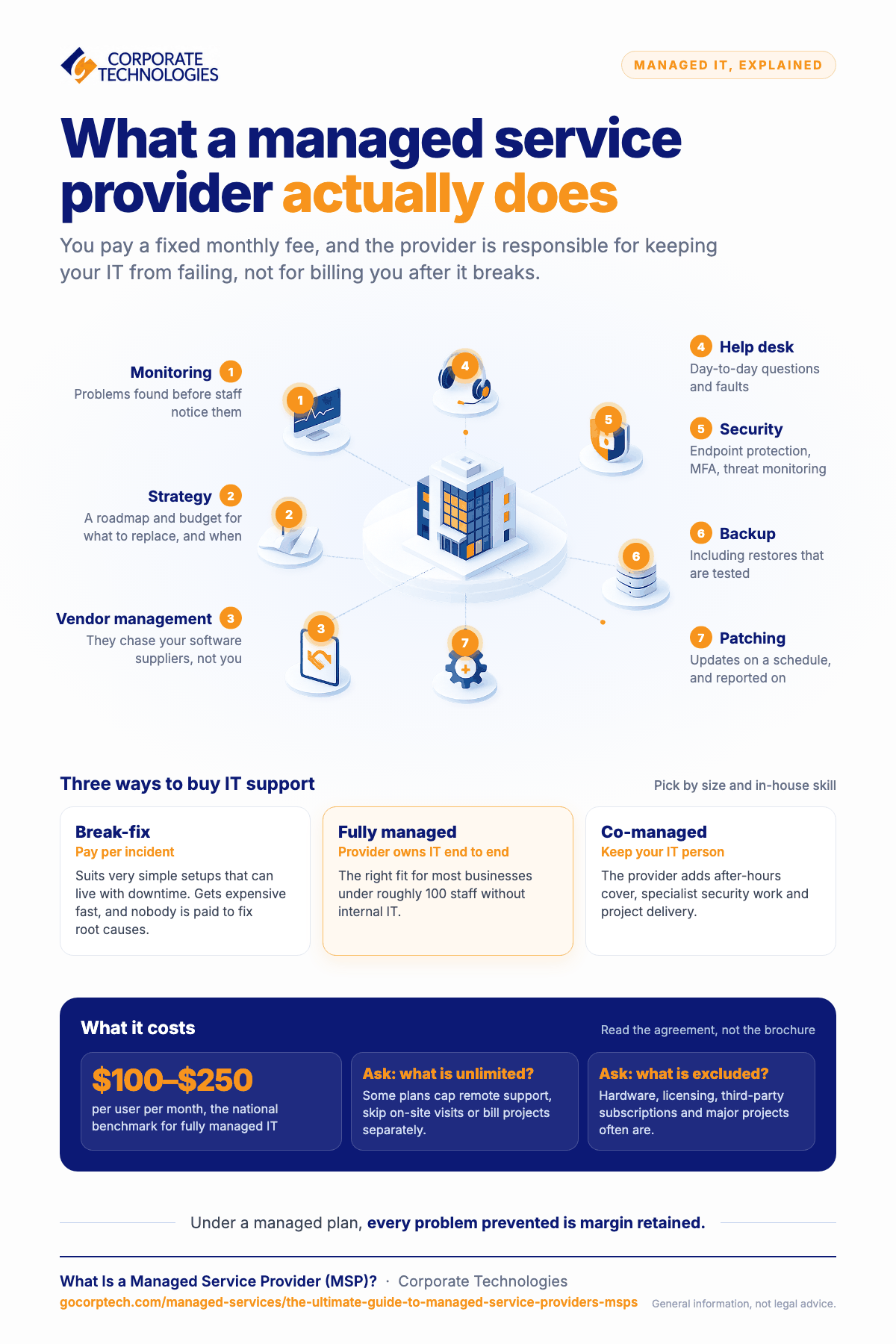
A managed service provider runs some or all of your IT for a predictable monthly fee. Rather than calling somebody when a server fails and paying by the hour to fix it, you pay a fixed amount and the provider is responsible for keeping it from failing.
That shift in incentive is the whole idea. Under break-fix, your provider earns more when things break. Under a managed agreement, every problem prevented is margin retained. It is one of the few arrangements in business where the vendor’s interests and yours point the same way.
What is usually included
Scope varies, so read the agreement rather than the brochure. A typical managed service covers:
- Monitoring, so problems are found before staff notice them
- Help desk, for the day-to-day questions and faults
- Patching and updates, enforced on a schedule and reported on
- Security, typically endpoint protection, multi-factor authentication and threat monitoring
- Backup and recovery, including tested restores
- Vendor management, so you are not the one chasing your line-of-business software supplier
- Strategy, a roadmap and budget for what needs replacing and when
MSP, break-fix, or co-managed
Break-fix means you pay per incident. It suits businesses with very simple environments and a high tolerance for downtime. It becomes expensive quickly, and it produces no incentive for anyone to fix root causes.
Fully managed means the provider owns IT end to end. This is the right fit for most businesses under roughly 100 staff without internal IT.
Co-managed means you keep your internal person or team and the provider supplements them, typically with after-hours cover, specialist security work, and project delivery. This suits businesses that have outgrown one IT person but cannot yet justify three. It is also the honest answer when a capable internal person is being asked to cover more than any individual can.
What it costs, and how pricing works
Most managed IT is priced per user per month, sometimes per device. National benchmarks for fully managed IT typically fall between $100 and $250 per user per month depending on scope, with security and compliance work usually priced separately.
Two questions matter more than the headline rate. What is genuinely unlimited? Some agreements cap remote support, or exclude on-site visits, or bill projects separately. And what is excluded? Hardware, software licensing, third-party subscriptions and major projects are commonly outside the monthly fee, which is reasonable, but it should be explicit before you sign.
The risk nobody selling this wants to discuss
Handing IT to an outside provider concentrates risk. Your MSP has privileged access to your systems, so a compromise of the MSP can become a compromise of every client it serves. This has happened, at scale, and CISA has published guidance on managed service provider supply chain risk specifically because of it.
We would rather say this plainly than have you discover it later. It does not mean using an MSP is a bad idea. It means you should ask a provider directly:
- Do you enforce multi-factor authentication on your own administrative access to our environment?
- Are your technicians’ accounts individual and auditable, or shared?
- Can you show us a log of who accessed our systems and when?
- What happens to your access when one of your staff leaves?
- Do you carry cyber liability insurance, and will you name us?
- Have you been breached, and what changed afterwards?
A provider who takes those questions well is demonstrating something. One who deflects has told you what you needed to know.
Questions to ask before signing
Beyond the security questions above:
- Who actually answers the phone, and where are they? Ask for the average time to reach a live service specialist, not the time to an automated acknowledgment.
- What are the contracted response times, and what happens if they are missed?
- Is support unlimited, and what does unlimited exclude?
- Who owns the documentation? If you leave, do you get your network documentation, license keys and administrative credentials?
- What does offboarding look like? Ask before you need it.
- Can I speak to a client of my size, in my industry?
Signs it is time to consider one
- Your IT person is the only one who knows how something works.
- You find out about problems from staff rather than from monitoring.
- Nobody can tell you when your backups were last successfully restored.
- Costs are unpredictable, and project invoices arrive without warning.
- A compliance obligation or an insurance renewal has raised questions nobody can answer.
- A server or storage refresh is coming and the capital cost is hard to justify.
What the first ninety days look like
Onboarding is where a managed relationship is won or lost, and it is worth asking any provider to describe theirs before you sign.
Discovery. A full inventory of servers, endpoints, applications, licenses, network and vendors. This routinely surfaces things nobody knew were running, and occasionally something nobody knew was exposed.
Stabilization. Fix what is actively broken or dangerous. Patching brought current, multi-factor authentication enforced, backups verified by an actual restore rather than a green tick on a dashboard.
Documentation and handover. Your environment written down, credentials brought under proper management, and access to your own documentation confirmed.
Steady state. Monitoring live, reporting cadence agreed, and a roadmap for what needs replacing and when.
If a provider cannot describe this, or wants to skip discovery to start faster, that tells you how the rest will go.
Frequently asked questions
How is an MSP different from an IT consultant?
A consultant advises and typically bills by the hour or by project. An MSP takes ongoing operational responsibility for a fixed fee. Many businesses use both.
Will we lose control of our IT?
You should not. Decisions about spend, direction and risk stay with you. A good agreement makes that explicit, and gives you access to your own documentation and administrative credentials.
What happens to our existing IT person?
In a co-managed arrangement, nothing bad. They usually get their evenings back, specialist support for the work they were never trained for, and cover when they take leave. Most internal IT people find that a relief rather than a threat.
How long are contracts?
Terms vary. Ask what happens if the relationship is not working, what notice is required, and what offboarding involves. A provider confident in their service will not be uncomfortable with the question.
Can we start small?
Yes. Many businesses begin with help desk and monitoring, then add security or project work once trust is established. That is a reasonable way to test a provider.
Do MSPs work with businesses that have compliance obligations?
Many do, but ask specifically what they can support and what they will document. A provider should be clear that they help you meet your obligations rather than implying they hold certifications on your behalf.
Why businesses choose Corporate Technologies
We have supported business IT since 1981 and serve more than 2,000 clients across 21 markets in 18 states, with a US-based help desk staffed around the clock where a live service specialist answers in about a minute on average.
Monitoring, help desk, field engineering, project delivery and account management are separate teams rather than one stretched person, which is why a project does not stall because the person who does everything is on another call. Each client has a named account manager, quarterly business reviews, a technology roadmap and monthly reporting.
Corporate Technologies has been recognized on the Channel Futures MSP 501 list of leading managed service providers.
If you are weighing this up, contact us or call 1-866-363-4628. We would rather have an honest conversation about fit than sign someone we are not right for.
This page is general guidance and not legal, regulatory or insurance advice. Standards, rules and reporting obligations change, and the requirements that apply to your business depend on your sector, your contracts and your location. Corporate Technologies helps clients meet their own obligations and does not represent that it holds any particular certification unless stated. Confirm current requirements with your legal, compliance and insurance advisers.
Keep reading
More in Managed Services →
How We Measure Managed IT
Real operational metrics from Corporate Technologies' managed client base: about 2.6 hours of downtime a year, critical issues resolved in 8.5 hours,…
New Mexico Data Breach Law Explained for Small Businesses
The New Mexico Data Breach Notification Act: 45-day notice, the 1,000-resident AG threshold, the encryption exception, penalties, and the IT work behind…

CMMC Readiness for New Mexico Defense Contractors
What CMMC means for New Mexico subcontractors to Kirtland, Holloman, White Sands and the labs: levels, phase-in dates, the usual gaps, and…
Free, same business day
What would managed IT cost for your team?
Tell us how many computers and users you have. An engineer sends a per-user range, usually the same business day. No credit card, no bot.
- Live service specialist in about a minute, 24/7
- 21 offices across 18 states
- 60-day money-back guarantee
Get your instant IT support estimate
Tell us how many computers and users you have and we send a per-user range, usually the same business day.

