


In short
Businesses are always looking for and identifying risks that can disrupt or destroy their company. For IT professionals risk comes in who has access to the network and its devices. Network Access and Permissions (NAAP) is one way to reduce risk.
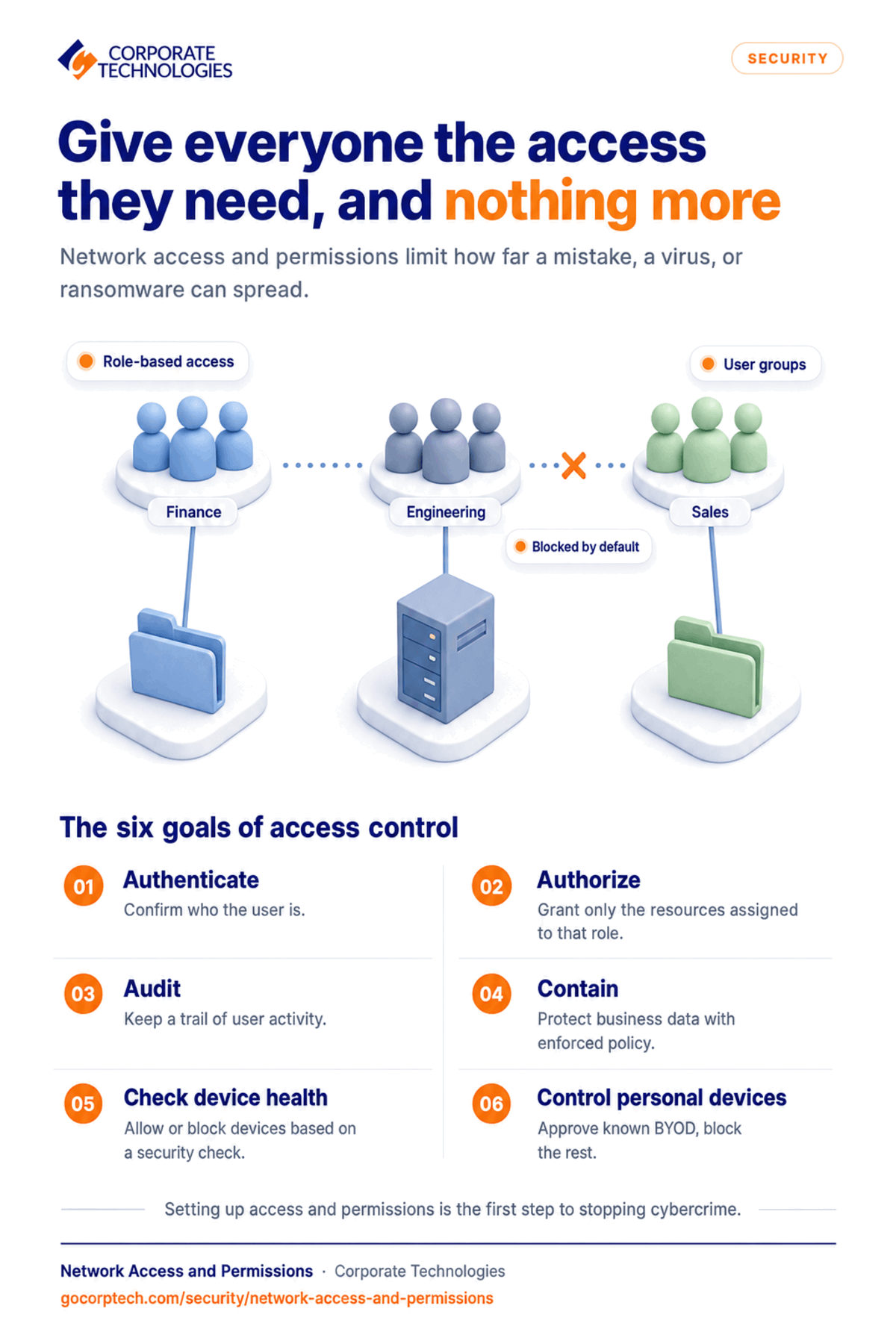
Businesses are always looking for and identifying risks that can disrupt or destroy their company. For IT professionals risk comes in who has access to the network and its devices. Network Access and Permissions (NAAP) is one way to reduce risk. There are many different access controls. The most commonly used one is user related controls or role-based access control. This is giving users access to only those devices and resources that are needed to complete their jobs. Active Directory is one way to control access of users. Users are given access to certain data and devices based on their job. The easiest way to do this is to create user groups. Financial users would have access to data that engineers would not. When the user is placed in their group, they are given the privileges assigned to that group. The goals of NAAP are: Authentication: confirm the user’s credentials against the Active Directory Authorization: allow user access to the assigned resources Audit: creates a user activity trail that can be analyzed if something uncommon were to occur Containment/Confidentiality: business intellectual property through policy enforcement Assess a device’s security posture: allow or block access on the security check Monitor Bring your own Devices (BYOD): show which BYOD are authorized to access and denying a device that is not authorized and could add great risk to your network. Without proper NAAP, your entire network becomes vulnerable to viruses and other threats. By limiting access to role-based, you are limiting how far a virus or ransomware threat can go on your network. With the increasing IoT and BYOD devices, managing and controlling access to your network is more difficult to maintain and should be a priority. You need to understand what is on your network and the risk that it brings. Protect your data and your users from cybercriminals. Setting up Access and Permissions is the first step to stopping cybercrime at your company.
Keep reading
More in Security →
Cybersecurity Insurance in Maryland: What Carriers Now Require from Your IT Infrastructure
Learn what cybersecurity insurance carriers require from Maryland businesses and how managed IT services help meet security controls, compliance, and audit expectations.
Cyber Insurance Requirements in Illinois: What Underwriters Ask For in 2026
What Illinois businesses need for cyber insurance: MFA, EDR, immutable backups, email security. Plus the Illinois laws behind the exposure and policy…
Dental Ransomware Incidents: What Actually Happens
Learn how ransomware attacks dental offices, what happens during an attack, and how backups and security can help you recover safely.
Free, same business day
What would managed IT cost for your team?
Tell us how many computers and users you have. An engineer sends a per-user range, usually the same business day. No credit card, no bot.
- Live service specialist in about a minute, 24/7
- 21 offices across 18 states
- 60-day money-back guarantee
Get your instant IT support estimate
Tell us how many computers and users you have and we send a per-user range, usually the same business day.

