


In short
What Is Spam Filtering and Why You Need It According to cloud reports and industry blogs, email spam filters have become a top testing ground for new language processing and artificial intelligence tools. The results speak for themselves properly implemented filters can block over 99% of unwanted emails before they ever reach employee inboxes.
In this article
Spam filtering helps keep unwanted, risky, and distracting messages out of employee inboxes. In 2026, modern email security uses layered checks and AI-driven detection to reduce junk mail, catch phishing attempts, and block malware before it reaches your team.
What Is Spam Filtering?
Spam filtering is the process of automatically identifying and handling unwanted or suspicious messages. Most systems route these messages to a spam or quarantine folder, while allowing legitimate business email to reach the inbox.
Spam filters commonly help protect against:
- Unsolicited marketing and bulk email
- Phishing links and credential theft
- Malware and harmful attachments
- Business email compromise (BEC) and impersonation attempts
How Spam Filtering Works (2026)
Spam filtering typically combines multiple detection methods. No single signal is perfect, but together they provide strong protection with fewer false positives.
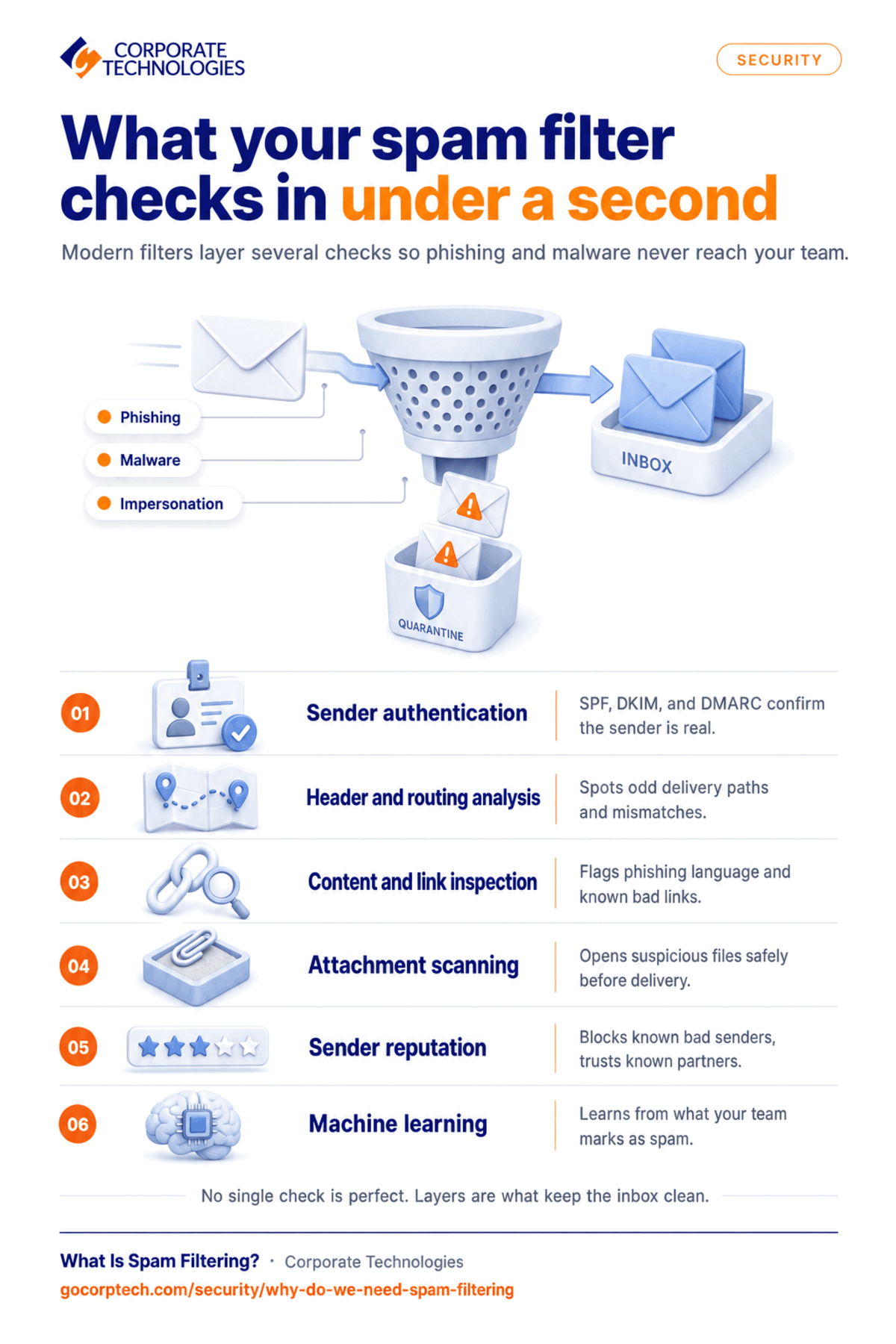
Authentication Checks (SPF, DKIM, and DMARC)
Modern filters verify whether a sender is authorized to send mail for a domain and whether the message was altered in transit. When configured correctly, domain authentication reduces spoofing and impersonation.
Header and Routing Analysis
Filters inspect technical routing data in email headers to spot suspicious sending patterns, mismatches, and abnormal delivery paths.
Content and URL Inspection
Filters analyze the message body for common spam patterns and phishing language. They also evaluate embedded links and compare them against threat intelligence to identify known malicious destinations.
Attachment Scanning and Detonation
Attachments are scanned for known threats. In more advanced setups, suspicious files may be opened in a safe environment to observe malicious behavior before delivery.
Reputation Signals (Blocklists and Allowlists)
Reputation scoring considers sending domains, IP addresses, and historical behavior. Known bad senders can be blocked automatically, while trusted partners can be allowlisted to reduce delivery issues.
Machine Learning and Behavioral Detection
Advanced filters use machine learning to adapt to new spam tactics. They learn from large volumes of signals, including user feedback (what gets marked as spam or not spam), to improve accuracy over time.
When a message is flagged, it is typically routed to a spam or quarantine folder. Your team can review quarantined messages and report false positives (legitimate mail marked as spam) or false negatives (spam that slipped through), which helps the system improve.
Benefits of Spam Filtering for Businesses
Improved Productivity
Spam filters reduce inbox clutter so employees spend less time sorting, deleting, and second-guessing messages.
Enhanced Security
Spam filtering acts as a first line of defense, blocking phishing and malware delivery paths that often lead to account takeover and data loss. It can also play a role in your cyber insurance strategy, since insurers increasingly expect layered email defenses as a baseline control.
Reduced Resource Consumption
Spam consumes bandwidth, storage, and processing time. Filtering reduces load on systems and helps keep email services performing reliably.
Protection of Sensitive Information
By catching phishing and impersonation attempts early, spam filtering helps reduce the risk of credential theft, identity fraud, and unauthorized access to sensitive data. If an incident does slip through, our guide on what to do after a data breach walks through the right next steps.
Better Email Deliverability and Reliability
Filtering supports a healthier email environment by keeping mail usable and organized. It also helps reduce the risk of a compromised account or server being used to send spam and triggering domain or IP reputation damage.
Peace of Mind
Constant spam is distracting and stressful. Effective filtering reduces daily noise and lowers the chance that one click becomes a major incident.
Common Types of Spam
Email Spam
This is the most familiar form: unsolicited messages sent to many recipients. While some messages are merely annoying, others include phishing links or malware designed to compromise devices or accounts. Security awareness training is essential so employees know what to report and avoid.
Messaging Spam (SMS, Chat, and Social Platforms)
Spam also arrives through SMS, instant messaging, and social media. These messages often try to trick recipients into sharing personal information, sending money, or clicking malicious links.
Comment Spam
Websites, blogs, and forums can be targeted with irrelevant comments that include promotional links or nonsensical text. This can damage trust, SEO quality, and user experience.
Spambots and Automated Attacks
Spambots are automated programs built to distribute spam quickly. They can create fake accounts, post spam at scale, and attempt credential stuffing or other automated abuse.
How to Fight Spam in Your Organization
Effective spam defense combines technology, policy, and user habits. For most organizations, a practical 2026 approach includes:
- Enable and enforce SPF, DKIM, and DMARC for your domains
- Use multi-factor authentication (MFA) for email accounts
- Deploy layered filtering with URL and attachment protection
- Add an easy “Report phishing” workflow so users can flag suspicious mail fast
- Provide ongoing security awareness training and simulated phishing exercises
- Monitor quarantine trends to tune rules and reduce false positives
If you’re still relying on two-factor authentication alone, or want to understand how MFA fits into your cyber insurance requirements, those are good next steps alongside spam filtering.
Corporate Technologies offers multi-level spam filtering designed to block malicious emails before they reach inboxes. Our filtering platform uses a combination of authentication checks, header analysis, IP reputation signals, and content inspection to reduce spam, phishing, and harmful attachments. Filters can be tuned to your organization so legitimate mail still gets delivered while suspicious messages are quarantined.
Contact Corporate Technologies
Corporate Technologies recognizes the impact spam can have on productivity and security. Our email spam filtering solutions and support are designed to reduce unwanted communication and strengthen protection across your organization.
To learn more about how spam filtering can benefit your business, contact our customer center for a complimentary consultation. Our team can review your current setup, identify gaps, and recommend an approach that fits your environment and budget.
Contact us today if you feel your business would benefit from professional help with spam filtering.
FAQ
Can Spam Filtering Stop Phishing and Business Email Compromise (BEC)?
It can significantly reduce risk, especially when paired with domain authentication (SPF/DKIM/DMARC), URL inspection, and user reporting. No solution is perfect, so MFA and training remain important.
Will Spam Filters Block Legitimate Emails?
Occasionally, yes. Reviewing quarantined messages, tuning rules, and using allowlists for trusted senders helps reduce false positives without lowering security.
What Should We Check If Customers Say They Are Not Receiving Our Emails?
Start with domain authentication (SPF, DKIM, DMARC), sender reputation, and whether your messages are being quarantined by recipient systems. Delivery monitoring and consistent sending practices help.
Keep reading
More in Security →
Cybersecurity Insurance in Maryland: What Carriers Now Require from Your IT Infrastructure
Learn what cybersecurity insurance carriers require from Maryland businesses and how managed IT services help meet security controls, compliance, and audit expectations.

Cyber Insurance Requirements in Illinois: What Underwriters Ask For in 2026
What Illinois businesses need for cyber insurance: MFA, EDR, immutable backups, email security. Plus the Illinois laws behind the exposure and policy…
Dental Ransomware Incidents: What Actually Happens
Learn how ransomware attacks dental offices, what happens during an attack, and how backups and security can help you recover safely.
Free, same business day
What would managed IT cost for your team?
Tell us how many computers and users you have. An engineer sends a per-user range, usually the same business day. No credit card, no bot.
- Live service specialist in about a minute, 24/7
- 21 offices across 18 states
- 60-day money-back guarantee
Get your instant IT support estimate
Tell us how many computers and users you have and we send a per-user range, usually the same business day.

