


In short
There’s no question that data is among the most critical elements of any modern business, big or small. This means that any unforeseen interruptions in the form of downtime for IT maintenance, cyberattack, natural disasters, etc.
In this article
- DRaaS in one paragraph
- How it actually works
- RPO and RTO, the two numbers that actually matter
- What a real recovery looks like
- The three DRaaS models
- DRaaS is not the same as backup
- What to ask a DRaaS provider before signing
- The mistakes we see most often
- How Corporate Technologies approaches disaster recovery
- Frequently asked questions
- Talk to us about what recovery actually looks like for you
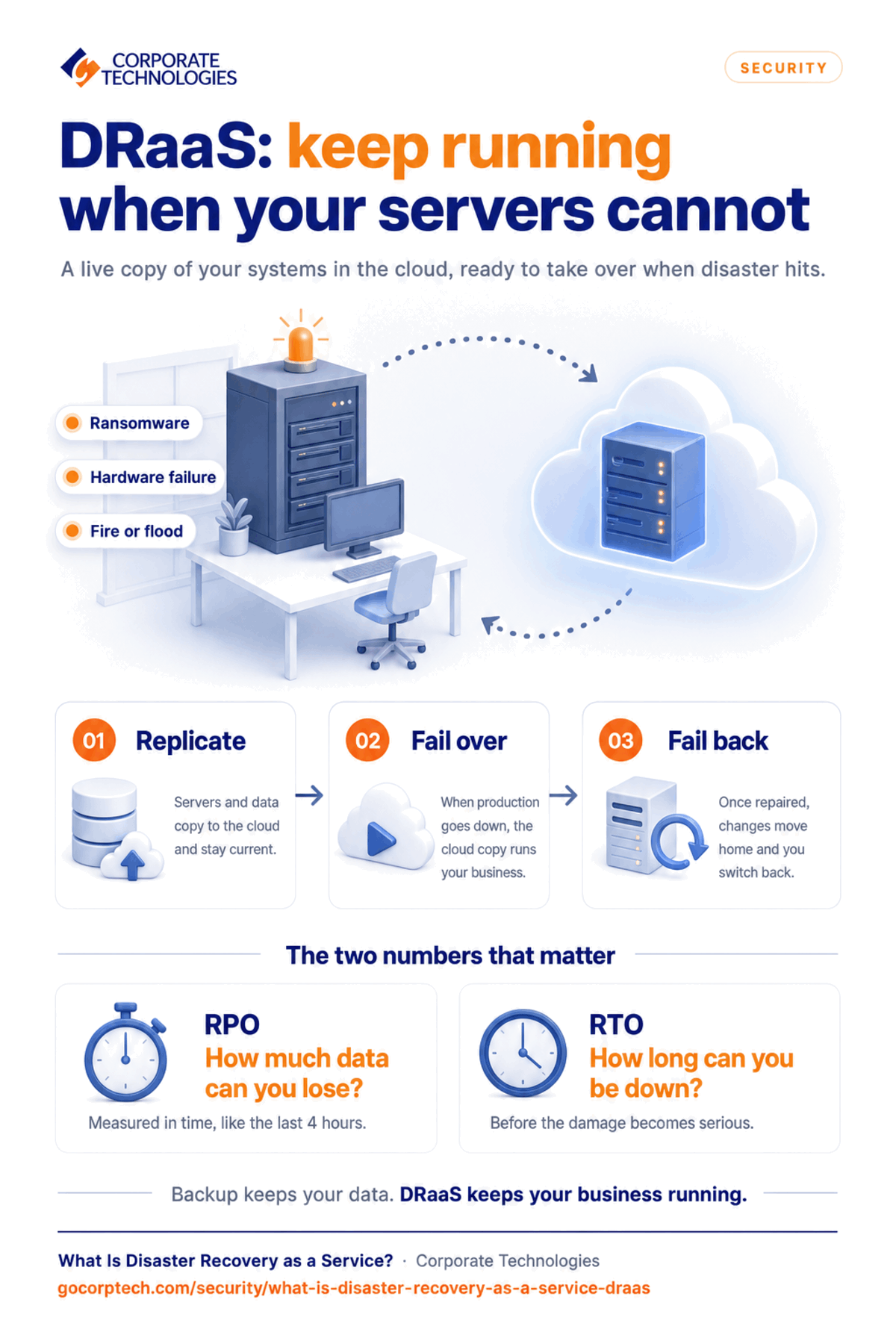
Disaster Recovery as a Service (DRaaS) is a subscription service that keeps a continuously updated copy of your servers, applications, and data in a provider’s cloud, ready to take over running your business if your own systems go down. You pay monthly instead of building a second data center, and the provider is responsible for making the failover work when you need it.
That last part is the whole point. Plenty of businesses have backups. Far fewer have ever proved they can actually run on them.
DRaaS in one paragraph
Your production environment is replicated to a provider’s infrastructure on a schedule. When something takes your systems offline, whether that is a ransomware attack, a failed storage array, a burst pipe above the server room, or a regional power cut, the provider brings the replicated environment up and your staff work from that instead. When your own environment is repaired, the provider migrates you back. The word “service” is doing real work in the acronym: you are buying an outcome and someone else’s responsibility, not a piece of software.
How it actually works
Replication. Your servers, applications, configuration, and data are copied to the provider’s environment and kept current. How current depends on what you pay for and what your business can tolerate. Some workloads replicate continuously. Others are fine at fifteen minute or hourly intervals.
Failover. When production is unavailable, the replicated environment is brought online and users are pointed at it. Good failover is orchestrated rather than manual, because the order things start up in matters. A domain controller that comes up after the application depending on it is not a recovery, it is a second outage.
Failback. Once your primary environment is repaired, the changes made while you were running in the cloud are migrated back and you cut over again. This is the step most providers gloss over in a sales meeting, and it is the step that most often goes badly, because it happens when everyone is tired and already thinks the crisis is over.
RPO and RTO, the two numbers that actually matter
Every conversation about disaster recovery should start with two questions, and any provider who does not ask them is selling you a product rather than designing a recovery.
Recovery Point Objective (RPO) is how much data you can afford to lose, measured in time. An RPO of four hours means that in the worst case, you lose the last four hours of work. Getting to a fifteen minute RPO costs more than getting to a four hour one, so the honest answer varies by system. Your accounting system and your marketing file share almost certainly do not need the same number.
Recovery Time Objective (RTO) is how long you can afford to be down before the damage becomes serious. For a manufacturer running a shift, that may be under an hour. For a professional services firm on a Friday afternoon, it may be considerably longer.
Very few small and mid-sized businesses have these written down, and fewer still have tested a restore against them recently. That gap is the single most common finding when we assess a new client’s environment, and it is usually the first thing worth fixing, because a backup nobody has restored from is a hope rather than a control. A documented IT roadmap for a small business should define these recovery priorities before an incident occurs.
What a real recovery looks like
Corporate Technologies restored a church client’s environment through our Cenetric team during an Easter livestream, in under five minutes, while the service was running. That recovery experience builds on the church-focused expertise added when Corporate Technologies acquired Cenetric.
That example is worth more than a page of adjectives, because it shows the two things that matter in a recovery. First, the restore was fast enough that the audience did not lose the broadcast. Second, it happened during the single highest-stakes hour in that organization’s calendar, which is exactly when systems fail and exactly when nobody has time to read a runbook. Recovery capability is only real if it works on your worst day, not on a quiet Tuesday when the engineer who built it is at their desk.
The three DRaaS models
Managed DRaaS. The provider owns the replication, the failover, the testing, and the recovery. You own the decision to invoke it. This is the right fit for organizations without a dedicated infrastructure team, which is most SMBs. For a broader comparison of outsourcing options, see managed IT versus internal IT.
Assisted DRaaS. You keep some control and run parts of the process yourself, with the provider supplying the platform and the expertise. This suits businesses with a capable internal IT person who needs specialist backup rather than replacement.
Self-service DRaaS. You get the platform and you do everything else. It is the cheapest option on the invoice and the most expensive one during an actual incident, unless you genuinely have experienced staff who test it regularly. In practice, most self-service DR plans are discovered to be out of date at the worst possible moment.
DRaaS is not the same as backup
This distinction gets blurred constantly, usually by people selling one and calling it the other.
Backup is a copy of your data. It answers the question “can we get the file back?” It is essential, and it is not a recovery plan. The right schedule depends on the value and rate of change of your information; this guide explains how often to back up business data.
DRaaS is a copy of your running environment plus the ability to operate from it. It answers “can the business keep working?”
You need both. Backup protects you from deletion, corruption, and ransomware encryption. DRaaS protects you from losing the environment those backups would have to be restored into. A business with excellent backups and no DR plan can still be down for a week, because restoring 4TB onto hardware you have not bought yet takes as long as it takes. A practical baseline is the 3-2-1 disaster recovery standard.
What to ask a DRaaS provider before signing
What is the contracted RTO and RPO, per system, in writing? Not the marketing figure. The number in the agreement.
How often is failover tested, and do I get the report? An annual test that produces a document you can hand an auditor or an insurer is worth far more than a monthly test nobody records.
Who declares a disaster, and how do I reach them at 2am? If the answer involves a web form, keep looking.
What does failback look like, and who pays for it? Some providers charge for egress or for the migration back. Find out before, not after.
Where does the data physically sit, and does that satisfy my compliance obligations? For regulated businesses this is not a detail. Your provider should also be able to explain its controls against established cybersecurity standards and frameworks.
What happens if your environment and mine are hit by the same regional event? Geographic separation is the entire premise, so make them explain theirs. Use a structured MSP selection checklist to compare answers consistently.
The mistakes we see most often
Treating DR as a purchase rather than a practice. The plan degrades the moment your environment changes, and your environment changes constantly. A DR plan that has not been revisited since a server was added is already partly fiction.
Protecting servers but not identity. If your directory, your MFA, and your email are unavailable, bringing up a file server does not get anyone working. Recovery order matters more than recovery speed.
No documented decision authority. Failover has a cost and a disruption of its own, so somebody has to be empowered to call it. If that decision has to travel up a chain on a Saturday, the outage lasts longer than the technical recovery time.
Assuming the cloud provider handles it. Hosting a workload in Microsoft 365 or Azure does not mean somebody is taking a recoverable copy of it for you. The shared responsibility model puts that on you, and a lot of businesses discover this after an incident rather than before. Secure recovery therefore needs to be part of your wider cloud security best practices.
How Corporate Technologies approaches disaster recovery
We have been supporting business IT since 1981, and we manage backup and recovery for clients across 21 markets in 18 states. Our approach is deliberately unglamorous:
On-site and cloud copies. Both, monitored nightly, because local copies restore fastest and off-site copies survive the events that destroy local ones. The backup server itself must also be secured; learn more about protecting your backup server.
Tested restores, not assumed ones. A recovery capability that has never been exercised is a theory.
Recovery targets written down per system, so the conversation about cost happens before the incident rather than during it.
A US-based help desk staffed around the clock, where a live service specialist answers the phone in about a minute on average.
One accountable team. Backup, disaster recovery, security, and day-to-day support come from the same provider, with a named account manager, quarterly business reviews, and monthly reporting. During an incident, nobody gets to point at somebody else. Recovery is coordinated through a documented cybersecurity incident response plan.
Corporate Technologies was named a 2026 Channel Futures MSP 501 winner.
Frequently asked questions
What does DRaaS cost? It scales with how much you are protecting and how fast you need it back. A tight RTO on every system costs considerably more than a tiered plan that treats a production database differently from an archive file share. We scope it against your actual recovery targets rather than quoting a list price, so the number reflects your environment.
How is DRaaS different from a cloud backup? Cloud backup stores copies of data. DRaaS stores a copy of your operating environment and can run your business from it. Backup answers “can we get the file back”, DRaaS answers “can we keep working”.
How quickly can we be back online? That depends on the RTO you contract for and on which systems are in scope. The relevant question is not how fast a provider can theoretically recover, but what they have committed to in writing and demonstrated in a test.
Do we still need on-premises backup if we have DRaaS? Usually yes. Local copies restore faster for everyday problems, which is the overwhelming majority of restore requests. DRaaS is for the events that take out the whole environment.
Does DRaaS protect against ransomware? It helps significantly, provided the replicated copies are isolated so that encryption cannot follow the replication path, and provided you can recover to a point before the intrusion started. Both of those are design decisions, not defaults, which is why the architecture matters more than the brand name. DRaaS works best as one layer in a broader strategy to prevent ransomware attacks.
How often should failover be tested? At least annually, and after any material change to the environment. If your provider cannot show you the results of the last test, treat that as the answer to the question.
Talk to us about what recovery actually looks like for you
If you are not sure what your recovery targets are, or you suspect the honest answer to “when did we last test a restore” is “we haven’t”, that is worth a conversation. We will map what you have, tell you plainly where the gaps are, and give you options with real numbers attached.
Contact Corporate Technologies or call 1-866-363-4628.
Keep reading
More in Security →
Cybersecurity Insurance in Maryland: What Carriers Now Require from Your IT Infrastructure
Learn what cybersecurity insurance carriers require from Maryland businesses and how managed IT services help meet security controls, compliance, and audit expectations.
Cyber Insurance Requirements in Illinois: What Underwriters Ask For in 2026
What Illinois businesses need for cyber insurance: MFA, EDR, immutable backups, email security. Plus the Illinois laws behind the exposure and policy…
Dental Ransomware Incidents: What Actually Happens
Learn how ransomware attacks dental offices, what happens during an attack, and how backups and security can help you recover safely.
Free, same business day
What would managed IT cost for your team?
Tell us how many computers and users you have. An engineer sends a per-user range, usually the same business day. No credit card, no bot.
- Live service specialist in about a minute, 24/7
- 21 offices across 18 states
- 60-day money-back guarantee
Get your instant IT support estimate
Tell us how many computers and users you have and we send a per-user range, usually the same business day.

