

In short
What California ethics rules and breach law require of a law firm, where firms of 10 to 100 people fall short, and what managed IT should cover.
In this article
Law firms in Sacramento work under two sets of rules at once: the ethics rules that govern every California lawyer, and the practical reality of running an office where the entire business lives in email, document management, and a billing system. When the technology fails, the firm cannot bill. When it leaks, the firm has an ethics problem as well as a security problem. This article explains what the California rules actually ask of a firm, where small and mid-sized firms most often fall short, and what a managed IT arrangement should cover if it is going to help.
What California actually requires of a firm
California does not hand lawyers a checklist of security products. It sets duties and expects each firm to work out what reasonable protection looks like for its own practice.
- Competence (Rule 1.1). The comment to the rule includes keeping up with the benefits and risks of relevant technology. A partner does not need to configure a firewall, but the firm needs to understand what protects client data and what does not.
- Confidentiality (Rule 1.6 and Business and Professions Code section 6068(e)). Lawyers must take reasonable steps to prevent unauthorized access to client information. The State Bar’s Formal Opinion 2010-179 set out the factors: how sensitive the information is, how likely disclosure is without extra safeguards, what those safeguards cost, and whether the client has asked for special handling.
- After a breach (Formal Opinion 2020-203). If client data is accessed or is reasonably suspected to have been accessed, the firm must investigate what happened and tell affected clients as soon as reasonably possible, so they can protect themselves. Rule 1.4 and section 6068(m) require keeping clients informed of significant developments, and a breach counts.
- State breach law (Civil Code section 1798.82). Separately from the ethics rules, a firm holding personal information such as Social Security numbers or financial account numbers of California residents has notification obligations if that data is exposed. The ABA reached similar conclusions nationally in Formal Opinion 483.
The practical consequence of the “reasonable steps” standard is that a firm needs to be able to show its reasoning: what it protects, how, and why that is proportionate. A firm that cannot answer those questions has a hard time defending itself after an incident, whatever products it bought.
Where firms of 10 to 100 people usually fall short
Across the firms we support, the gaps repeat. None of them are exotic.
- Multi-factor authentication is on for some accounts and not others. Email usually has it. The document management system, the remote desktop, and the billing portal often do not. Attackers go where it is missing.
- Former staff still have access. Paralegals and associates leave, and their accounts stay active in one or two systems because nobody owns the offboarding checklist.
- Backups exist but have never been restored. A backup that has not been tested is a hope, not a plan. Ransomware recovery depends on knowing how long a full restore takes.
- Payment instructions move by email. Settlement and trust account wiring instructions sent or changed over email are the most common route to a six-figure loss. A call-back rule to a known number, enforced without exceptions, prevents most of it.
- Home and courthouse Wi-Fi. Opinion 2010-179 was written about a laptop on a coffee shop network, and the issue has not gone away. Device encryption, a VPN or secure gateway, and the ability to wipe a lost laptop remotely are the baseline.
- Nobody knows where client data is. It is in the DMS, in email attachments, in a shared drive, on two laptops, and in a vendor’s cloud. A data map is unglamorous and it is the first thing an incident responder asks for.
What a managed IT arrangement should cover for a law firm
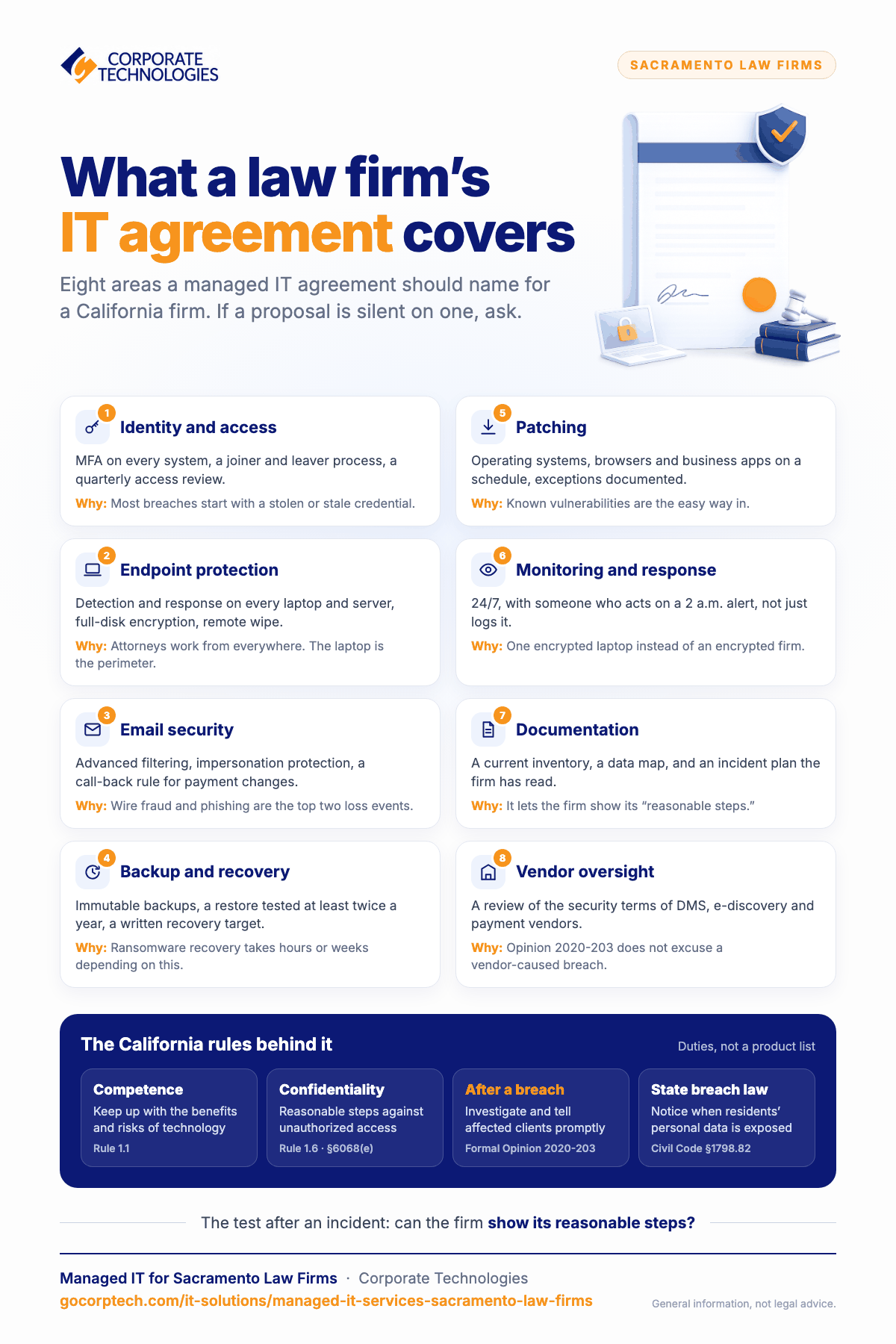
Managed IT means a provider takes ongoing responsibility for the firm’s systems for a flat monthly fee, instead of being called when something breaks. For a law firm, the agreement should explicitly cover the items below. If a proposal is silent on any of them, ask.
| Area | What it should include | Why it matters for a firm |
|---|---|---|
| Identity and access | MFA on every system, a joiner and leaver process, least-privilege permissions, quarterly access review | Most breaches start with a stolen or stale credential |
| Endpoint protection | Managed detection and response on every laptop and server, full-disk encryption, remote wipe | Attorneys work from everywhere; the laptop is the perimeter |
| Email security | Advanced filtering, impersonation protection, a documented call-back rule for payment changes | Wire fraud and phishing are the top two loss events for firms |
| Backup and recovery | Immutable backups, a tested restore at least twice a year, a written recovery time target | Ransomware recovery is measured in hours or weeks depending on this |
| Patching | Operating systems, browsers, and line-of-business applications on a schedule, with exceptions documented | Known vulnerabilities are the easy way in |
| Monitoring and response | 24/7 monitoring with someone who will act on an alert at 2 a.m., not just log it | The difference between one encrypted laptop and an encrypted firm |
| Documentation | A current inventory, a data map, and an incident response plan the firm has read | This is what lets the firm show its “reasonable steps” |
| Vendor oversight | Review of the security terms of the DMS, e-discovery, and payment vendors | Opinion 2020-203 does not excuse a breach because a vendor caused it |
Local support versus a remote-only provider
Most law firm IT work is remote, and it should be: password resets, software problems, and monitoring do not need a technician in the office. Where a local presence earns its keep is the smaller number of events that do: a server or network device failing, a new office build-out, a workstation that will not boot before a filing deadline, and the onboarding of a firm that has never had a structured IT relationship. Our Sacramento office serves firms across the region and is backed by the same 24/7 help desk and security operations team that supports all 21 of our locations, so the firm gets local hands when they are needed and round-the-clock coverage when they are not.
How Corporate Technologies works with law firms
We support law firms from our Sacramento office and across the country. Our Secure Advantage package covers the security controls above: 24/7 security operations center monitoring, next-generation antivirus with endpoint detection and response, multi-factor authentication, spam filtering, security awareness training, CEO fraud protection, website restrictions, and application and storage control. Help desk and onsite support come through our managed IT packages, priced flat per user per month. Pricing is published, so there is nothing to request.
If you want to know where your firm stands before talking to anyone, the law firm IT readiness assessment takes a few minutes and covers the gaps listed above. For a broader view of how we work with the legal sector, see managed IT services for law firms.
Frequently asked questions
Does a small firm really need 24/7 monitoring?
Ransomware is typically detonated at night or over a weekend, after the attacker has spent days inside the network. Monitoring that only works during business hours misses the part that matters. The cost of 24/7 coverage from a managed provider is a fraction of what it would cost to staff internally, which is why firms outsource it.
Can we keep our existing document management and billing software?
Yes. A managed IT provider supports the applications the firm has chosen; it does not replace them. What changes is that someone is responsible for keeping them patched, backed up, and protected by MFA, and for reviewing the vendor’s own security.
What happens if we have a breach?
You will need to establish quickly what was accessed, contain it, and decide on client notification under Opinion 2020-203 and state law. A provider with monitoring and logging in place can usually answer the first question in hours rather than weeks, which shapes everything that follows. Your incident response plan should name who makes the notification decision and who the firm’s outside counsel and insurer contacts are.
Will this satisfy our cyber insurance application?
Underwriters now ask specifically about MFA, endpoint detection and response, tested backups, and email security. The controls in the table above are the ones they ask about. We cover the application questions in detail in what cyber insurance underwriters actually ask for.
Keep reading
More in IT Solutions →
FINRA and SEC IT Controls for Small Financial Firms in Maryland
Amended Regulation S-P (incident response, 72-hour vendor notice, 30-day customer notice), FINRA 4370, Reg S-ID, Maryland PIPA, and what examiners expect.

IT for New Mexico Cannabis Businesses: Track and Trace, POS, Cameras, and Compliance
Cannabis Control Division rules that are really IT rules: daily track-and-trace reconciliation, unique accounts, camera retention, and what managed IT covers.
Maryland PIPA Explained: What the Data Breach Law Requires of Small Businesses
Maryland PIPA after the 2022 amendments: 45 days from discovery, Attorney General notice first, 10-day vendor notice, reasonable security, and the IT…
Free, same business day
What would managed IT cost for your team?
Tell us how many computers and users you have. An engineer sends a per-user range, usually the same business day. No credit card, no bot.
- Live service specialist in about a minute, 24/7
- 21 offices across 18 states
- 60-day money-back guarantee
Get your instant IT support estimate
Tell us how many computers and users you have and we send a per-user range, usually the same business day.

