
Managed IT pricing
Instant IT Support Pricing Calculator
See your monthly IT support cost in less than 60 seconds. Move the sliders, submit, and your price appears right away.
- One flat price per user, per month
- 1, 2 or 3-year terms, price locked for the term
- 60-day money-back guarantee
Trusted by 2,000+ businesses in 18 states
- Certified engineers
- 24/7 help desk
- 21 local offices
Recognized byCRN, Channel Futures and Clutch












Our plans
Corporate Technologies managed IT plans
Starting prices per user, per month, on a 3-year agreement. 1 and 2-year terms are available. Every plan includes 24/7 help and our 60-day money-back guarantee. Calculate your price →
Help Desk Connect
Unlimited 24/7 help desk for everyday issues
$35per user / month
- Unlimited 24/7 remote help (Tier 1)
- Your personal IT manager
- Proactive monitoring and patching
- Onsite and advanced support by request
Technology Advantage
Proactive IT management with engineering and onsite time
$55per user / month
- Everything in Help Desk Connect
- Tier 2 remote engineering
- Monthly onsite time included
- Business reviews and IT planning
- Best seller
Total Advantage
All-inclusive managed IT, one flat rate
$80per user / month
- Unlimited remote and onsite support
- Unlimited advanced remote support
- Proactive network protection
- No hourly or travel charges
Secure Advantage
Cybersecurity plan, standalone or add-on
$45per user / month
- 24/7 SOC monitoring and breach detection
- Next-gen antivirus and EDR
- CEO fraud and email protection
- Compliance as a Service
Managed IT services pricing guide (2026)
What small businesses actually pay for managed IT
Every expense matters in a small business, and IT is easy to overpay for. Many managed service providers quote a low per-user fee, then bill extra for anything they consider out of scope. This guide shows typical market prices, what drives them, and what a good plan should include, so you can compare offers without hidden costs.

Average managed IT cost for small businesses
Across the industry, managed IT services typically cost $100 to $300 per user per month. Most small and mid-sized businesses pay around $125 to $200 per user, depending on security, support level and how complex their setup is.
- $75–$150Basic support, per user per month
- $150–$300Fully managed IT, per user per month
- $300+Advanced security environments
Per-user pricing means you pay a set amount for each person on your network. It covers their help desk requests and account management, and users can open as many tickets as they need. The real differences between providers are the per-user rate and the extras billed by the hour. Check security in particular: on lower tiers it is often an add-on, and hourly charges during a breach get expensive fast.
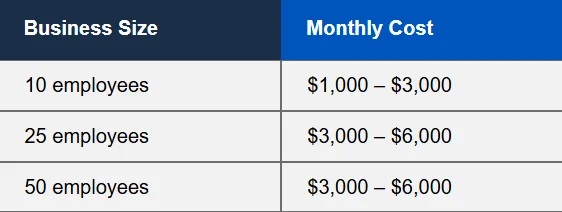
Why managed IT pricing varies so much
Most small businesses start with someone in the office handling IT, then patch on new equipment as they grow. A provider first has to review that setup and bring it to a secure, consistent baseline. Headcount is only one factor in the price:
- Business size and infrastructure
- Even a small business can have a complex setup, which means more work to manage.
- Cybersecurity stack
- Security is often overlooked. A good provider will close the gaps that put your data at risk.
- Compliance requirements
- If you store personal or sensitive data, regulations such as HIPAA may apply, and your environment has to meet them.
- Number of locations
- Onsite support across several sites is factored into the price.
- Onsite vs remote support
- Remote help fixes most issues. Onsite support matters for hardware problems and security incidents.
Managed IT pricing models explained
Per user. The most common model, and the easiest to budget. With 25 employees at $150 per user, IT costs $3,750 a month, every month.
Per device. Useful when each person has several devices, such as a workstation, laptop, phone and tablet.
Tiered plans. Most providers package services into tiers. Cybersecurity is often reserved for a higher tier or billed hourly.
À la carte. Paying per service can work for a very small office with little infrastructure, but it gets expensive as you grow compared with a flat rate.
Real examples of managed IT costs
Industry matters because it decides which compliance rules you must follow. If your environment is not compliant yet, the provider has to plan for that, and non-compliance can mean heavy fines after a breach.
20-employee law firm
- Managed IT
- $3,200/mo
- Security stack
- $900/mo
- Total
- $4,100/mo
35-employee manufacturer
- Managed IT
- $5,800/mo
- Security stack
- $1,400/mo
- Total
- $7,200/mo
35-employee healthcare organization
- Managed IT
- $9,500/mo
- Security stack
- $3,000/mo
- Total
- $12,500/mo
The hidden cost most businesses ignore: downtime
What a critical system outage can cost a business, from failed hardware, a misconfiguration or a cyberattack. Lost revenue is only part of it: idle payroll, damaged reputation and regulatory risk add up, and a ransomware attack can threaten the business itself. Read our downtime research →
Managed IT vs internal IT: what actually costs more?
An internal IT hire means salary, benefits, training, tools, and cover when that person is sick or on vacation. Specialist skills, such as compliance for a law office, cost even more to hire. Managed IT can look more expensive at first, but a flat per-user fee buys a whole team. With managed IT you get:
- A team of specialists for your specific setup
- Predictable monthly costs
- Broader expertise as the business grows
Get the Managed IT vs Internal IT checklist →
What should be included in managed IT pricing
Choose a package that covers what you will need as you grow, not only what you need today. You do not want to face a serious security incident with no help in your plan. A good provider includes:
- 24/7 help deskFor issues and questions, day or night
- Proactive monitoringStops malware and failures before they spread
- Patch managementKeeps hardware and software up to date
- BackupsFor disaster recovery and deleted files
- CybersecurityThreat response and incident support
- Strategic planningFor growth and future IT needs
Always choose proactive support over reactive IT. Proactive support finds and stops threats before they cause damage; reactive IT only responds after something has already gone wrong.
Technology roadmapping: the missing piece in most IT pricing
Many providers only keep systems running. A real partner also plans ahead with you, so your IT is ready for growth and threats and you avoid costly overhauls later. A technology roadmap sets out what the business plans to do and how IT will support it. It is one of the areas where Corporate Technologies does the most for its clients. How technology roadmaps work →
Pricing questions
Straight answers before the first call.
Something else? 1-866-363-4628
Prefer to read first? The checklist most of our clients used before they called: how to evaluate an MSP, in 20 minutes.
Get the checklistHow much do managed IT services cost?
Industry-wide, most small businesses pay $100 to $300 per user per month. Corporate Technologies plans start at $35 per user for Help Desk Connect, $55 for Technology Advantage and $80 for Total Advantage, with Secure Advantage cybersecurity from $45 per user. Use the calculator for an instant estimate.
What is included in the monthly price?
Every plan includes 24/7 help desk support, your personal IT manager and proactive monitoring. Higher plans add Tier 2 engineering, onsite support and network protection. Total Advantage includes unlimited remote and onsite support with no hourly or travel charges.
What contract terms do you offer?
1, 2 or 3-year terms. The prices shown are 3-year agreement pricing, and your price is locked for the length of the term.
Is there a guarantee?
Yes. Help Desk Connect, Technology Advantage and Total Advantage are covered by our 60-day money-back guarantee.
How accurate is the calculator?
It gives a starting monthly price based on your users, computers, servers and support hours. A service specialist confirms the final price with you on a short call, based on the services and support level you choose.
See your price in under a minute
Enter your computers, users and servers and get an instant monthly estimate. A service specialist confirms it with you on a short call.

