


In short
Uncover what a virtual data center is with our comprehensive guide. Simplified explanations for everyday understanding await.
Those of us immersed in IT daily often forget that, for most people, many technical phrases we use can sound like a foreign language. The term “virtual data center” is a good example. So, what exactly is a virtual data center?
If you’re unsure, don’t worry – we’re here to help. We’ll start by looking at the technical definition of a virtual data center (VDC), but we won’t leave you there. We’ll also make sure to translate the concepts into the language of the living room. So, let’s get started.
The Technical Definition of a Virtual Data Center
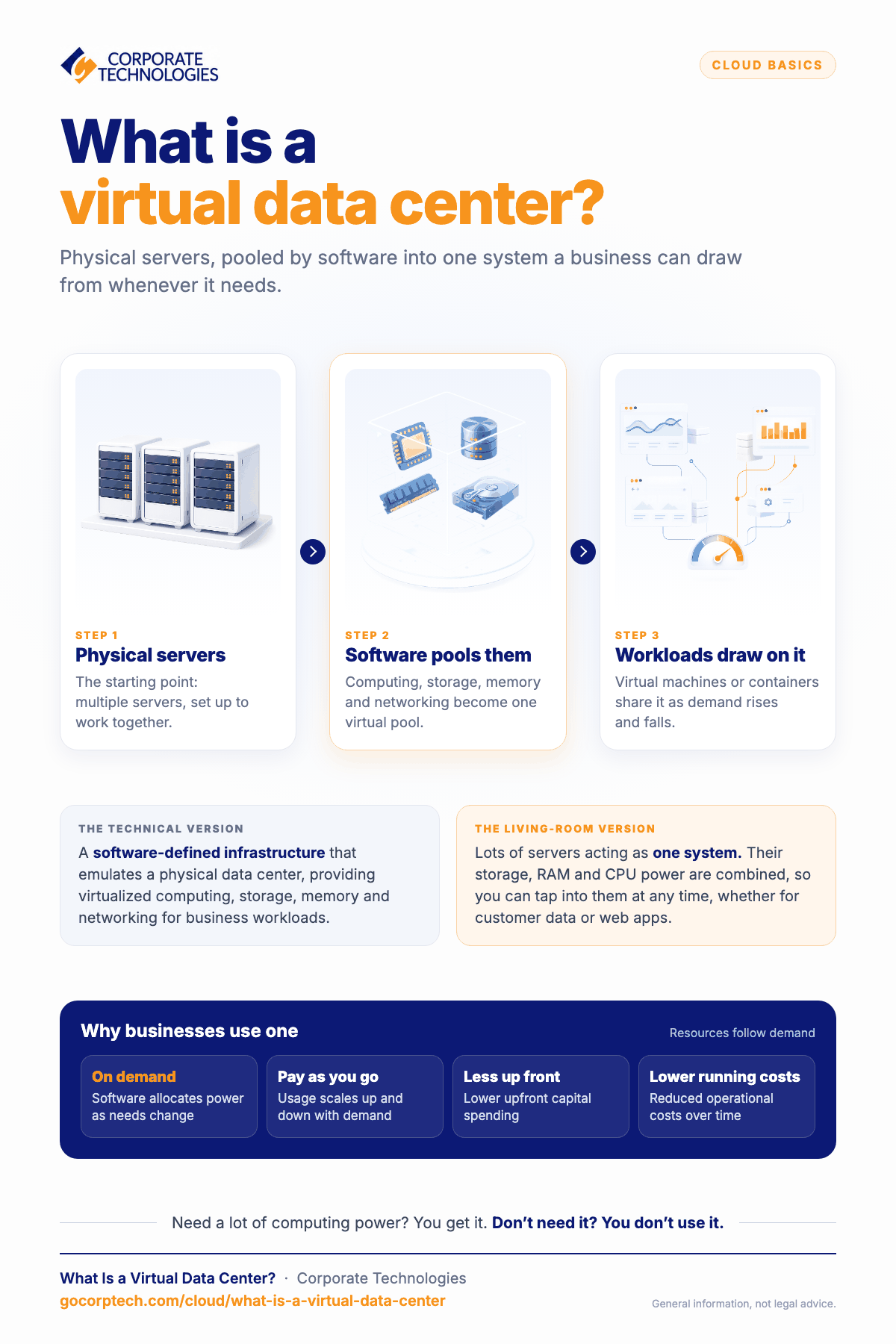
Suppose somebody asks you what a virtual data center is. In that case, you can tell them this: a virtual data center (VDC) is a software-defined infrastructure that emulates a physical data center by providing virtualized computing, storage, memory, and networking resources to support enterprise workloads. You’ll sound like you’ve memorized a Wikipedia page, which will be impressive.
The Layman’s Definition of a Virtual Data Center
Well, now that we’ve gotten the technical definition out of the way, let’s try to figure out exactly what it actually means.
To start with, let’s take a look at the phrase, “virtualized pool of cloud infrastructure resources”. It sounds complicated, but essentially, all it really means is an abstraction of physical servers into a dynamic pool of virtualized resources using software-defined techniques. Have you ever seen a server? Well, a pool of cloud infrastructure resources is basically just multiple servers, set up to work together.
What about the phrase “enterprise business needs”? That just means that the network of servers has been set up to help businesses perform the activities that they need to do– whether that be managing customer data or running web applications.
So, when it comes to a virtual data center (VDC), think of it this way: a virtual data center is a unified system where virtual machines or containers dynamically share computing, storage, and networking resources beyond the capabilities of individual personal devices. The storage, RAM, and CPU power would all be combined into one system that could be accessed at any time.
Why Virtual Data Centers are Useful
Now that you know what virtual data centers (VDC) are, it’s worthwhile to have an understanding of what makes them valuable.
The great thing about virtual data centers is that resources in a virtual data center are dynamically allocated using software-defined methods to optimize performance and cost efficiency according to demand fluctuations. When you use an app or program that requires a lot of computing power, you’re able to access it. When you don’t need power, you don’t use it. VDCs operate on a pay-as-you-go model that dynamically scales resource usage, reducing upfront capital expenditures and operational costs.
Have any more questions about what a virtual data center is, or why they’re helpful? Let us know. At Corporate Technologies, we’re honored to provide technology services to businesses. Get in touch with us.
See Also
Keep reading
More in Cloud Computing →
How to Migrate to the Cloud Without Disrupting Operations
Learn how to migrate to the cloud without disrupting operations. Discover step-by-step strategies to reduce downtime, prevent data loss, and ensure a…
Data Storage
Disaster Recovery for Churches (Fire, Flood, Ransomware)
Learn how disaster recovery protects churches from fire, flood, and ransomware. Plan backups, RTO, RPO, and continuity to prevent data loss.

How to Secure Your Cloud Accounts (Best Practices for AWS, Google Workspace, and Microsoft 365)
Learn best practices to secure AWS, Google Workspace, and Microsoft 365 accounts. Protect data, prevent breaches, and stay compliant with HIPAA &…
Free, same business day
What would managed IT cost for your team?
Tell us how many computers and users you have. An engineer sends a per-user range, usually the same business day. No credit card, no bot.
- Live service specialist in about a minute, 24/7
- 21 offices across 18 states
- 60-day money-back guarantee
Get your instant IT support estimate
Tell us how many computers and users you have and we send a per-user range, usually the same business day.

