
IT for San Diego Dental Practices: HIPAA, California Privacy Law, and What Managed IT Covers

In short
HIPAA, the California CMIA, state breach law and PCI for a dental office, where practices are exposed, what managed IT should cover, and published pricing.
In this article
A dental practice is a small business with hospital-grade data obligations. Patient records, imaging, insurance details, and payment information all live in a practice management system and a handful of connected devices, protected by whoever in the office has the most patience for computers. For a San Diego practice that means HIPAA, California’s own stricter medical privacy law, the state breach statute, and PCI rules for card payments, all at once. This article explains what those actually require, where practices fall short, and what a managed IT arrangement should cover for a dental office.
The rules a California dental practice works under
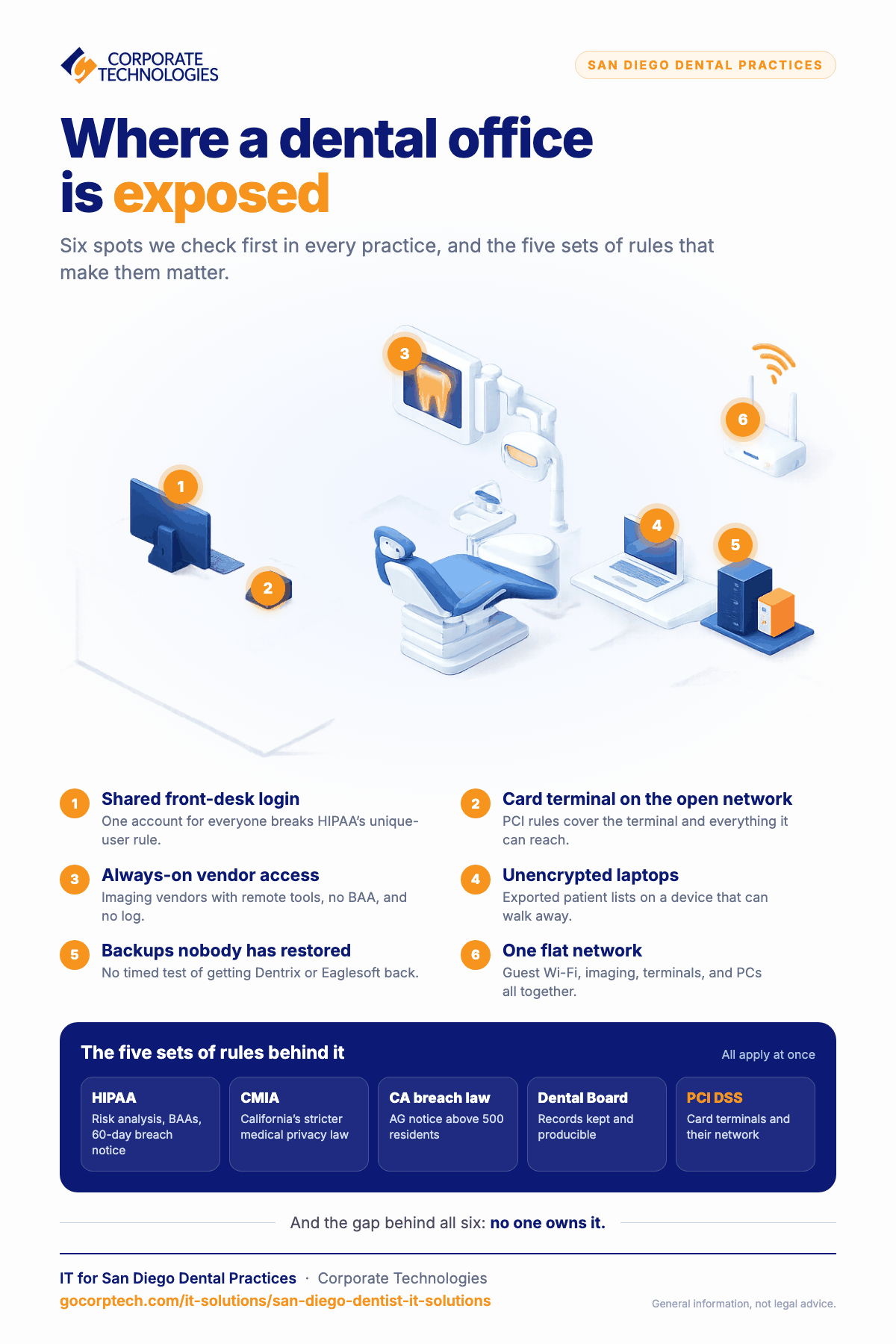
- HIPAA Security Rule. A documented risk analysis, a named security official, workforce training, business associate agreements with every vendor touching patient data (including your IT provider and imaging vendor), unique user accounts, audit logs, and encryption, which is technically “addressable” but indefensible to skip. Breaches must be reported to patients within 60 days of discovery and to HHS. A proposed 2025 update would make multi-factor authentication, encryption, an asset inventory, and 72-hour restoration mandatory; it has been delayed to 2027 or later, but it describes what a competent practice should already do.
- California Confidentiality of Medical Information Act (Civil Code 56 and following). Stricter than HIPAA in places, with its own penalties and a private right of action for patients. A practice can be HIPAA-compliant and still violate the CMIA.
- California breach notification (Civil Code 1798.82). Applies to personal information outside HIPAA, such as employee records, and requires notice to the Attorney General when more than 500 California residents are affected.
- Dental Board of California record requirements. Records must be retained and producible; losing them to ransomware is a licensing problem, not only a security one.
- PCI DSS. If you take card payments, the card brands’ security standard applies to the terminals and anything on the same network.
Where dental practices are exposed
The same gaps show up in practices of every size, and they are the ones we look for first.
- Backups nobody has restored. The practice management database is backed up to a drive on the server, or to a vendor service nobody has tested. Ransomware recovery for a dental office is measured by how long it takes to get Dentrix, Eaglesoft, or Open Dental back with the schedule intact. If nobody has timed a restore, the practice does not know.
- Shared front-desk logins. One account for the whole front desk breaks HIPAA’s unique-user rule and makes the audit trail worthless when a record is accessed inappropriately.
- Imaging and vendor remote access. Imaging, lab, and software vendors with always-on remote tools, no business associate agreement, and no log of what they touched.
- Flat network. Patient Wi-Fi, the sensor and panoramic unit, the card terminal, and the front-desk PCs all on one network.
- Unencrypted laptops and old workstations. A dentist’s laptop with exported patient lists, or a treatment-room PC on an unsupported Windows version because the sensor software needs it.
- Email with patients and labs. Protected health information sent in plain email.
- No one owns it. The office manager is the security official in name only, and the risk analysis is from the year the practice opened, if it exists.
What managed IT should cover for a dental office
Managed IT means a provider is responsible for keeping your systems running, secure, and documented for a flat monthly fee, and signs a business associate agreement to do it. For a dental practice, the scope should include:
| Area | What to expect |
|---|---|
| Practice systems | Support for your practice management and imaging software, coordination with the vendors, patching on a schedule that respects the vendors’ supported versions |
| Backup and recovery | Immutable backups of the practice database, images, and Microsoft 365, with a timed restore test and a stated recovery time |
| Identity | Unique accounts, multi-factor authentication on email, remote access, and admin accounts, same-day offboarding |
| Endpoints | Encryption on every device, endpoint detection and response, remote wipe, and isolation of any unsupported workstation the sensor software requires |
| Network | Business firewall and segmented networks: clinical, imaging devices, card terminal, guest Wi-Fi, office |
| Monitoring | 24/7 security operations monitoring and audit log retention |
| Email and training | Encrypted email for PHI, phishing protection, annual HIPAA security awareness training with records |
| Compliance support | Risk analysis documentation, business associate agreement inventory, and vendor access review |
What it costs
Our pricing is flat per user per month and published on the managed IT packages page. A practice with eight workstations and staff on Total Advantage plus Secure Advantage, which is $125 per user, would pay $1,000 per month for unlimited support and the full security layer. Network segmentation or a server replacement is scoped as a one-time project. For most practices that is less than one day of lost production.
How Corporate Technologies works with San Diego dental practices
We support dental offices across San Diego County from our San Diego office, with a 24/7 help desk and security operations center shared across our 21 locations, and we sign a business associate agreement as standard. Our dental practice resources are on managed IT for dental, including the Beyond HIPAA compliance checklist. If you want a quick read on where your practice stands, the dental office IT readiness assessment takes a few minutes. Related reading: dental practice software and the IT behind it and HIPAA compliance checklist for dental offices.
This article is general information, not legal advice. Breach determinations under HIPAA and the CMIA should involve privacy counsel.
Frequently asked questions
Our practice management software is in the cloud. Do we still need this?
Yes. Cloud software protects its own servers. Your workstations, email, imaging devices, network, staff accounts, and risk analysis are still yours, and that is where most dental breaches start.
Is a lost encrypted laptop a reportable breach?
Generally not under HHS guidance if the device was properly encrypted and the key was not compromised. California’s breach law has a similar exclusion. This is why encryption is the first thing we turn on.
Our sensor software only runs on an old version of Windows. What do we do?
Isolate that workstation on its own network segment with no internet access and no email, document the compensating controls, and press the vendor for a supported version. That is what an auditor expects to see.
Can you work with our existing imaging and software vendors?
Yes. We manage the environment they run in and coordinate with them on issues, and we put a business associate agreement and controlled remote access in place for each one.
Keep reading
More in IT Solutions →
FINRA and SEC IT Controls for Small Financial Firms in Maryland
Amended Regulation S-P (incident response, 72-hour vendor notice, 30-day customer notice), FINRA 4370, Reg S-ID, Maryland PIPA, and what examiners expect.

IT for New Mexico Cannabis Businesses: Track and Trace, POS, Cameras, and Compliance
Cannabis Control Division rules that are really IT rules: daily track-and-trace reconciliation, unique accounts, camera retention, and what managed IT covers.
Maryland PIPA Explained: What the Data Breach Law Requires of Small Businesses
Maryland PIPA after the 2022 amendments: 45 days from discovery, Attorney General notice first, 10-day vendor notice, reasonable security, and the IT…
Free, same business day
What would managed IT cost for your team?
Tell us how many computers and users you have. An engineer sends a per-user range, usually the same business day. No credit card, no bot.
- Live service specialist in about a minute, 24/7
- 21 offices across 18 states
- 60-day money-back guarantee
Get your instant IT support estimate
Tell us how many computers and users you have and we send a per-user range, usually the same business day.

