

In short
Set your recovery targets, size UPS correctly, add internet failover, protect data off site, and use a one-page decision tree for the first hour of an outage.
In this article
- Start with two numbers
- Power: ride through, shut down cleanly, or keep running
- Internet: the outage that stops a cloud-based office
- Data: the plan for when the building is the problem
- The decision tree for the first hour
- Test it twice a year
- How Corporate Technologies helps Chicago businesses
- Frequently asked questions
Chicago businesses lose power and internet for the same reasons everyone else does: summer storms, winter ice, construction crews cutting fiber, a transformer failing on a hot afternoon. The outage itself is rarely the expensive part. The expensive part is what the business does during the first ten minutes and the first ten hours, and whether anyone decided that in advance. This article is a practical continuity plan for a small or mid-sized office: what to protect, how long to protect it for, and how to decide when to ride an outage out versus when to move.
Start with two numbers
Every continuity decision comes back to two targets you should set for your own business.
- Recovery time objective (RTO): how long can a system be down before the damage becomes serious. For a professional office, email and phones might be 15 minutes; the accounting system might be a day.
- Recovery point objective (RPO): how much data can you afford to lose. If your last backup was last night, your RPO is a day. For a business taking orders all day, that is probably too long.
Write these down per system. They decide how much battery to buy, whether you need a generator, and how your backups should run. Without them, continuity spending is guesswork. Our cost of downtime whitepaper walks through putting a dollar figure on an hour of outage, which makes the targets easier to justify.
Power: ride through, shut down cleanly, or keep running
A battery backup (UPS) does three different jobs, and most offices buy it for the wrong one.
- Ride through flickers. The majority of power events last seconds. A UPS on every network device, server, and critical workstation turns those into non-events. This is the cheapest and most valuable layer.
- Shut down cleanly. For an outage of more than a few minutes, the UPS should tell servers and storage to shut down in order before the battery dies. This needs the UPS connected to the server and the shutdown software configured and tested. In our experience, most installations skip this step, and the result is corrupted databases rather than a tidy restart.
- Keep working. If the business needs to keep operating through a multi-hour outage, batteries will not do it. That is a generator decision, and a generator needs the right circuits, fuel, and a transfer switch, plus a test schedule.
Sizing matters more than brand. A UPS rated for 15 minutes under full load gives much less if it is five years old. Our guide to what a UPS is and how long it should keep your business running covers runtime math, battery life, and the automated shutdown that nobody configures.
Internet: the outage that stops a cloud-based office
An office that runs on Microsoft 365, cloud phones, and web applications has moved its single point of failure from the server room to the internet connection. The fix is a second path that takes over automatically.
- Cellular failover. A business firewall or router with a 5G or LTE module, on a different carrier than anything else in the building, switches over in seconds when the primary line drops. For most offices under 50 people, this is enough.
- Two wired carriers. Where the budget allows, a second wired connection from a different provider on a different physical path. Ask the carriers how their lines enter the building; two lines in the same conduit fail together.
- Phones. Cloud phone systems keep working on failover. If you still have an on-premises phone system, decide now where calls go when the office is dark, and test it.
Our internet failover plan for business goes deeper, with a downloadable checklist.
Data: the plan for when the building is the problem
A flood, fire, or a multi-day outage means the office is unavailable, not just offline. The questions are where your data is and how your people get to it.
- Cloud-first where it fits. Email, files, and line-of-business applications that can run in the cloud remove the building from the equation. People work from home on day one.
- Backups off site and immutable. Whatever still runs on a server in the office needs a backup that lives somewhere else and cannot be altered or deleted by an attacker. Test the restore, and time it; that is your real RTO. See how often to back up your business data.
- Remote access that was tested before the emergency. If staff have never logged in from home, the emergency is the wrong time to find out their laptops are not enrolled or MFA is not set up.
The decision tree for the first hour
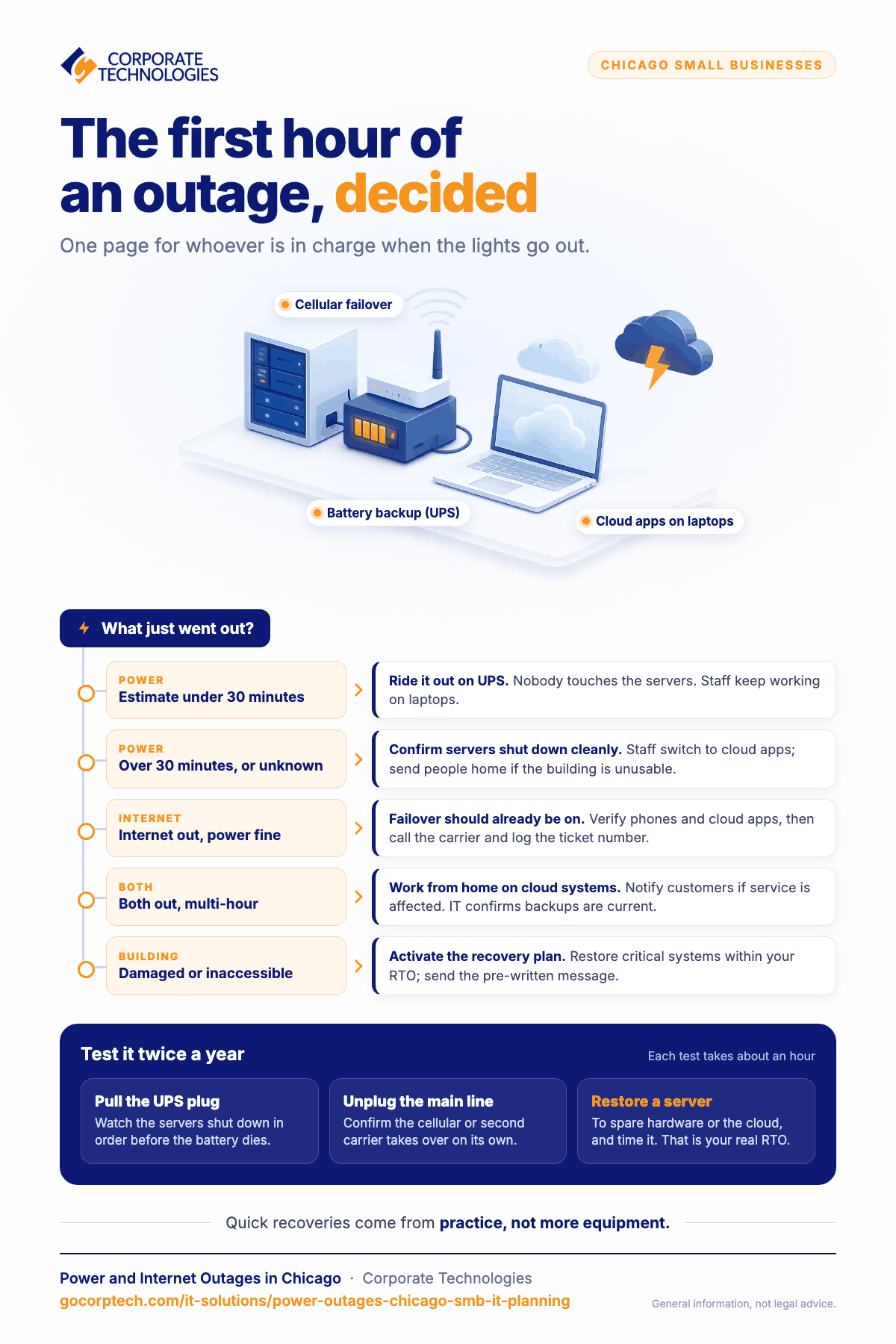
Write this on one page and give it to whoever is in charge when the lights go out.
| Situation | Decision |
|---|---|
| Power out, utility estimates under 30 minutes | Ride it out on UPS. Nobody touches the servers. Staff keep working on laptops. |
| Power out, estimate over 30 minutes or unknown | Confirm servers shut down cleanly (automatically if configured). Staff switch to cloud apps on laptops and phones; send people home if the building is unusable. |
| Internet out, power fine | Failover should already have kicked in. Verify phones and cloud apps work. Call the carrier and log the ticket number. |
| Both out, multi-hour | Work from home on cloud systems. Notify customers if service is affected. IT confirms backups are current and ready. |
| Building damaged or inaccessible | Activate the recovery plan: restore critical systems to the cloud or alternate hardware within the RTO. Communications go out on a pre-written template. |
Test it twice a year
Pull the plug on the UPS and watch the shutdown happen. Unplug the primary internet line and confirm failover. Restore a server from backup to spare hardware or the cloud and time it. Each test takes an hour and finds something. The businesses that recover quickly are not the ones with the most equipment; they are the ones that have practiced.
How Corporate Technologies helps Chicago businesses
Our Chicago office handles the onsite work, including UPS and failover installation and testing, and our 24/7 help desk and monitoring team watches power and connectivity events across all 21 of our locations, so an outage at 3 a.m. is seen and handled. Continuity planning, backup, and monitoring are part of our managed IT packages, priced flat per user per month. If you want to know where you stand, the network health check takes about three minutes and covers backups, power protection, and connectivity.
Frequently asked questions
How long should our UPS run?
Long enough to ride through short events and to shut servers down cleanly in long ones, which for most offices means 10 to 20 minutes under real load. Buying for hours of runtime is rarely cost-effective; that is what generators and the cloud are for.
Is cellular failover fast enough for phones and video calls?
Yes for a small office, provided the router is business-grade and the cellular plan is sized for your usage. Expect somewhat lower speeds than your primary line; prioritize phones and essential applications in the firewall settings.
We are fully in the cloud. Do we still need any of this?
You need less of it, but you still need power protection for network equipment, internet failover, backups of your cloud data (Microsoft 365 and Google Workspace do not back up for you), and a tested way for staff to work from home.
What does a continuity plan cost?
For a typical office of 20 to 50 people, UPS units for the network and servers, a failover-capable firewall, and a cellular plan are a modest one-time project plus a small monthly carrier fee. The planning and testing are included in a managed IT relationship.
Keep reading
More in IT Solutions →
FINRA and SEC IT Controls for Small Financial Firms in Maryland
Amended Regulation S-P (incident response, 72-hour vendor notice, 30-day customer notice), FINRA 4370, Reg S-ID, Maryland PIPA, and what examiners expect.

IT for New Mexico Cannabis Businesses: Track and Trace, POS, Cameras, and Compliance
Cannabis Control Division rules that are really IT rules: daily track-and-trace reconciliation, unique accounts, camera retention, and what managed IT covers.
Maryland PIPA Explained: What the Data Breach Law Requires of Small Businesses
Maryland PIPA after the 2022 amendments: 45 days from discovery, Attorney General notice first, 10-day vendor notice, reasonable security, and the IT…
Free, same business day
What would managed IT cost for your team?
Tell us how many computers and users you have. An engineer sends a per-user range, usually the same business day. No credit card, no bot.
- Live service specialist in about a minute, 24/7
- 21 offices across 18 states
- 60-day money-back guarantee
Get your instant IT support estimate
Tell us how many computers and users you have and we send a per-user range, usually the same business day.

