

In short
The handful of everyday keyboard shortcuts actually worth learning, why the seconds add up, and one trick for making them stick. About a three-minute read.
In this article
We all spend hours each week clicking, dragging, and hunting for the right button on our computers. It’s not that we don’t know better; we just fall into habits. But here’s the secret: a handful of simple keyboard shortcuts can shave off precious minutes each day and save you from a lot of small frustrations.
Think of this as your 3–5 minute productivity boost before your coffee gets cold. By the end of this read, you’ll have a few shortcuts ready to test drive today.
Why Shortcuts Matter
Keyboard shortcuts are like the fast track on a busy road. You can drive the long way if you want, but once you try the shortcut, you’ll ask yourself why you never used it before. Just a few keys, that’s it. Use them every day, and the minutes stack up. Weeks later, it feels like hours back in your pocket.
So, before your coffee goes cold, here are some quick wins you can try right now.
Everyday Essentials
Copy & Paste Like a Pro
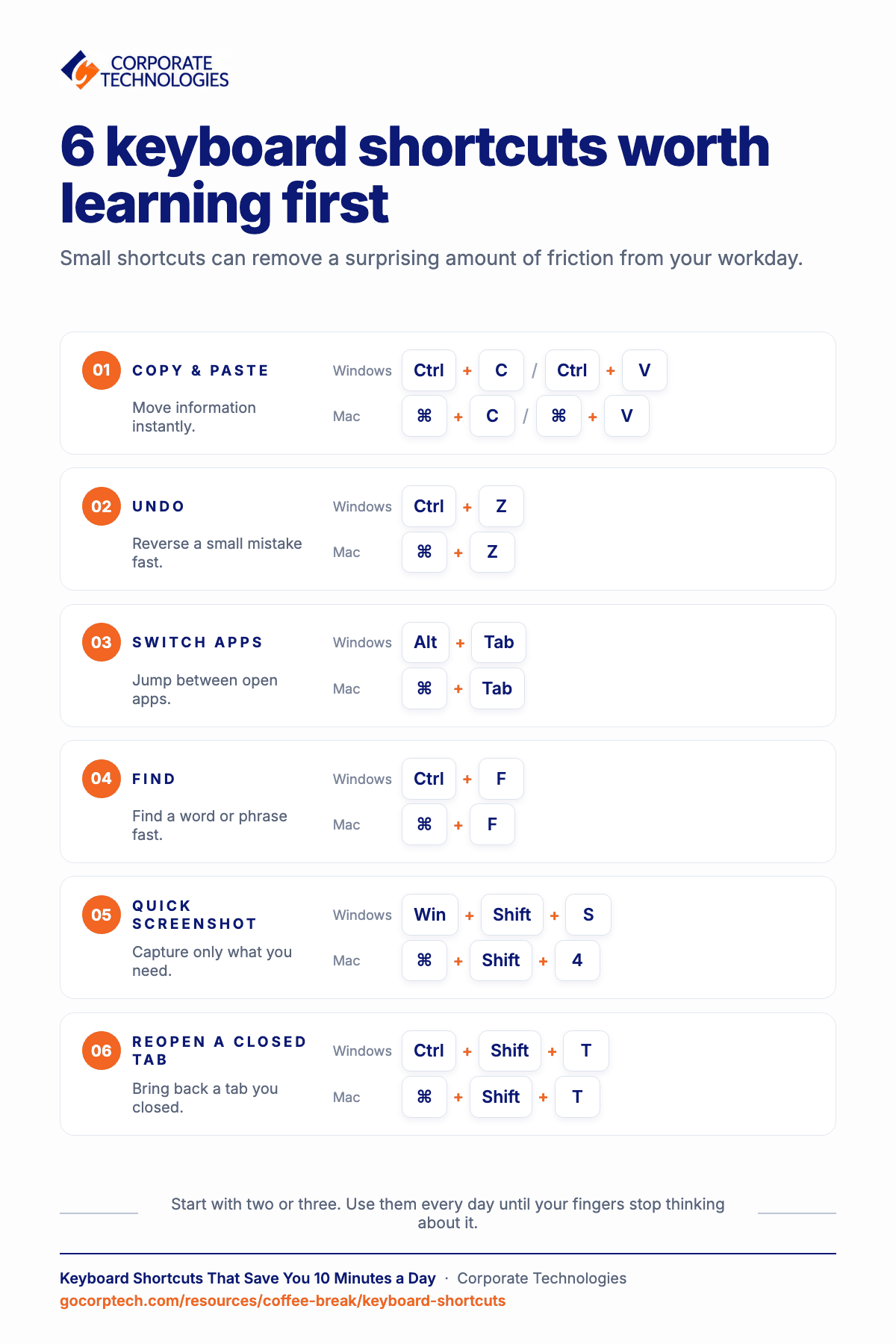
- Windows: Ctrl + C / Ctrl + V
- Mac: Command + C / Command + V
The classics. They’re the bread and butter of shortcuts. Instead of right-clicking, selecting “Copy,” and then “Paste,” just tap these and you’re done.
Undo Oops
- Windows: Ctrl + Z
- Mac: Command + Z
Accidentally deleted half a sentence or moved a file? No need to panic. This command is your instant safety net, like having a rewind button for your mistakes.
Redo That Fix
- Windows: Ctrl + Y
- Mac: Command + Shift + Z
We all overdo the undo. This brings things right back without retyping or reformatting.
Navigation Made Easy (Switch Between Apps)
- Windows: Alt + Tab
- Mac: Command + Tab
Perfect when you’re juggling email, spreadsheets, and a browser window all at once.
Find Anything Fast
- Windows: Ctrl + F
- Mac: Command + F
Scrolling endlessly to locate one phrase in a document is a mood killer. With this shortcut, just type the word, and it lights up instantly.
Snap Windows Side by Side
- Windows: Win + Left/Right Arrow
Research on one side, notes on the other. Or chat on one side, report on the other. Multitasking suddenly feels effortless.
Minimize Everything at Once
- Windows: Win + D
This shortcut drops all windows and takes you to your desktop. Handy when clutter builds up.
Speed Boost for Text (Select All in One Go)
- Windows: Ctrl + A
- Mac: Command + A
Instead of dragging your cursor across pages of text, just highlight everything in a blink. Perfect for emails, Word docs, or even spreadsheets.
Cut It Out
- Windows: Ctrl + X
- Mac: Command + X
Think of this as “copy and delete.” Move text, files, or even entire folders without leaving duplicates behind.
Bold, Italic, Underline
- Windows: Ctrl + B / I / U
- Mac: Command + B / I / U
Dress up your words instantly. If you format text often, this keeps your hands on the keyboard and away from clunky toolbars.
Jump to Start or End
- Windows: Ctrl + Home / End
- Mac: Command + Up / Down Arrow
Skip scrolling. Land at the top or bottom of a document instantly. It’s like teleporting through pages.
Screenshots on the Fly (Quick Snip)
- Windows: Win + Shift + S
- Mac: Command + Shift + 4
Instead of cluttering your desktop with full screenshots, highlight only the exact area you need to see.
Whole Screen Shot
- Windows: PrtScn key
- Mac: Command + Shift + 3
Capture the entire view with one click. Great for saving confirmation pages or error messages before they disappear.
Power User Extras (Lock Your Screen)
- Windows: Win + L
- Mac: Control + Command + Q
This locks your screen instantly. A must if you’re in an office or working around others.
Open New Tab Instantly
- Windows: Ctrl + T
- Mac: Command + T
This shortcut pops open a fresh tab instantly, ready for your next search.
Reopen a Closed Tab
- Windows: Ctrl + Shift + T
- Mac: Command + Shift + T
Closed a tab by accident? Don’t panic. This shortcut is the browser equivalent of time travel.
Wrap-Up Tip
No need to learn every shortcut today. Start small. Just pick two or three that fit how you usually work, like jumping between apps, copying stuff, or snapping windows side by side. Use them every day, and soon your fingers just do it without thinking.
And then you notice it. Things that felt slow don’t feel slow anymore. The work moves smoothly. And those few minutes you save? That’s time for coffee, a stretch, or maybe even finishing a bit earlier.
Your Turn
So, which shortcut do you use most often? Or maybe you have a hidden gem we didn’t cover? We’d love to hear from you. Just hit reply and share it. Who knows, we might drop it in the next Coffee Break Reads.
Till then, finish your coffee. And enjoy those few minutes you just got back.
Keep reading
More in Coffee Break Reads →
Multitasking Is Slowing You Down (And Increasing Risk)
Multitasking feels productive, but your brain is switching gears and paying for it in lost time, more mistakes and more stress. Here…

What Happens When You Click “Remind Me Later” Too Many Times
That little "Remind me later" button feels harmless. But a hundred clicks later, your devices are out of sync and the security…
Stop Searching for Files: 5 Tips That Actually Work
Save time and find files faster with 5 practical file organization tips, smarter naming habits, better search, and simple maintenance routines.
Free, same business day
What would managed IT cost for your team?
Tell us how many computers and users you have. An engineer sends a per-user range, usually the same business day. No credit card, no bot.
- Live service specialist in about a minute, 24/7
- 21 offices across 18 states
- 60-day money-back guarantee
Get your instant IT support estimate
Tell us how many computers and users you have and we send a per-user range, usually the same business day.

