


In short
That little "Remind me later" button feels harmless. But a hundred clicks later, your devices are out of sync and the security gaps are real. Here is what to do about it.
In this article
It always seems to show up at the worst possible moment. You are mid sentence in an email, three tabs deep in something important, and there it is again: that small prompt asking you to update, restart, or review. So you do what any reasonable, busy person does. You click “Remind me later” and move on.
No harm done, right? One click, gone. This is Coffee Break Reads, our short take on the small habits that quietly shape a workday. So grab your coffee, and let us look at what really happens when that one click becomes a hundred.
When Nothing Seems Wrong
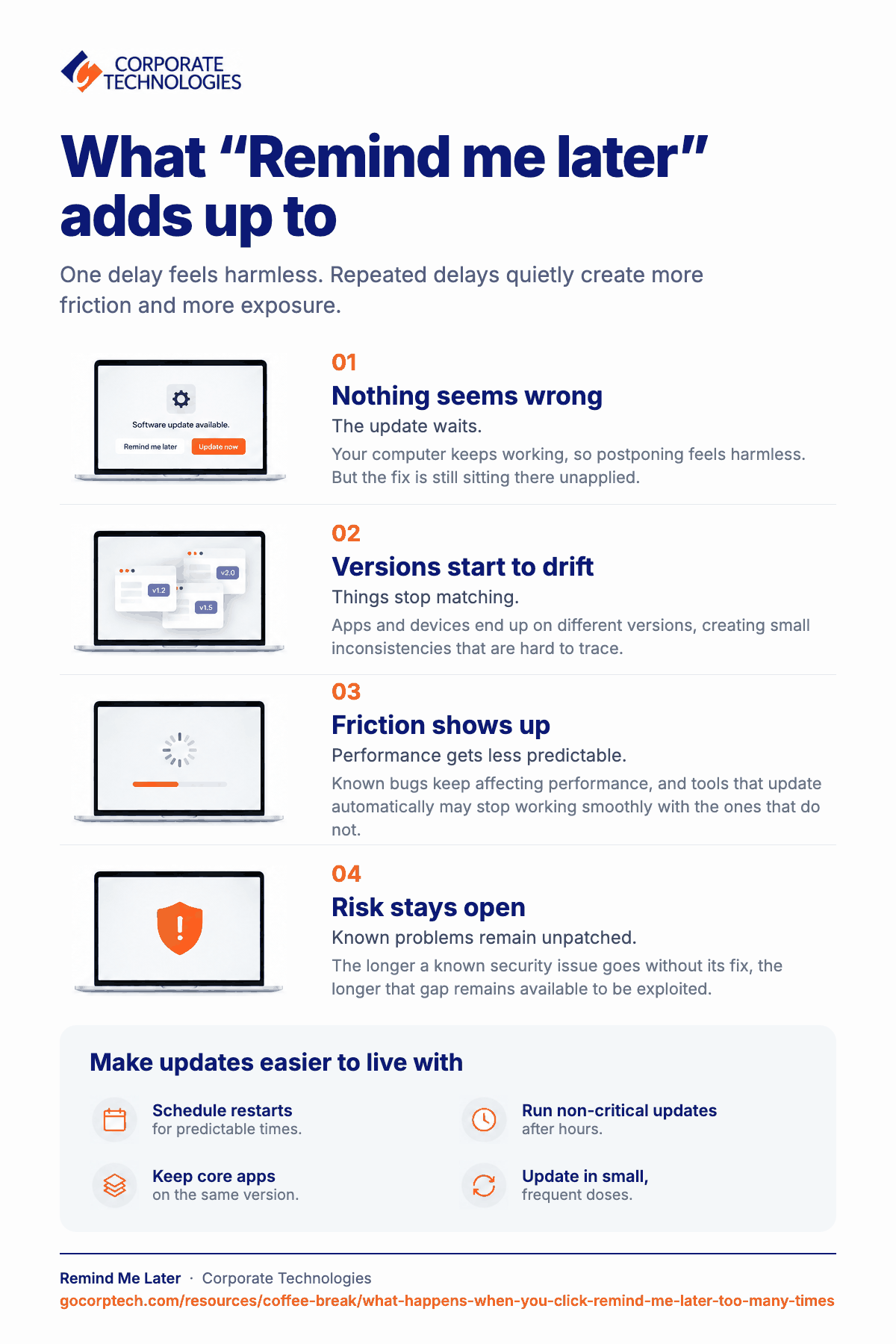
At first, nothing does. Your computer keeps humming, your apps keep opening, your day keeps moving. That is exactly why the habit sticks. Postponing feels not just harmless but smart, because you protected your focus and nothing broke.
But those prompts are not random. Each one is tied to a specific issue someone has already found and fixed: a bug, a compatibility tweak, or a security hole that is now public knowledge. Once a weakness is known, it is known to everyone, including the people looking for a way in. The update is the fix. Clicking “later” just leaves the door open a little longer.
How Small Delays Add Up
One delay is nothing. The trouble is that one delay is rarely alone. Over a few weeks, apps drift onto different versions, some devices restart daily while others stay on for a month, and quiet inconsistencies creep in.
A file opens perfectly on your laptop and acts strange on your desktop. A website behaves for a colleague and misbehaves for you. Things feel a little slower, a little less predictable, with no obvious reason. None of it is dramatic. It is just friction, and friction is hard to trace back to a hundred small “not right now” decisions.
What Actually Breaks
Give it enough time and the cracks show. Systems fall behind, so the tools that update automatically stop playing nicely with the ones that do not. Known bugs that already have fixes keep dragging performance down.
The security side is the quiet one. There is no alarm and no flashing light. Just a longer and longer stretch where a problem with a known solution sits unpatched on your machine, which is exactly the kind of gap that gets taken advantage of.
A Few Easy Fixes
The good news is that avoiding all of this does not take much. A few small habits go a long way:
- Schedule restarts for predictable moments, like the end of the day, so they never interrupt real work.
- Let non-critical updates run automatically after hours.
- Keep browsers and core apps on the same version across your devices.
- Restart regularly instead of letting updates pile up.
- Handle updates in small, frequent doses so they never become one big disruptive event.
When It Is Really About Something Bigger
Sometimes “Remind me later” is not about you at all. It is a sign of the setup around you. Maybe the machines are stretched thin, updates take forever, or nothing is being watched from one central place. In that case, postponing is just how people keep working, even though it quietly adds complexity down the road.
The Coffee Break Takeaway
Clicking “Remind me later” once is part of a normal day. Clicking it every time, for months, slowly shapes how reliable and secure everything around you feels.
Here is the reassuring part. If Corporate Technologies manages your IT, most of this is already handled for you, quietly, in the background. Updates are scheduled for after hours, devices are kept in sync, and security patches are applied before they ever become your problem. So the next time that little prompt appears at the worst possible moment, you can click “Remind me later” with a clear conscience. The updates that truly matter are already taken care of.
Enjoy the rest of your coffee.
Keep reading
More in Coffee Break Reads →
Multitasking Is Slowing You Down (And Increasing Risk)
Multitasking feels productive, but your brain is switching gears and paying for it in lost time, more mistakes and more stress. Here…
Stop Searching for Files: 5 Tips That Actually Work
Save time and find files faster with 5 practical file organization tips, smarter naming habits, better search, and simple maintenance routines.

Your Browser Knows More About You Than You Think
Your browser knows more about you than you think. Discover how browsing habits shape your online experience and ads.
Free, same business day
What would managed IT cost for your team?
Tell us how many computers and users you have. An engineer sends a per-user range, usually the same business day. No credit card, no bot.
- Live service specialist in about a minute, 24/7
- 21 offices across 18 states
- 60-day money-back guarantee
Get your instant IT support estimate
Tell us how many computers and users you have and we send a per-user range, usually the same business day.

