


In short
Our published per-user prices, a worked example for a 15-person office, what drives cost up or down, and the costs businesses forget.
In this article
Most articles about the cost of IT support give you a range and no way to check it. This one uses our own published prices, because we publish them, and walks through what drives the number up or down for a small business in New Jersey. Prices are flat, per user, per month, and the same in Fairfield as in Minneapolis, so what follows applies anywhere, with a few New Jersey specifics noted where they matter.
The three ways small businesses pay for IT
- Break/fix. You call someone when something breaks and pay by the hour. Hourly rates in New Jersey typically run $125 to $200 for a competent technician, with emergency and after-hours work higher. There is no monitoring, so nothing is prevented, and the bill arrives at the worst possible time.
- An in-house person. One technician or a part-time IT manager on payroll. Reliable for day-to-day help, but one person cannot provide 24/7 coverage, cannot cover their own vacation, and is rarely a specialist in security and networking at the same time. Fully loaded cost in northern New Jersey is well into six figures once benefits and tools are included.
- Managed IT. A provider takes ongoing responsibility for your systems for a flat monthly fee per user. Monitoring, help desk, patching, and security are included according to the plan. The fee is predictable and the incentive is aligned: the provider makes money when things do not break.
What managed IT costs: our published prices
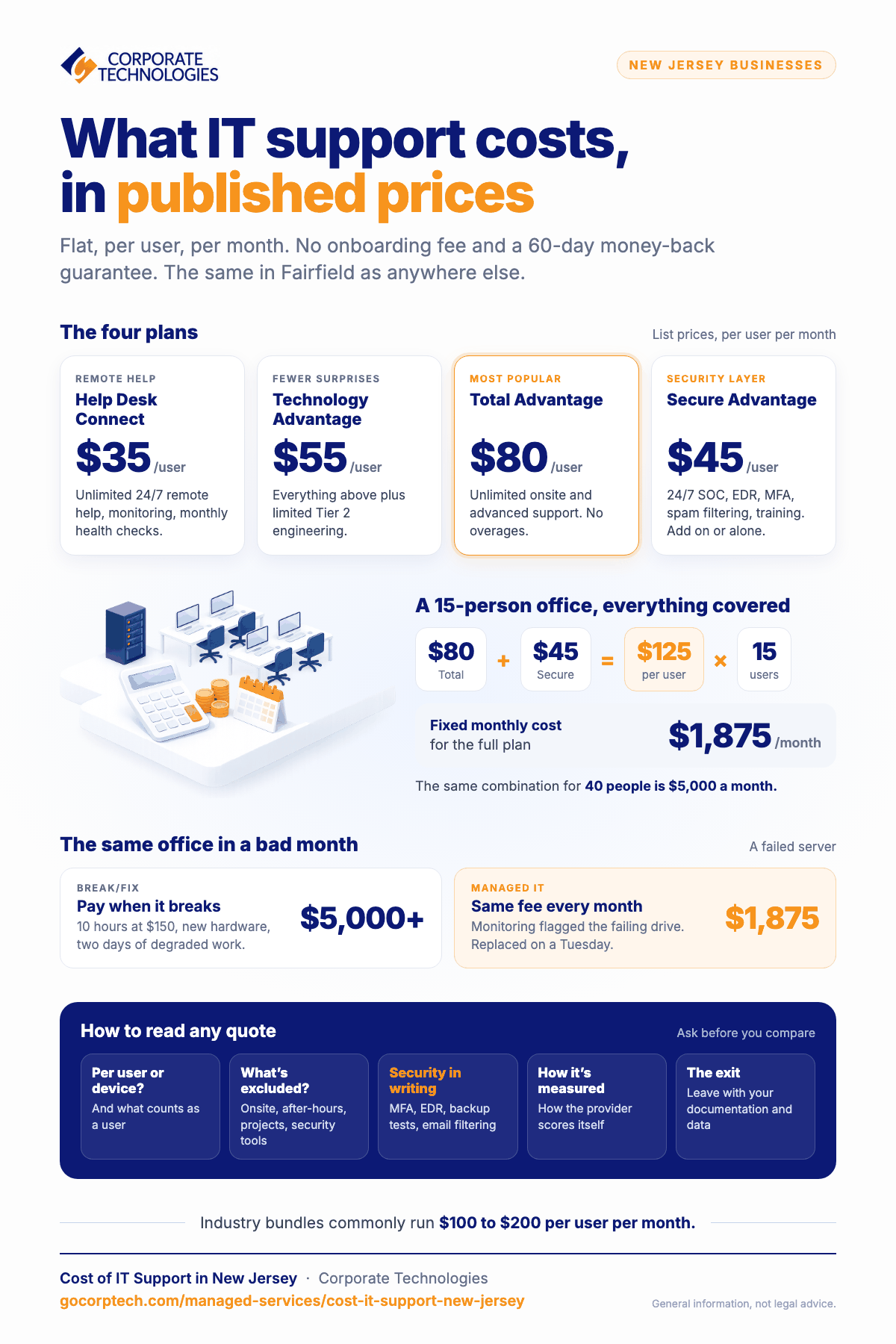
These are our list prices as of this writing. They are flat, per user, per month, with no onboarding fee and a 60-day money-back guarantee. Current pricing is always on the managed IT packages page.
| Plan | Per user / month | What it is for |
|---|---|---|
| Help Desk Connect | $35 | Unlimited 24/7 remote help, proactive monitoring, monthly health checks. Onsite and advanced work billed as needed. |
| Technology Advantage | $55 | Everything above plus limited Tier 2 engineering included, for businesses that want fewer surprises. |
| Total Advantage | $80 | Unlimited onsite and advanced support. Flat monthly, no overages. Our most popular plan. |
| Secure Advantage | $45 | Security layer: 24/7 SOC monitoring, endpoint detection and response, MFA, spam filtering, awareness training, CEO fraud protection. Add to any plan or stand alone. |
Worked example for a 15-person office that wants everything covered: Total Advantage at $80 plus Secure Advantage at $45 is $125 per user, or $1,875 per month. A 40-person company on the same combination is $5,000 per month. If you want to model your own headcount and plan, the managed IT services calculator does it in a minute.
For comparison, bundled managed IT and security plans across the industry are commonly quoted in the range of $100 to $200 per user per month. Quotes below that range usually leave security out or cap support hours; quotes above it usually include compliance work or specialized applications.
What moves the number
- Headcount, not device count. Pricing per user is simpler and fairer than per device, since most people now have a laptop and a phone. Check which model a quote uses before comparing.
- Industry rules. A medical or dental practice (HIPAA), an accounting firm (FTC Safeguards Rule), or a defense subcontractor (CMMC) needs documented controls and evidence, which is more work than keeping a general office running. Expect the security tier to be mandatory rather than optional.
- Servers and line-of-business applications. An office that runs entirely in Microsoft 365 is simpler to support than one with an on-premises server, a practice management system, and a vendor who needs remote access. Each adds monitoring and patching work.
- Condition of the environment. A business with aging hardware, no documentation, and shared passwords will have a busier first 90 days. Good providers price this as a one-time stabilization project rather than inflating the monthly fee.
- Multiple locations. Each site needs its own network equipment and connectivity, and ideally a backup internet path. Monthly support scales with users; the project cost scales with sites.
The costs people forget
The monthly fee is the visible cost. The invisible ones are usually larger.
- Downtime. Work out what an hour of your business not operating costs in payroll and lost revenue. For a 15-person professional office it is routinely more than a month of managed IT fees. Our cost of IT downtime whitepaper walks through the calculation.
- A breach. New Jersey’s Identity Theft Prevention Act requires notice to the State Police and to affected individuals when personal information is exposed. Add forensics, legal fees, and the time your team spends on it instead of customers. Cyber insurance helps only if you meet the controls on the application, which are the same controls a security plan provides.
- Wire fraud. A single redirected payment to a fake vendor account can exceed a year of IT spend. Email protection plus a call-back rule is cheap by comparison.
- Staff time. Employees fixing their own technology, or waiting for a colleague to, is a real cost that never appears on an invoice.
Break/fix versus managed IT on a real month
Take a 15-person office. On break/fix, a quiet month might cost nothing, and a bad month with a failed server might be ten hours at $150 plus a hardware purchase plus two days of degraded work, easily $5,000 or more in direct and indirect cost. Over a year, most businesses on break/fix spend more than they expected and still have no monitoring, no security layer, and no one responsible for prevention. On managed IT, the same office pays a fixed $1,875 for the full plan and the bad month largely does not happen, because the failing drive was flagged by monitoring and replaced on a Tuesday afternoon.
How to read a quote
- Confirm whether pricing is per user or per device, and what counts as a user.
- Ask what is excluded. Onsite visits, after-hours work, projects, and security tooling are the usual exclusions.
- Ask for the security controls in writing: MFA, endpoint detection and response, backup testing, email filtering, monitoring hours.
- Ask how the provider measures itself. We publish ours in how we measure managed IT.
- Ask about the exit. A good agreement lets you leave with your documentation and your data.
Working with us in New Jersey
Our New Jersey team works from the Fairfield office and supports businesses across the state; see managed IT services in New Jersey. The help desk and security operations center run 24/7 and are shared across all 21 of our offices, with calls answered by a live person in about a minute. If you want a quick view of where your systems stand before any conversation about cost, the network health check takes about three minutes.
Frequently asked questions
Is there a minimum number of users?
Our plans are designed for businesses of roughly 10 to 200 employees. Smaller offices can be supported; the fit depends on what you run and what you need covered.
Is the security package optional?
Technically yes. In practice, for any business handling customer data, payments, or regulated information, we consider it the baseline, and cyber insurers increasingly require the controls it provides.
What is included in onboarding?
Discovery and documentation of your environment, deployment of monitoring and security tools, account cleanup including MFA, and a review of backups. There is no onboarding fee; stabilization work on a neglected environment is scoped separately and agreed in advance.
Can we keep our current internal IT person?
Yes, and many clients do. Co-managed IT gives your internal person the monitoring, security tooling, help desk overflow, and specialist backup they cannot provide alone, and lets them focus on the business.
Keep reading
More in Managed Services →
How We Measure Managed IT
Real operational metrics from Corporate Technologies' managed client base: about 2.6 hours of downtime a year, critical issues resolved in 8.5 hours,…
IT Solutions
FINRA and SEC IT Controls for Small Financial Firms in Maryland
Amended Regulation S-P (incident response, 72-hour vendor notice, 30-day customer notice), FINRA 4370, Reg S-ID, Maryland PIPA, and what examiners expect.
New Mexico Data Breach Law Explained for Small Businesses
The New Mexico Data Breach Notification Act: 45-day notice, the 1,000-resident AG threshold, the encryption exception, penalties, and the IT work behind…
Free, same business day
What would managed IT cost for your team?
Tell us how many computers and users you have. An engineer sends a per-user range, usually the same business day. No credit card, no bot.
- Live service specialist in about a minute, 24/7
- 21 offices across 18 states
- 60-day money-back guarantee
Get your instant IT support estimate
Tell us how many computers and users you have and we send a per-user range, usually the same business day.

