

In short
The New Mexico Data Breach Notification Act: 45-day notice, the 1,000-resident AG threshold, the encryption exception, penalties, and the IT work behind it.
In this article
New Mexico was one of the last states to pass a data breach notification law, in 2017, and it is one of the few that also tells businesses what to do with personal data before anything goes wrong. If your business holds Social Security numbers, driver’s license numbers, or account numbers of New Mexico residents, this applies to you, whether you have five employees or five hundred. This article explains what the law requires, what triggers a notification, and what the practical IT work looks like to stay on the right side of it.
The law in plain terms
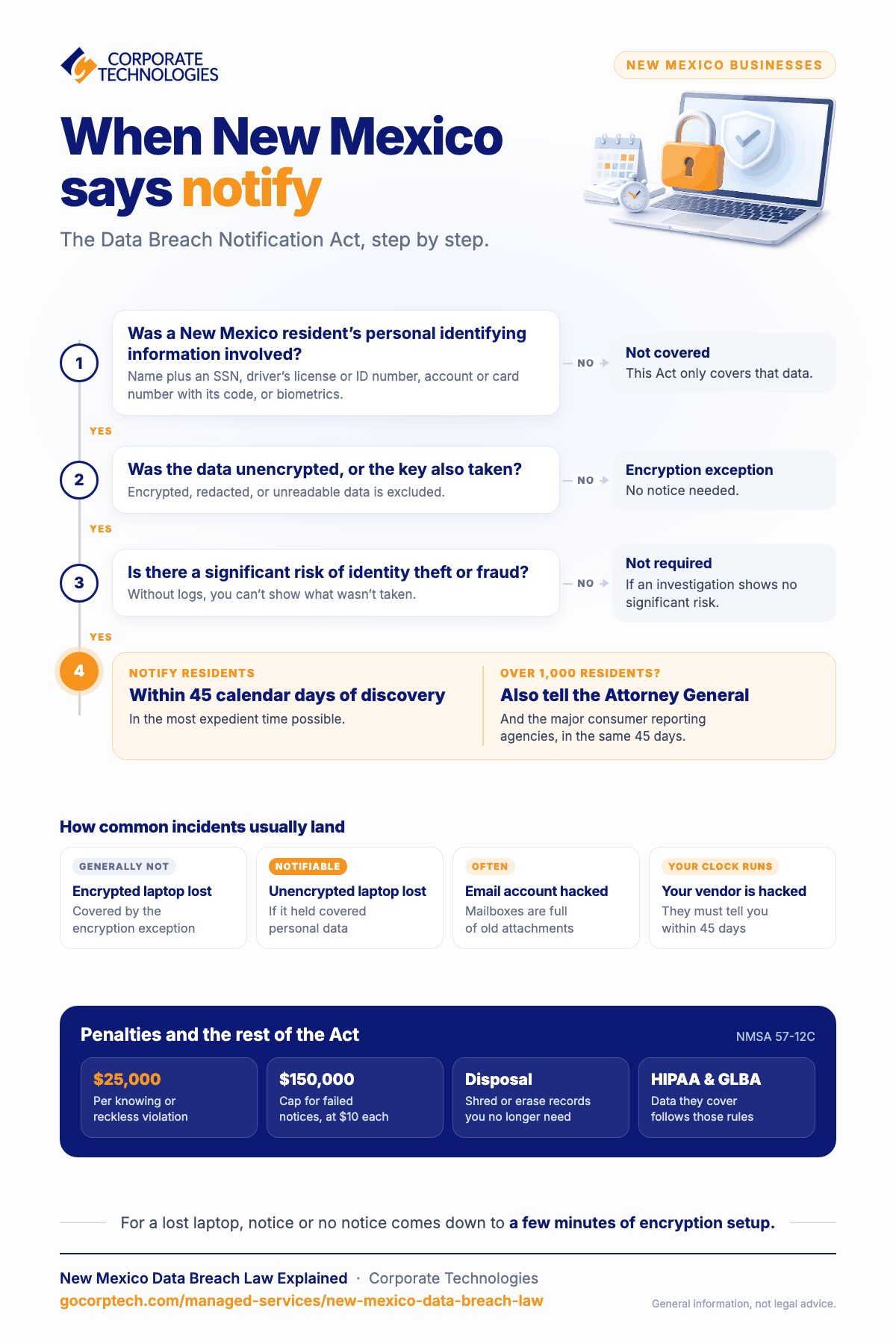
The Data Breach Notification Act is at NMSA 1978, Sections 57-12C-1 through 57-12C-12. It covers “personal identifying information,” which means a person’s first name or initial and last name together with any of the following: Social Security number, driver’s license or government-issued ID number, an account, credit or debit card number combined with the code or password needed to use it, or biometric data such as fingerprints or facial geometry.
The Act has three parts that matter to a small business:
- Security. A business that owns or licenses personal identifying information must implement and maintain reasonable security procedures and practices appropriate to the nature of the information.
- Disposal. Records containing personal identifying information must be shredded, erased, or otherwise made unreadable when the business no longer needs them.
- Notification. After a security breach, affected New Mexico residents must be notified in the most expedient time possible and no later than 45 calendar days after the breach is discovered. If more than 1,000 residents are notified, the Attorney General and the major consumer reporting agencies must also be notified within the same 45 days.
Two further points are easy to miss. A service provider that holds personal information on your behalf must notify you within the same 45 days, so your contracts with vendors should say so explicitly. And the Act exempts businesses already subject to HIPAA or the Gramm-Leach-Bliley Act for the data covered by those laws, which means a medical practice follows HIPAA’s breach rule rather than this one, but still falls under this Act for data HIPAA does not cover, such as employee records.
What counts as a breach, and the encryption exception
A breach is the unauthorized acquisition of unencrypted computerized data that compromises the security, confidentiality, or integrity of personal identifying information. Notification is not required if, after an appropriate investigation, the business determines the breach does not give rise to a significant risk of identity theft or fraud.
The encryption exception is the most important practical lever in the law. Data that was encrypted, redacted, or otherwise rendered unreadable is not covered, provided the encryption key was not also accessed. In concrete terms: a stolen laptop with full-disk encryption and a strong login is, in most cases, not a notifiable breach. The same laptop without encryption is. The cost difference between those two outcomes is a few minutes of configuration per device.
What triggers notification in practice
These are the events that most often lead to a notification decision for small businesses, and how the law treats each.
| Event | Likely outcome |
|---|---|
| Ransomware that encrypts files and the attacker also exfiltrated data | Notifiable if the exfiltrated data includes personal identifying information and was not encrypted by you |
| Ransomware with no evidence of exfiltration | Depends on the investigation. Without logs, you cannot show data was not taken, which usually pushes toward notifying |
| A compromised email account containing HR or customer documents | Frequently notifiable; mailboxes are full of attachments nobody remembers |
| Lost or stolen laptop or phone, encrypted | Generally not notifiable under the encryption exception |
| Lost or stolen laptop, not encrypted | Notifiable if it held personal identifying information |
| Payment card data skimmed from a point-of-sale system | Notifiable under this Act and reportable to your card processor under PCI DSS |
| A vendor tells you their system was breached | The 45-day clock is running for you as well; the vendor has its own 45 days to tell you |
The common thread is evidence. Whether you have to notify often turns on whether you can show what happened. A business with endpoint monitoring, email audit logs, and an access inventory can usually answer that in days. A business without them is left assuming the worst, because the law does not reward guesswork.
Penalties
The Attorney General enforces the Act. For a knowing or reckless violation, a court may impose a civil penalty of up to $25,000 per violation, or, for a failure to notify, $10 per instance of failed notification up to $150,000, and may order the business to comply. The direct penalty is usually not the largest cost. Investigation, notification, credit monitoring, legal fees, and lost customers typically exceed it.
The IT work that keeps you compliant
“Reasonable security procedures” is not defined in the statute, but the controls below are what regulators, insurers, and courts consistently treat as reasonable for a small business, and they map directly to the triggers above.
- Know where personal data is. A short inventory: which systems, which shared folders, which mailboxes, which vendors. You cannot protect or dispose of what you have not found.
- Encrypt every device. Full-disk encryption on laptops and desktops, and encryption on phones that hold company email. This is the single control that most often turns an incident into a non-event under the Act.
- Multi-factor authentication everywhere. Email first, then remote access, then every business application that supports it.
- Endpoint detection and response with 24/7 monitoring. So that an intrusion is seen and stopped, and so that you have the logs to show what was and was not touched.
- Backups that are immutable and tested. Recovery from ransomware without paying depends on it. Our guide to how often to back up business data covers schedules and testing.
- A disposal routine. Retention periods for HR and customer records, secure deletion when they expire, and certified destruction for old drives and paper.
- Vendor terms. Contracts that require vendors to notify you within the statutory 45 days and to protect the data to the same standard.
- A written incident response plan. Who decides, who you call (counsel, insurer, IT provider), and how the 45-day clock is tracked from the day of discovery.
How Corporate Technologies helps New Mexico businesses
We support businesses across the state from our Rio Rancho office, with a 24/7 help desk and security operations center shared across our 21 locations. The controls above are what our Secure Advantage package delivers: 24/7 SOC monitoring, endpoint detection and response, multi-factor authentication, spam filtering, security awareness training, and CEO fraud protection, with device encryption and backup handled through our managed IT plans. If you want to see where you stand first, the network health check takes about three minutes.
This article is general information about the statute, not legal advice. For a specific incident, involve counsel early; the 45-day clock does not pause.
Frequently asked questions
Does the law apply if we only have a few New Mexico customers?
Yes. It applies to any person or business that owns or licenses personal identifying information of a New Mexico resident. Headcount and revenue do not matter.
We are a medical practice under HIPAA. Do we follow this law or HIPAA?
For protected health information, HIPAA’s breach notification rule applies and this Act does not. For personal information outside HIPAA, such as employee payroll records, this Act applies. Most practices are subject to both for different data.
Is a password-protected laptop “encrypted”?
No. A login password without full-disk encryption does not protect the data on the drive, and it does not qualify for the exception. Encryption has to be turned on explicitly (BitLocker on Windows, FileVault on Mac) and the recovery keys stored where you can find them.
Who is liable if our vendor is breached?
You still have the duty to notify your customers. The vendor has a duty to notify you within 45 days. Whether the vendor reimburses your costs depends on your contract, which is why the contract should say so.
Keep reading
More in Managed Services →
How We Measure Managed IT
Real operational metrics from Corporate Technologies' managed client base: about 2.6 hours of downtime a year, critical issues resolved in 8.5 hours,…

CMMC Readiness for New Mexico Defense Contractors
What CMMC means for New Mexico subcontractors to Kirtland, Holloman, White Sands and the labs: levels, phase-in dates, the usual gaps, and…
HIPAA Cybersecurity for Albuquerque Clinics: What the Rule Requires and What Is Changing
What the HIPAA Security Rule requires of a small clinic today, the proposed update, the gaps we see in Albuquerque practices, and…
Free, same business day
What would managed IT cost for your team?
Tell us how many computers and users you have. An engineer sends a per-user range, usually the same business day. No credit card, no bot.
- Live service specialist in about a minute, 24/7
- 21 offices across 18 states
- 60-day money-back guarantee
Get your instant IT support estimate
Tell us how many computers and users you have and we send a per-user range, usually the same business day.

