

In short
Learn how to identify phishing emails before it’s too late. See real examples, red flags, and simple tips to protect your business.
If you open your inbox, it feels endless. Emails keep coming, notifications, and follow-ups. These requests all sound urgent. That’s usually when phishing emails sneak in. Not because you don’t know better. But because you’re tired. Rushing and trying to get through the day.
Phishing emails today are not obvious. They don’t scream scam. They look normal and professional. Sometimes even helpful. And that’s what makes them dangerous.
This is not a lesson. It’s more like a quiet reminder. Something to read during a short coffee break. No technical talk. Just simple things to notice before clicking.
Step 1: Slow Down and Look at Who Sent It
Most people see the sender’s name and move on. That’s natural. We’re used to trusting names we recognize. Finance team. HR. A known company. Maybe even your boss.
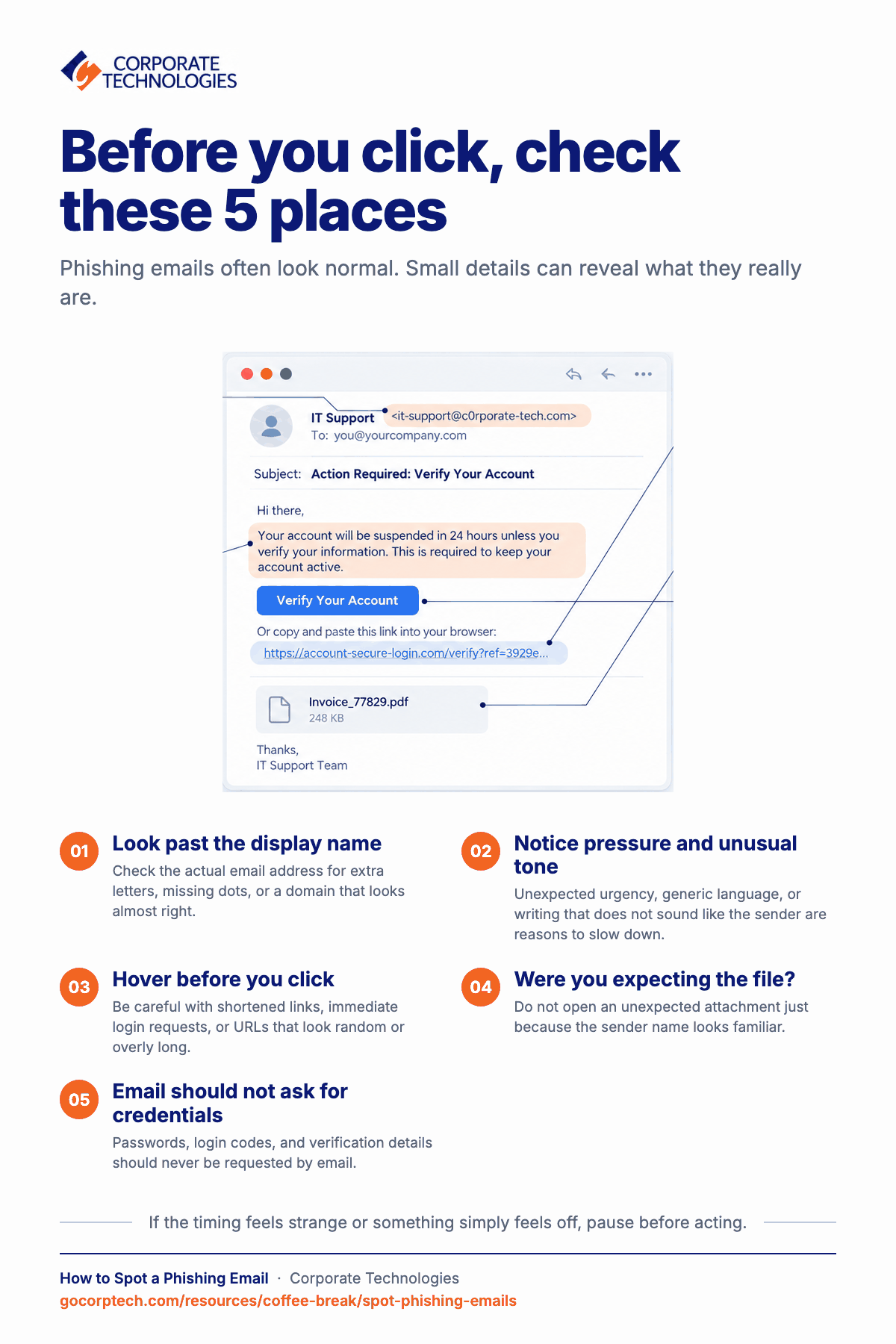
But the sender’s name is the easiest thing to fake. Take one extra second and look at the actual email address. That’s where the truth usually shows up. Small changes matter here. One extra letter. A missing dot. A domain that looks almost right but isn’t.
If it feels slightly off, don’t ignore that feeling. Real companies usually don’t send important emails from strange or messy addresses.
Step 2: Notice When the Email Feels Pushy
Phishing emails love urgency. They want you stressed. They want you to act fast without thinking. You’ll see words like “urgent,” “action required,” or “account issue.” Sometimes it’s subtle. Sometimes it’s loud.
Ask yourself something simple. Would this really need to be handled right now, by email?
Most real business issues come with context. Previous messages. A heads-up. Not sudden pressure out of nowhere. When an email tries to rush you, that’s usually a sign to slow down.
Step 3: Read the Email Like a Human Would
A lot of phishing emails sound professional. Too professional sometimes. The tone can feel stiff. Overly polite. Or strangely generic.
You might notice things like:
- No use of your name
- Long explanations for simple requests
- A tone that doesn’t match how the sender usually writes
Real emails from real people are often casual, short, and familiar. They don’t try so hard to sound official. When an email feels polished but empty, it’s worth reading again.
Step 4: Don’t Trust Links Just Because They Look Clean
Links are where most mistakes happen. You don’t need tools or tech skills here. Just hover your mouse over the link. Don’t click. Just look.
Be extra careful when:
- The link is shortened
- The link asks you to log in immediately
- The link looks random or overly long
If you’re unsure, open a new browser tab and go to the website yourself. Never trust a link just because the email sounds confident.
Step 5: Treat Unexpected Attachments With Suspicion
Attachments are still a favorite trick, like invoices, PDFs, or secure documents. They sound normal. They look harmless. But they can cause serious damage.
Don’t open any file right away if you were not expecting it. Even if the sender’s name looks familiar. Especially then.
Step 6: Emails Should Never Ask for Your Login Details
This rule is simple and worth remembering on tired days. No real company will ask for your password, login codes, or verification details by email. Ever.
If an email asks you to “confirm your account” or “re-authenticate,” that’s a red flag. Even if the logo looks real. Even if the wording sounds official.
Step 7: Timing Can Tell You a Lot
Phishing emails often arrive when people are least alert. Early mornings. Late nights. End of the week. Right before the holidays. Attackers know people are tired during these times.
They count on it. If an email arrives at a strange hour and demands quick action, that’s another reason to pause and think. Real work emails usually follow patterns. Scams often don’t.
Step 8: Trust That Quiet Feeling Something Isn’t Right
This part matters more than people admit. If an email makes you uneasy, that’s enough reason to stop. You don’t need proof. You don’t need to explain yourself. Reporting a suspicious email helps everyone. One pause can prevent a bigger issue for the whole team.
Wrapping Up
Phishing doesn’t work because people are careless. It works because people are human. Busy and tired. Focused on getting things done.
You don’t need a cybersecurity degree to avoid phishing emails. You just need to slow down a little. Check the sender. Question urgency. Look at the links. Trust your instincts.
Your Turn
Now we’re curious. What’s the first thing you check when an email feels a bit off? Or maybe you’ve spotted a phishing trick that almost fooled you once. Hit reply and tell us about it. We read every message, and your insight might just show up in a future Coffee Break Read.
Keep reading
More in Coffee Break Reads →
Multitasking Is Slowing You Down (And Increasing Risk)
Multitasking feels productive, but your brain is switching gears and paying for it in lost time, more mistakes and more stress. Here…
What Happens When You Click “Remind Me Later” Too Many Times
That little "Remind me later" button feels harmless. But a hundred clicks later, your devices are out of sync and the security…
Stop Searching for Files: 5 Tips That Actually Work
Save time and find files faster with 5 practical file organization tips, smarter naming habits, better search, and simple maintenance routines.
Free, same business day
What would managed IT cost for your team?
Tell us how many computers and users you have. An engineer sends a per-user range, usually the same business day. No credit card, no bot.
- Live service specialist in about a minute, 24/7
- 21 offices across 18 states
- 60-day money-back guarantee
Get your instant IT support estimate
Tell us how many computers and users you have and we send a per-user range, usually the same business day.

