

In short
Are your devices listening? Explore The 5 Things in Your House That Are Spying on You and gain insights into household privacy.
In this article
This happens to a lot of us. You are sitting at home, maybe after dinner. You talk to your spouse or a friend about needing new running shoes. Not typing. Not searching. Just normal face-to-face talk. And then, somehow, your phone shows ads for running shoes a few minutes later.
It feels weird. And no, it’s not your imagination.
We keep telling ourselves it’s a coincidence. But it happens too often. When we talk about something we want to change with someone, not the phone, not the internet, just face to face, and still we get ads for that exact thing. That’s when people pause.
At work, we think about security. Passwords. Access rules. Locked systems. At home, we don’t think the same way. We plug things in. We connect to Wi-Fi. We click “agree” and move on.
This is not about panic. It’s just knowing what’s around you.
1. The TV That Knows Your Taste Better Than You Do
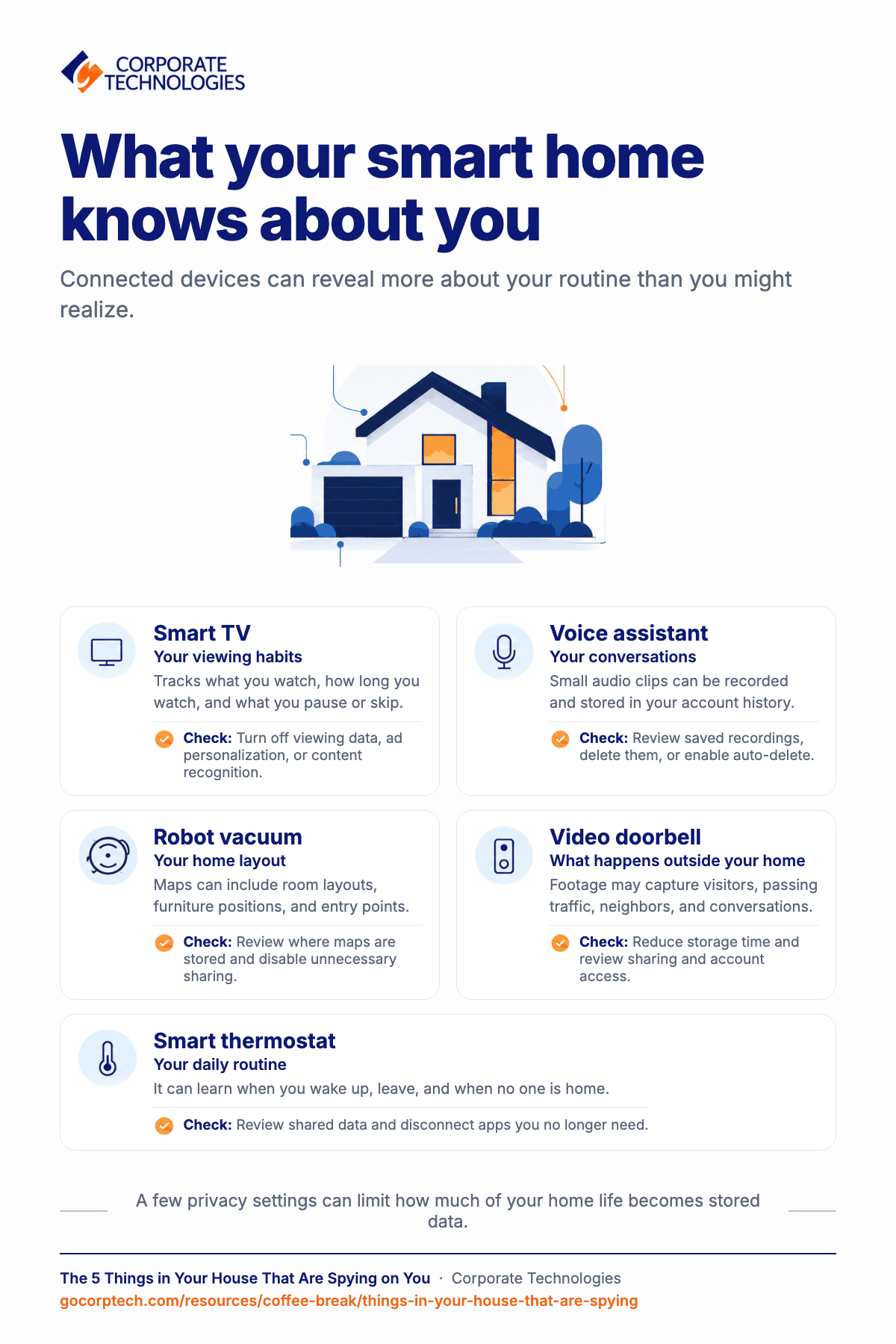
Smart TVs today do more than show Netflix. They quietly watch what you watch. They track channels, apps, time spent, and even what shows you pause or skip.
Most people never check these settings. Because honestly, who buys a TV to read privacy menus?
What usually happens is this. The TV uses tracking tools to recognize content. That data is then shared or sold to advertisers. You don’t see it happening. But it’s there.
What helps is taking five minutes. Go into your TV settings. Look for things like viewing data, ad personalization, or content recognition. Turn them off.
Your TV will still work fine. It won’t break. It just stops reporting your habits.
2. The Speaker That Hears More Than You Say
Voice assistants are useful. They help in setting timers, playing music, checking the weather, and doing simple stuff. But they are always listening for a wake word. Always waiting.
That means small audio clips get recorded. Sometimes by mistake. Sometimes triggered by words that sound similar.
These recordings don’t just disappear. Many are stored in your account history.
You can open the app. You can listen to what was saved. That part surprises most people. You can also delete them. Or set them to auto-delete after some time.
It doesn’t stop the assistant from working. It just limits how much of your voice stays online forever.
3. The Vacuum That Maps Your Life
Robot vacuums feel harmless. They clean floors. They bump into walls. Kind of cute, honestly.
But to clean properly, they create a map of your home. A detailed one that includes room layout, furniture positions, and entry points.
Some brands store these maps in the cloud. Some share data with partners to improve services. That sounds nice, but it also means your house layout exists outside your house.
Check the app. See where maps are stored. Turn off sharing options. Delete old maps if you moved or changed things.
Your floor plan doesn’t need an audience.
4. The Doorbell That Watches the Street
Doorbell cameras help with safety. Packages. Unexpected visitors. Late-night alerts.
But they also record a lot more than you think, like people walking by, passing cars, nearby neighbors, and sometimes conversations.
The footage is usually stored online. For days or months. And access rules are not always clear to users.
You can tighten this up. Reduce how long videos are saved. Turn off sharing features you don’t use. Review who has access to your account.
Shorter storage means less risk. Simple as that.
5. The Thermostat That Knows When You’re Home
Smart thermostats learn fast. They know when you wake up. When you leave. When no one is home.
That information helps save energy. But it also creates a pattern in your daily life. And patterns are valuable data.
Most people never look at these settings. They just let it run.
Check what data is being shared. Disconnect apps you don’t need. Keep it simple. You still get comfort, without turning your schedule into a data file.
A 15-Minute Lockdown Checklist
This part is not complicated. You don’t need to unplug everything or live without technology. Just treat your home like you treat work systems.
Here’s a quick list:
- Review permissions on smart devices
- Turn off data sharing and ad tracking
- Delete old recordings and histories
- Update firmware when available
- Change default passwords
It really takes about fifteen minutes. One coffee break.
We already think about security at work. We just forget that home deserves the same care. Being aware doesn’t mean being scared. It just means you’re paying attention.
Keep reading
More in Coffee Break Reads →
Multitasking Is Slowing You Down (And Increasing Risk)
Multitasking feels productive, but your brain is switching gears and paying for it in lost time, more mistakes and more stress. Here…

What Happens When You Click “Remind Me Later” Too Many Times
That little "Remind me later" button feels harmless. But a hundred clicks later, your devices are out of sync and the security…
Stop Searching for Files: 5 Tips That Actually Work
Save time and find files faster with 5 practical file organization tips, smarter naming habits, better search, and simple maintenance routines.
Free, same business day
What would managed IT cost for your team?
Tell us how many computers and users you have. An engineer sends a per-user range, usually the same business day. No credit card, no bot.
- Live service specialist in about a minute, 24/7
- 21 offices across 18 states
- 60-day money-back guarantee
Get your instant IT support estimate
Tell us how many computers and users you have and we send a per-user range, usually the same business day.

