


In short
Explore AI in cybersecurity and discover its impact on small and mid-sized businesses in today's digital landscape.
In this article
Claude Mythos has just been released, which is an Anthropic LLM model that will change AI in cybersecurity. What this means for you is that the public internet no longer needs to have hacking experience to breach your business environment. This doesn’t mean that you are helpless to threats, but you should take steps to secure your applications and data. You might feel risk-proof with your current security infrastructure, but AI lets attackers find vulnerabilities much more efficiently than before.
How Advancements in AI Change the Cybersecurity Landscape
Hackers already use AI to find vulnerabilities in popular software, but new AI models like Claude Mythos have made discovery of threats more attainable to everyday people. More obscure vulnerabilities required better hacking skills, but that’s not a requirement anymore. With AI models and LLMs, an attacker can now:
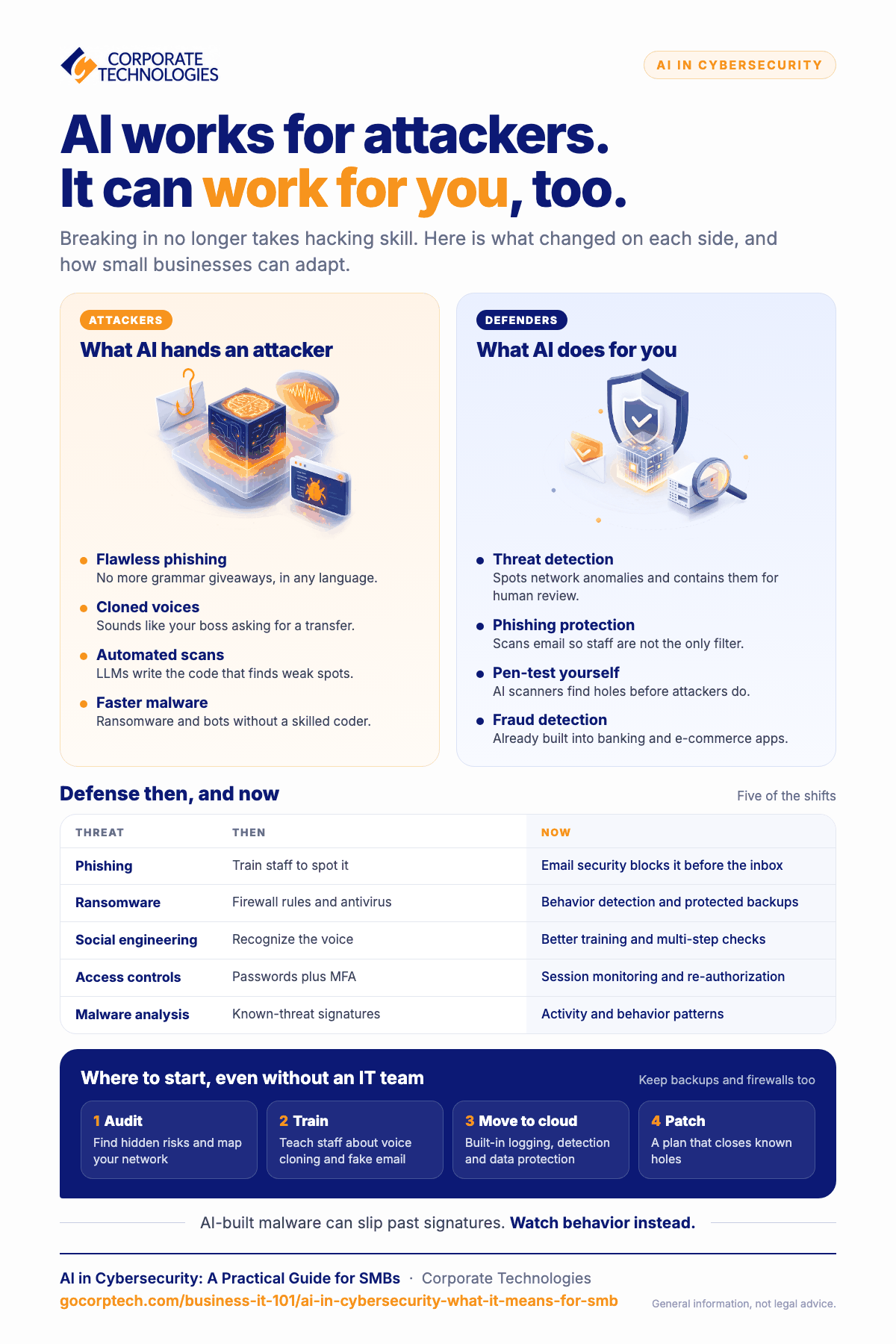
- Build more realistic-looking phishing emails: Poor language or grammar mistakes in phishing emails were one of the giveaways prior to LLMs improving language and messaging for attackers. Now, language is precise and formal like a business message, and AI can stay grammatical in any language, not just English.
- Cloned voices in social engineering: An attacker can now sound like your boss or someone you know, making it easier to trick you into transferring money or divulge sensitive information.
- Automated vulnerability scans: Scanning for vulnerabilities was already common in cybersecurity, but now hackers can have LLMs build the code for them, making threat creation faster and more effective.
- Faster malware creation: Instead of relying on a coder to build malware, an attacker can use LLMs to build malware like ransomware or bots to do damage across a wide range of sites and networks.
How AI Helps with Cybersecurity Defenses
AI might make it easier for threat actors, but it also makes it easier for businesses to defend against these threats. For products like banking applications or e-commerce, AI is already a part of threat detection and fraud detection. Your business can also take advantage of AI:
- Threat detection and prevention: Add infrastructure to your environment that works with AI to detect anomalies on your network. Prevention systems automatically contain the threat for further human review.
- Phishing protection: Instead of putting the responsibility of phishing detection on employees, you can let an AI scan incoming and outgoing emails and detect it for you. Removing the human element in phishing ruins the ability to trick users, which is the purpose of using a phishing email in the first place.
- Pen-test your applications: Just like an attacker can scan your network and applications for vulnerabilities, so can you. Use AI-based scanners to detect vulnerabilities before attackers do, limiting your risk of a data breach.
Cybersecurity: Then and Now Comparison Table
Cybersecurity has changed since AI and LLMs were introduced, and this means that AI in cybersecurity changes some of the ways you handle data protection and defending your network from threats. Here is a comparison table to give you guidance on what you can do to adapt to changes in the cybersecurity landscape.
| Threat | Defense Then | Defense Now |
| Phishing | Train employees to detect phishing emails themselves | Use email cybersecurity to detect and block phishing emails from reaching user inboxes |
| Ransomware | Firewall rules to block ransomware communication and antivirus to stop it from installing | Behavioral detection that analyzes traffic patterns. Backups that avoid ransomware detection |
| Threat Detection | Signature-based detection and SIEM rules to have a human analyst review threats | AI-based baselines used to analyze traffic behaviors and automatically contain threats |
| Threat Prevention | Firewall rules, signature-based antivirus, and schedule security patching | Machine learning creates predictions and scores threats for priority patching and automated detection and prevention |
| Social Engineering | Human detection using voice recognition and security questions | Since voices can be cloned, employees need better training and multi-step security before being able to take action |
| Vulnerability Management | Manual penetration testing and static analysis | Continual scanning and increased authentication and authorization using zero-trust frameworks |
| Access Controls | Usernames and passwords with multi-factor authentication (MFA) | Session monitoring and behavioral re-authorization |
| Malware Analysis | Signature-based analysis using a database of known threats | Analysis based on malware activity and behavior patterns |
What You Can Do for Your Business Cybersecurity
If you don’t have a dedicated IT team, your current network administrator can still implement a few changes to help defend against newer AI-based threats. Even with these changes, you should still maintain some common cybersecurity procedures like disaster recovery backups, compliance monitoring, identity management, and firewall management.
Here are a few guidelines to get you started:
- Audit your environment: Auditing will help you discover hidden risks and better understand your network design so that you can build better security infrastructure.
- Train employees to detect phishing and social engineering: Although AI has made phishing and social engineering more effective, your employees are still your next layer of defense should your main security fail. Train employees to be more aware of voice cloning and suspicious email messages.
- Migrate to the cloud: This step is much more involved than the others, but the cloud can be more secure and offer additional security to protect your environment. A good managed service provider (MSP) can help with data migration to the cloud.
- Create a patch management plan: Even with AI in cybersecurity making threat detection more difficult, you can still keep your infrastructure patched with the latest updates to eliminate known vulnerabilities.
How Corporate Technologies Can Help
Managing the changing cybersecurity landscape from AI integration requires experience. The cloud can be a better way to host your applications, because the cloud offers event logging, threat detection and prevention, and native data protection tools. If your environment is ready for AI-based threats, Corporate Technologies can help. We have consultants and professionals with years of cybersecurity experience, cloud migration, and incident response to improve your defenses.
To find out what Corporate Technologies can do for your cybersecurity posture, contact us today.
FAQs
Q: What are some ways AI in cybersecurity changes the way businesses build defenses?
A: AI allows attackers to create more effective phishing emails, clone voices for better social engineering, and build malware like ransomware faster.
Q: Is antivirus software still effective for network security?
A: Antivirus software is good for threat prevention, but AI-based malware can evade signature-based antivirus software. Businesses should use behavior and traffic pattern-matching anti-malware software to have more effective cybersecurity defenses.
Q: How does AI help with cybersecurity defenses?
A: AI can combat threat actors by better detecting malware using machine learning traffic patterns, block malicious phishing emails, and find vulnerabilities that other penetration tests didn’t find.
Q: Will MFA stop unauthorized access from an AI-based threat?
A: Multifactor authentication is still effective, but a better way to detect unauthorized is to use AI-based threat detection that uses normal traffic patterns and user activity as a baseline to then determine anomalies.
Q: How can I stop AI-based ransomware?
A: Firewall rules can help with outgoing ransomware attacks, but AI-based detection and prevention using traffic patterns is better at stopping ransomware from encrypting files and communicating with the central command server.
Keep reading
More in Business IT 101 →
Most SMB Security Stats Are Confident Claims. We Published the Operational Data Instead.
We published our real Q2 2026 operational data across ~1,700 SMBs, including a patch number that dropped 29 points the moment we…

Patch Management Explained: Why Unpatched Systems Get Breached
Learn why patch management is critical for business security. Discover how unpatched systems get breached, real-world examples like WannaCry, and how Corporate…

VMware After Broadcom: A Cost Analysis of Your Migration Options
VMware costs up 2–10x after Broadcom? Compare 5 migration options with TCO breakdowns and find the right fit for your business.
Free, same business day
What would managed IT cost for your team?
Tell us how many computers and users you have. An engineer sends a per-user range, usually the same business day. No credit card, no bot.
- Live service specialist in about a minute, 24/7
- 21 offices across 18 states
- 60-day money-back guarantee
Get your instant IT support estimate
Tell us how many computers and users you have and we send a per-user range, usually the same business day.

