

In short
VMware costs up 2–10x after Broadcom? Compare 5 migration options with TCO breakdowns and find the right fit for your business.
In this article
If you use VMware, you might decide to migrate away from it after Broadcom’s acquisition. A primary factor for moving away from VMware is Broadcom’s elimination of lifetime licenses replaced by subscription services that will skyrocket IT costs. VMware Broadcom migration cost seems like a scary thought, especially if your core business systems rely on your current architecture, but you have plenty of VMware alternatives to choose from in 2026. This article will give you guidance on costs and what it takes to migrate.
There are five factors to determine your VMware alternative:
- Renewal date (Broadcom eliminated lifetime licenses)
- Refresh cycle
- Internal IT
- Compliance
- Capex tolerance
Depending on your profile, VMware can be 2-10 times higher than other options. Here is a table of options (we’ll discuss each option, the questions you should ask yourself when you make a decision, and which option best fits your business scope):
| Option | 3-Year Cost vs Baseline | Best for |
|---|---|---|
| Stay on VMware (renegotiated) | +50% to +200% | Largest enterprises with leverage |
| Switch hypervisors (Proxmox, Nutanix, Hyper-V, KVM) | −20% to +40% | Strong internal IT, standard workloads |
| Public cloud (AWS / Azure / GCP) | −10% to +100% | Cloud-native organizations, bursty workloads |
| Managed private cloud / hyperscaler platform | −30% to −40% | SMB/mid-market wanting predictable OPEX |
| Hybrid | Varies | Mixed workload requirements |
What Changed – The Broadcom-VMware Situation
In November 2023, Broadcom acquired VMware for $61 billion. If you run a business and use VMware, you can either pay the new subscription price or migrate to an alternative. As of 2026, the cost of a VMware subscription is much higher than alternatives. For some businesses, sticking to the VMware subscription makes sense. For most others, migrating away from VMware to another cloud solution is more affordable with the same or more benefits.
Here are the four policy changes to consider if you are currently using VMware:
- perpetual licenses retired, subscription-only renewals
- product consolidation into VCF and VVF bundles
- free tier (ESXi Free) eliminated (they later revived it on 2025 with limitations)
- partner program cut from 4 tiers to 2
Before you think that sticking with a VMware subscription is the right move, you might want to consider the costs. Forrester saw anecdotal reports of a 400% to 700% increase in VMware customer costs. Reuters tracked the acquisition from 2023 to 2025, and the result was one notable lawsuit from Fidelity in 2025 saying that Broadcom threatened to cut off the investment firm from key software after their massive payment changes.
Because of the numerous VMware changes and increase in cost, The Register reported that over half of VMware’s customer base was looking for alternatives. It seems like an inflated high number of customers wanting to jump ship from a platform that had mass popularity in the cloud industry, but the cost increase was astronomical.
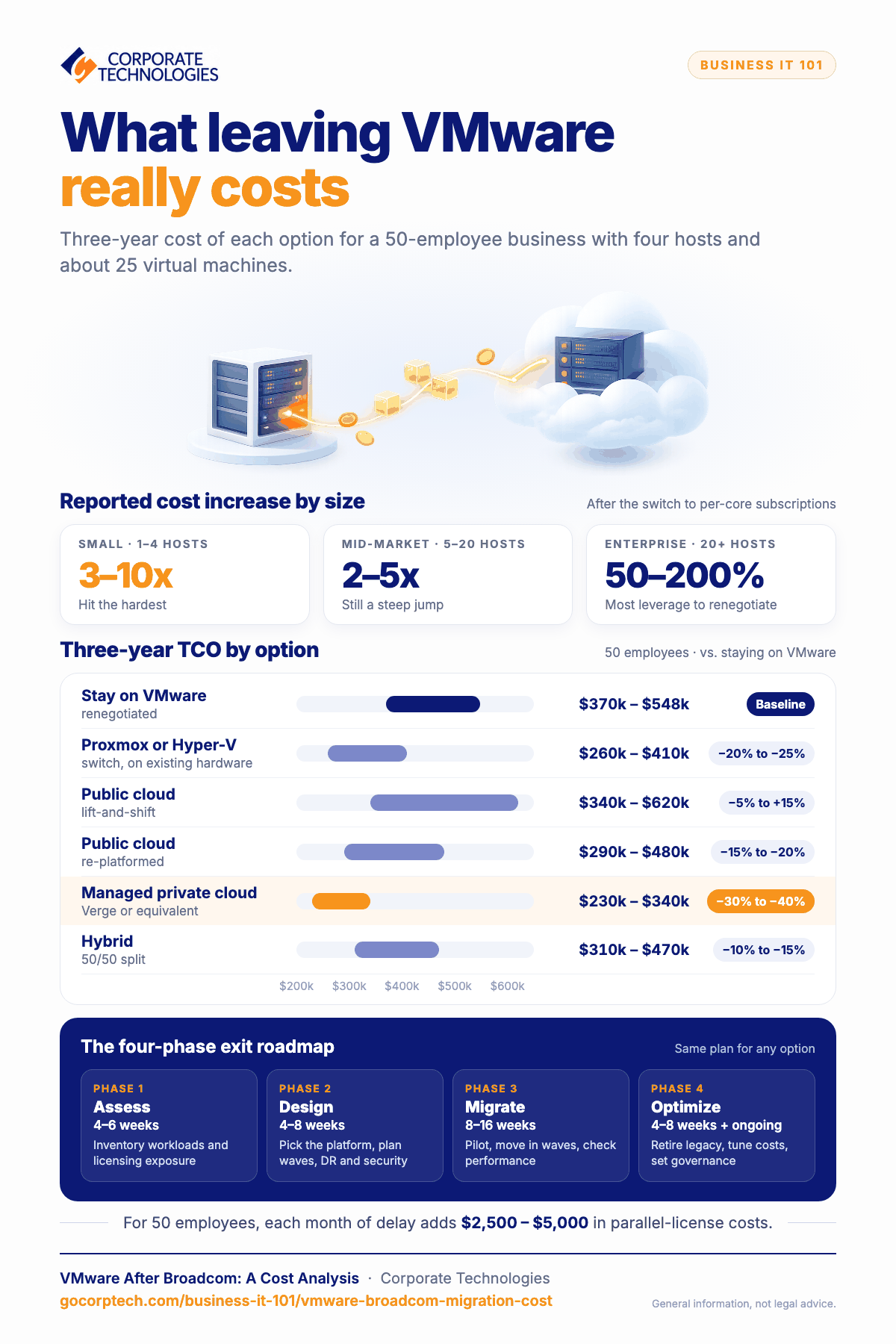
Reported customer cost-impact ranges by environment size:
- Small (1 – 4 hosts): 3 – 10x increase
- Mid-market (5 – 20 hosts): 2 – 5x increase
- Enterprise (20+ hosts): 50% – 200% increase
The price hike depends on a new subscription license called a per-core licensing model. This means that your cost is based on the number of cores in your processor instead of the virtual machine workload. If you have a small workload on a 64-core CPU, you pay more than if you have it on a 2-core CPU. This can make it hard to balance costs with scalability.
For any business, these costs are astronomical for a critical service. Once you integrate a cloud service into your business workflow, replacing it is tricky. You need to make the right decision or risk spending even more money on an additional migration. Migration from VMware takes time between planning, implementation, and testing. You don’t want to migrate again to another service, but Corporate Technologies will help guide you through the decision process so that you make the right choice.
The Real Cost of Staying with VMware
Decision makers often have a hard time changing IT infrastructure. This can be because of the massive undertaking. Planning doesn’t often determine the true cost of changes especially if you run into obstacles. These obstacles could be difficulties with the new technology, bugs, additional infrastructure to compensate for issues, and testing any hiccups. Even testing doesn’t usually catch all bugs, so you must deal with any outcomes from unforeseen changes.
Staying with VMware (or the “do nothing” option) might seem like a more cost viable option. Here is a breakdown of the three-year costs of staying with VMware for a 50-employee organization with four hosts and approximately 25 virtual machines:
| Line Item | 3-Year Cost Range |
|---|---|
| VMware subscription (per-core) | $90,000 – $180,000 |
| Hardware refresh (one cycle in 3 years) | $46,000 – $50,000 |
| Windows Server / SQL licensing | $30,000 – $60,000 |
| Backup software & storage | $18,000 – $30,000 |
| Security stack | $24,000 – $48,000 |
| Operational labor | $90,000 – $180,000 |
| 3-Year Total Cost of Stay | $298,000 – $548,000 |
Corporate Technologies analyzed these numbers for small businesses. In the Corporate Technologies Cloud Advantage Platform Analysis, 2026, it was reported that a 20-employee small business infrastructure refresh will cost about $46,000 – $50,000. Here is a breakdown for SMBs:
- Server plus Windows licensing: $15,000
- Workstations: $20,000
- Firewall and networking equipment: $4,000
- Backup appliance: $3,000
- Miscellaneous hardware: $4,000
For each month in a migration delay, a 50-employee organization pays an additional $2,500 – $5,000 in unrecoverable parallel-license costs. The takeaway is that the longer you wait, the more costs your business will incur.
Your Five Migration Options
Businesses have five main migration options to choose from, including the option to do nothing and stay on VMware. Every option has its pros and cons, but we’ll help you with the decision-making process.
Stay on VMware
Before we get into VMware alternatives, let’s first talk about the option to simply stay on VMware and incur the costs. This option is best for large enterprises with proprietary VMware integrations where migration is just too much of a risk and IT overhead.
Pros:
- Proven Reliability: VMware is a known product and can integrate into any major vendor application.
- Minimal Disruption: No need to migrate or retrain your IT staff on new hypervisors.
- Central Management: Streamlined operations if you are already heavily invested in the VMware suite.
Cons:
- High Costs: Licensing costs have surged under Broadcom’s subscription model, severely impacting smaller or mid-sized businesses.
- Vendor Lock-in: Strict licensing terms and no other choice if Broadcom chooses to increase costs in the future.
Three-year cost impact based on a 50-employee business: $370,000 – $548,000.
Switch Hypervisors
Several competitors are on the market for businesses. You can choose from Proxmox VE, Nutanix AHV, Microsoft Hyper-V, and KVM / Red Hat OpenShift Virtualization. This option is best if you are already tied into existing hardware, such as on-premises buildouts.
Pros:
- Lower Costs: Alternatives like Hyper-V are often included at no extra cost if you already own Windows Server Datacenter licenses. Open-source options like Proxmox or KVM are completely free to deploy.
- Simplified Licensing: Broadcom’s licensing models for VMware are complex. Switching to open-source or native OS hypervisors lets you bypass bundled requirements.
- Reduced Vendor Lock-in: Migrating away from VMware gives you more flexibility to mix-and-match hardware and software.
Cons:
- Migration Downtime: Moving virtual machines requires planning and system interruptions.
- Retraining Your Team: Your IT staff may have years of experience with VMware. Switching means spending time and money to retrain them.
Three-year cost impact based on a 50-employee business: $260,000 – $410,000.
Public Cloud
Large public cloud vendors have hypervisors and the hardware to run any size business. AWS (Amazon), Azure, and GCP (Google) are the most popular. Microsoft and Amazon offer VMware Cloud on AWS and Azure VMware Solution as lift-and-shift options. This option is best for small businesses that need a restructure of their infrastructure and need to modernize their environment.
Pros:
- Infinite Scalability: Scale compute and storage resources up or down on-demand to handle increase and decrease of business productivity.
- Upfront Cost Savings: Transition from high upfront hardware purchases to a pay-as-you-go model.
- Reduced Maintenance: Offload physical hardware management and hardware lifecycle refreshes to the cloud provider.
Cons:
- Migration Complexity: “Lifting and shifting” legacy workloads can be time-consuming and often requires re-architecting applications.
- Predictability of Costs: While cheaper for lower workloads, a public cloud can become more expensive at scale if resources are unoptimized.
- Vendor Lock-In: Migrating native applications to a specific hyperscaler makes it difficult or expensive to migrate your infrastructure to a different provider later.
Three-year cost impact based on a 50-employee business: $340,000 – $620,000.
Managed Private Cloud / Hyperscaler Platform
You can choose to have a more managed private cloud to reduce overhead. Several vendors in this space offer managed private clouds including Corporate Technologies Cloud Advantage, Verge.io, Nutanix, and managed VCF (VMware Cloud Foundation). This option is best for small to midsize businesses that don’t have the IT experience or infrastructure to handle their own solutions.
Pros:
- Lower TCO: Moving away from VMware avoids forced bundling (like VMware Cloud Foundation). Platforms like Nutanix and Verge.io allow you to pay only for the features you actually need.
- Reduced Management Overhead: Natively integrate compute, storage, and networking, reducing the operational overhead.
Cons:
- Resource Overhead: Some solutions like Nutanix rely on Controller VMs (CVMs) to manage storage, which consume dedicated CPU and RAM resources.
- Learning Curve: While these platforms are marketed as simpler than VMware, your IT team will still have to undergo training to learn new UIs, APIs, and troubleshooting.
- Proprietary Environments: Migrating to a private cloud may mean adapting to a proprietary third-party environment.
Three-year cost impact based on a 50-employee business: $230,000 – $340,000.
Hybrid
For businesses that need a more customized approach, you can choose to go the hybrid route. A hybrid approach requires some technical expertise, but businesses that have proprietary environments and need more customizations usually go with hybrids.
Pros:
- Scalability: Scale to public clouds (like AWS, Azure, or Google Cloud) during peak demand without buying new on-premises hardware.
- Cost Efficiency: Optimize budgets by shifting steady, predictable workloads to private data centers while paying-as-you-go for temporary cloud resources.
Cons:
- Increased Complexity: Managing and securing resources across both on-premises and public environments requires specialized, cross-platform IT expertise.
- Data Fees: Transferring large volumes of data out of the public cloud can result in unexpected costs.
Three-year cost impact based on a 50-employee business: $310,000 – $470,000.
Three-Year TCO Comparison Table
It’s hard to accurately predict TCO, because migration rarely maps one-to-one between hardware and software. You might need more hardware or less and migration costs vary between businesses. Some businesses take the opportunity to upgrade infrastructure, which costs more if infrastructure is more scalable and uses more compute power.
Here is a ballpark estimate on TCO sourced from 2024 – 2026 industry resources and analysis for you to work with:
| Migration Option | 3-Year TCO | vs. Stay on VMware |
|---|---|---|
| Stay on VMware (renegotiated) | $370,000 – $548,000 | Baseline |
| Switch to Proxmox or Hyper-V (existing hardware) | $260,000 – $410,000 | −20% to −25% |
| Public cloud (lift-and-shift) | $340,000 – $620,000 | −5% to +15% |
| Public cloud (re-platformed) | $290,000 – $480,000 | −15% to −20% |
| Managed private cloud (Verge or equivalent) | $230,000 – $340,000 | −30% to −40% |
| Hybrid (50/50 split) | $310,000 – $470,000 | −10% to −15% |
The Vendor-Neutral Four-Phase Exit Roadmap
Regardless of the route you choose, you need a plan. The plan is executed in phases. For large businesses, it can take up to 16 weeks to migrate. You also have an optimization phase where you might need continual changes to make changes as you find issues or realize potential for cost savings.
You have four phases during migration. The following table gives you the general roadmap:
| Phase | Duration | What happens |
|---|---|---|
| Phase 1, Assess | 4–6 weeks | Inventory workloads/dependencies, identify licensing exposure, define success criteria/timelines |
| Phase 2, Design | 4–8 weeks | Select target platform, architect target environment, define migration waves, establish DR/security |
| Phase 3, Migrate | 8–16 weeks | Pilot migration, wave-based transition, performance validation |
| Phase 4, Optimize | 4–8 weeks + ongoing | Decommission legacy, optimize costs/performance, establish ongoing governance |
Note that each phase is vendor-neutral. You might be tied to a vendor after you migrate, but your roadmap does not need to be specific towards a vendor. This roadmap covers even hybrid approaches to ensure that you follow a framework that leads to success.
Decision Framework – Which Option Fits Your Business
No business is the same, and no business has the same requirements. Your VMware Broadcom migration cost will depend on the type of transition, the size of your business, and licensing for your new environment. In some businesses, multiple options might sound good. Here is a table to help you choose the best roadmap:
| If you are… | Best-fit option |
|---|---|
| 10–50 employee SMB facing hardware refresh in next 12 months | Managed private cloud |
| Mid-market with predictable, steady-state workloads | Managed private cloud or Switch Hypervisors |
| Mid-market with bursty / seasonal / growing workloads | Public cloud |
| Enterprise (250+) with proprietary VMware integrations | Stay and Renegotiate, or Hybrid |
| Mid-market with regulatory constraints (HIPAA, PCI, CMMC) | Managed private cloud with single-tenant guarantees |
| Strong internal IT, on-premises preference | Switch Hypervisors |
| Active cloud transformation across multiple departments | Public cloud |
| Mixed workload profiles | Hybrid |
Before choosing your framework and locking into a decision, here are five questions to ask yourself:
- When is your VMware renewal date?
- What is your hardware refresh status?
- How sensitive is your business to short-term operational disruption?
- What is your compliance posture?
- What is your internal IT capability?
Where Corporate Technologies Fits
Not every business is capable of planning an efficient migration from VMware. That’s where Corporate Technologies fit in with our 40+ years of experience as a leading managed service provider. We can help with every step in your roadmap and help you choose a migration strategy. The option Corporate Technologies recommends most often is a managed private cloud delivered through Cloud Advantage and built on the Verge hyperscaler platform.
You might ask, “Why Verge?” We evaluated Verge and prefer it over other platforms for five reasons:
- Linear Scaling: Increase performance during peak seasonal traffic spikes.
- Lower TCO: Reduced costs from our analysis and client experience.
- Operational Simplicity: Our clients work with us to build out an environment that they can manage and scale.
- MSP-Managed Environment Support: As your MSP, Corporate Technologies can handle your business operational requirements with onsite support when needed.
- Unified Management of Resources: Verge has a unified management system that makes it easy to oversee compute, storage, and network resources.
Cloud Advantage is best for businesses with 15 to 250 employees where a hardware refresh is coming up soon. Businesses with malware concerns like ransomware have better security, especially with an MSP overseeing their cybersecurity infrastructure. The cloud is best for businesses with roaming or multi-location employees with compliance pressure from CMMC, HIPAA, or PCI. With Cloud Advantage, we help you get unpredictable IT spend under control.
Corporate Technologies Cloud Advantage isn’t right for every situation. You may want to consider other environment options for manufacturing OT environments with hard real-time constraints, enterprises with deep VMware-specific integrations costing more to re-architect than to keep, and organizations already deep into a public cloud journey.
What’s Next
The first step is to determine your renewal date with VMware. This date is when new pricing kicks in, and it’s when you need to decide if you will stay with your current solution or start planning for VMware Broadcom migration cost decisions.
Here are a few more tips to consider:
If you’re more than 6 months from renewal: Download the Cloud Migration Readiness Checklist – 36-point self-assessment.
If you’re inside 6 months of renewal: Schedule a structured 90-minute Cloud Migration Readiness Assessment. Output = current-state cost analysis, recommended target architecture, timeline mapped to renewal date.
If you’ve already decided to migrate: Phase 1 typically begins within 2 weeks of contract execution. Most SMB/mid-market migrations complete in 6–12 months.
Appendix: Glossary
Broadcom acquisition: The $61 billion purchase of VMware by Broadcom Inc. completed in November 2023, which led to the change of licensing to subscription form.
Hyperscaler platform: A large cloud computing infrastructure with services including compute, storage, networking, and AI.
Hypervisor: Software that creates and manages virtual machines by abstracting a physical server’s hardware resources.
OPEX vs CAPEX: OPEX (Operating Expenditure) refers to ongoing day-to-day business costs such as software subscriptions, maintenance, and cloud service fees. CAPEX (Capital Expenditure) refers to upfront investments in physical assets such as servers, hardware, and on-premises infrastructure.
Per-core licensing: A software licensing model where costs are calculated based on the number of processor cores in a server rather than the number of physical CPUs, seats, or users.
TCO (Total Cost of Ownership): A financial metric that calculates the full cost of a technology investment over its entire lifecycle, including the initial purchase price and ongoing expenses such as licensing, maintenance, support, training, and infrastructure.
VCF: Broadcom’s private cloud platform that bundles VMware’s vSphere, vSAN, and NSX into a single integrated stack.
VVF: A simpler VMware platform bundle introduced by Broadcom designed for organizations that need virtualization without the full private cloud feature set of VCF.
VMware Cloud on AWS / Azure VMware Solution: Managed service providers that allow organizations to run VMware natively on public cloud hyperscaler infrastructure.
Keep reading
More in Business IT 101 →
Most SMB Security Stats Are Confident Claims. We Published the Operational Data Instead.
We published our real Q2 2026 operational data across ~1,700 SMBs, including a patch number that dropped 29 points the moment we…

Patch Management Explained: Why Unpatched Systems Get Breached
Learn why patch management is critical for business security. Discover how unpatched systems get breached, real-world examples like WannaCry, and how Corporate…

AI in Cybersecurity: What It Really Means for Small and Mid‑Sized Businesses
Explore AI in cybersecurity and discover its impact on small and mid-sized businesses in today's digital landscape.
Free, same business day
What would managed IT cost for your team?
Tell us how many computers and users you have. An engineer sends a per-user range, usually the same business day. No credit card, no bot.
- Live service specialist in about a minute, 24/7
- 21 offices across 18 states
- 60-day money-back guarantee
Get your instant IT support estimate
Tell us how many computers and users you have and we send a per-user range, usually the same business day.

