


In short
Learn why patch management is critical for business security. Discover how unpatched systems get breached, real-world examples like WannaCry, and how Corporate Technologies can help protect your network.
In this article
Unpatched systems are one of the primary cybersecurity vulnerabilities for businesses, but patch management is also commonly overlooked as an unnecessary priority. If you have a business network, you could be vulnerable to exploits that take advantage of your unpatched systems. You don’t need to be a victim of the latest malware running rampant online, so we’ll explain the importance of keeping your systems up to date and what could happen if you don’t.
What is Patch Management?
Patch management is a plan of action that ensures hardware and software on your environment has the latest updates, specifically security patches. Patches cover basic updates and bug fixes, but security patches are considered critical changes to avoid having open known vulnerabilities on your systems.
It doesn’t matter if your network is made up of one workstation or thousands, you need a patch management plan to ensure that updates are installed. For example, suppose that you have 10 workstations running Windows on them. You need to ensure that the latest Windows operating system patches are applied to each workstation, or you could have open vulnerabilities.
Examples of Unpatched Systems Being Breached
Several worldwide exploits and malware spread across the internet before security patches. A good example is the WannaCry ransomware spread in 2017. WannaCry used an exploit called EnternalBlue, a vulnerability specific to the Windows operating system. The vulnerability was so severe that Microsoft deployed a patch to unsupported legacy operating systems like Windows XP.
Not everyone patched their systems, so the US government put together presentations to explain why it’s important to patch systems with the latest security patches. Newer versions of Windows are already patched for WannaCry, but older vulnerable Windows XP computers are still in the wild. Ransomware like WannaCry can destroy your business data, and serious attacks can cost thousands of dollars in extortion fees.
Attackers routinely scan systems for vulnerabilities. Internet-facing public servers are primary targets. In 2025, attackers targeted unpatched on-premise Microsoft SharePoint servers. The vulnerability, known as ToolShell, allowed attackers to execute remote code on unpatched SharePoint servers.
How Patch Management Works
In a business environment, you can’t simply install every patch and call it a day. You need a plan, a staging environment for critical infrastructure, monitoring, and documentation. Here are the steps you should follow for patch management and deployment:
- Audit your environment: You need to account for each item that might need patches. Don’t forget hardware that might need firmware updates like routers, switches, and firewalls.
- Create a patch repository: Instead of downloading patches for every workstation, you can download patches to a single location and install from this one location. This speeds up patching and reduces bandwidth usage.
- Patch staging first: Some patches cause conflicts or crashes to servers, so installing to a single staging server that mirrors production will help reduce downtime.
- Deployment: On a specific day, deploy patches to all systems across your environment. You can have workstations patch their operating system and applications when they boot up in the morning.
- Verify completion: You should have a deployment system that verifies and confirms that patches were installed on each system.
- Documentation: Documentation is mainly for other employees to follow the exact same steps in future patch deployments. It also helps employees avoid mistakes and miss important steps in the next deployment.
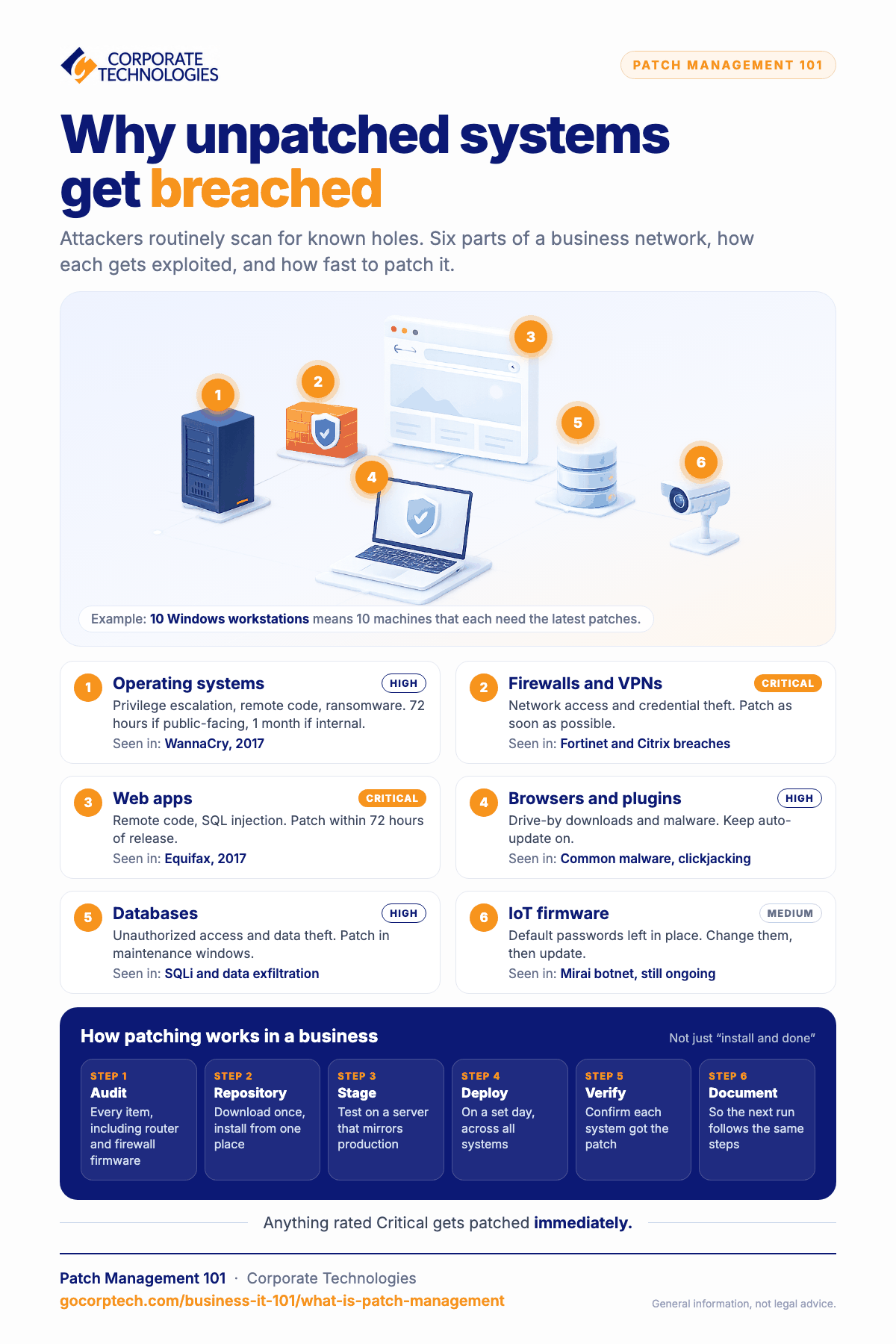
How Unpatched Systems Get Breached
Even a midsize business has several dozen moving parts, so it can be difficult to keep track of what needs to be updated, what can go wrong, and priority for patching. Some systems aren’t as critical as others, so they don’t need patching immediately. Other systems don’t have public access, so they too can wait for patching.
Here is a comparison table of common business infrastructure that should be on your patch management plan:
| Common Exploits | Priority and Cadence | Example Breaches | |
| Web apps | Remote code execution, DoS, or common web exploits like SQLi or code injection | Critical, within 72 hours of patch availability | Equifax data breach in 2017 |
| Operating systems | Privilege escalation, remote code execution, ransomware | High, within 72 hours for public-facing servers, or 1 month for internal servers | WannaCry ransomware in 2017 |
| Firewalls and VPNs | Unauthorized network access, credential theft, malware injection | Critical, patch as soon as possible | Fortinet and Citrix breaches |
| Third-party libraries | Supply-chain exploits | High, patch as soon as possible after testing | Log4Shell in 2021 |
| IoT firmware | Default credential usage | Medium, make sure default credential passwords are changed | Mirai botnet, still ongoing |
| Browsers and plugins | Drive-by downloads and malware | High, browsers have auto-update features | Common malware and clickjacking |
| Databases | Unauthorized access and data exfiltration | High, patch during maintenance downtime | SQLi and common data exfiltration breaches |
When an exploit is found, it’s given a risk factor. Anything labeled “Critical” should be patched immediately. Developers and firmware manufacturers usually have options to auto-update, but most businesses prefer to install on a staging server first. Patch management for the latest exploits can often be a full-time job, especially if you have a large environment with remote workers.
How Corporate Technologies Can Help
Unless you have someone dedicated to keeping up with the latest exploits and software patches, you will probably miss when developers release updates. This is where Corporate Technologies can help. Running some infrastructure in the cloud helps alleviate some of this overhead, because firmware updates and backend infrastructure are handled by the cloud provider.
For internal infrastructure, you need to constantly keep up with the latest releases for both hardware and software. Workstations need updates, remote devices should be updated, and server updates are also necessary. Corporate Technologies can take on this overhead to reduce the amount of time local IT people need to focus on patch management.
Getting behind on updates can be the vulnerability attackers need to steal your data. Contact Corporate Technologies to see how we can help you with your patch management strategy.
FAQs
Q: What is patch management?
A: Patch management is a strategy for updating hardware and software with the latest updates including security patches and bug fixes.
Q: How often should you patch software?
A: Developers release updates periodically, so there is no specific timeframe for patching. When a patch is released, the priority for patching depends on the risk factor of the vulnerability. Critical vulnerabilities should be patched immediately, high should be patched in a few days, and low-priority patches can wait for your next maintenance schedule.
Q: Have there ever been real-world consequences for unpatched systems?
A: Yes, the 2017 Equifax data breach was from an unpatched system, and 2025 exploits of Microsoft SharePoint servers were from unpatched servers.
Q: What’s the first step in patch management?
A: You first need to audit your environment to identify every item that might need patches, including hardware like firewalls and VPNs.
Q: How can I patch software on a user’s computer?
A: Some software allows for automatic updates. Otherwise, you can deploy patches using login scripts or third-party software installed on all user computers.
Keep reading
More in Business IT 101 →
Most SMB Security Stats Are Confident Claims. We Published the Operational Data Instead.
We published our real Q2 2026 operational data across ~1,700 SMBs, including a patch number that dropped 29 points the moment we…

AI in Cybersecurity: What It Really Means for Small and Mid‑Sized Businesses
Explore AI in cybersecurity and discover its impact on small and mid-sized businesses in today's digital landscape.

VMware After Broadcom: A Cost Analysis of Your Migration Options
VMware costs up 2–10x after Broadcom? Compare 5 migration options with TCO breakdowns and find the right fit for your business.
Free, same business day
What would managed IT cost for your team?
Tell us how many computers and users you have. An engineer sends a per-user range, usually the same business day. No credit card, no bot.
- Live service specialist in about a minute, 24/7
- 21 offices across 18 states
- 60-day money-back guarantee
Get your instant IT support estimate
Tell us how many computers and users you have and we send a per-user range, usually the same business day.

