


In short
Learn about scareware, the alarming malware that tricks users with fake alerts to steal information and sell fake solutions.
When you hear “malware,” you might picture sneaky programs that quietly steal your data or cause havoc. Scareware, however, adds a dramatic flair to the mix.
What Is Malware?
Malware is any software designed to harm your system, whether it’s a virus, worm, ransomware, or spyware. It often operates silently, infiltrating your computer and causing damage without your knowledge.
Meet Scareware
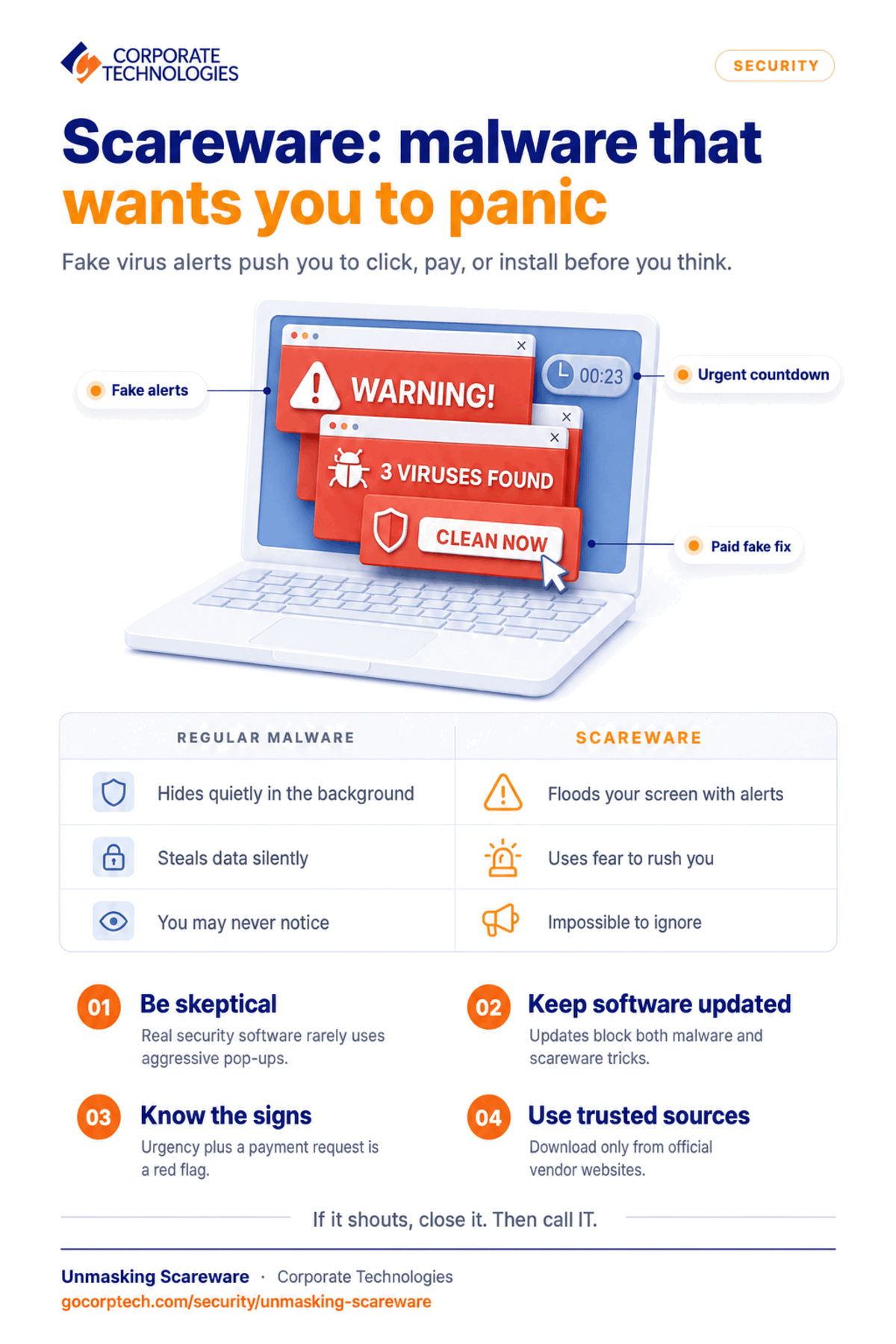
Scareware is a subtype of malware that makes a lot of noise. Instead of working in the background, it floods your screen with alarming pop-ups and fake alerts. These warnings mimic those from trusted security programs, convincing you that your computer is under attack. The goal? To scare you into buying fake antivirus software or handing over sensitive details.
Key Differences
Tactics:
Regular malware stays hidden, while scareware goes on full display with urgent, hard-to-ignore messages.
Psychological Play:
Scareware exploits your natural reaction to fear, pushing you to act quickly, often without verifying the threat.
User Disruption:
The constant barrage of alerts from scareware can disrupt your work and browsing, making it more than just a security risk, it becomes a nuisance.
A Real-Life Snapshot
Imagine enjoying a quiet evening online when a pop-up suddenly claims your system is crawling with viruses. The message looks professional, urging immediate action. In a moment of panic, you might click a link to buy supposed security software, only to later find out it was all a scare tactic.
How to Stay Protected
Be Skeptical:
Genuine security software rarely uses aggressive pop-ups. If something seems off, verify it through trusted channels.
Keep Updated:
Regular software updates improve your defense against both traditional malware and scareware.
Educate Yourself:
Knowing how scareware works makes it easier to spot and avoid its tricks.
Use Trusted Sources:
Only download software from reputable vendors and always check official websites when in doubt.
In Summary
Scareware is malware with a flair for dramatics. It relies on flashy, fear-inducing alerts to trick you into making hasty, often costly decisions. By staying informed and maintaining good digital habits, you can protect yourself from these deceptive tactics and enjoy a safer online experience.
Happy and safe browsing!
See Also
Keep reading
More in Security →
Cybersecurity Insurance in Maryland: What Carriers Now Require from Your IT Infrastructure
Learn what cybersecurity insurance carriers require from Maryland businesses and how managed IT services help meet security controls, compliance, and audit expectations.
Cyber Insurance Requirements in Illinois: What Underwriters Ask For in 2026
What Illinois businesses need for cyber insurance: MFA, EDR, immutable backups, email security. Plus the Illinois laws behind the exposure and policy…
Dental Ransomware Incidents: What Actually Happens
Learn how ransomware attacks dental offices, what happens during an attack, and how backups and security can help you recover safely.
Free, same business day
What would managed IT cost for your team?
Tell us how many computers and users you have. An engineer sends a per-user range, usually the same business day. No credit card, no bot.
- Live service specialist in about a minute, 24/7
- 21 offices across 18 states
- 60-day money-back guarantee
Get your instant IT support estimate
Tell us how many computers and users you have and we send a per-user range, usually the same business day.

