

In short
Learn how churches can protect donor and member data from cyber threats using access controls, monitoring, and simple cybersecurity best practices.
In this article
Church donations are often done anonymously, but donor information is often stored on church networks, making it available to staff. Unfortunately, when private data is stored on a network, poor security might accidentally disclose private data to cyber-criminals. No business is an exception for hackers, so your church should make cybersecurity a priority.
Let’s use a common data breach scenario. You have donor and member information stored on a central server. You don’t have many staff members, but everyone has access to the database that stores user information. One staff member falls for a phishing email and downloads malware. Using your staff member’s access controls, malware now has access to private data. In many cases, the database data is then uploaded to a third-party server. Worst case scenario: the data is encrypted in a ransomware attack and you must make donors and members aware that their data is now in the hands of cyber-criminals.
You don’t need to be a cybersecurity expert to put a few access controls and safety nets in place. Church staff should be educated in the many phishing campaigns on the internet, but cybersecurity controls are also important for data protection. The next sections highlight a few ways you can make user data protection a priority and add access controls to your storage.
Follow the “Least Privilege” Rule
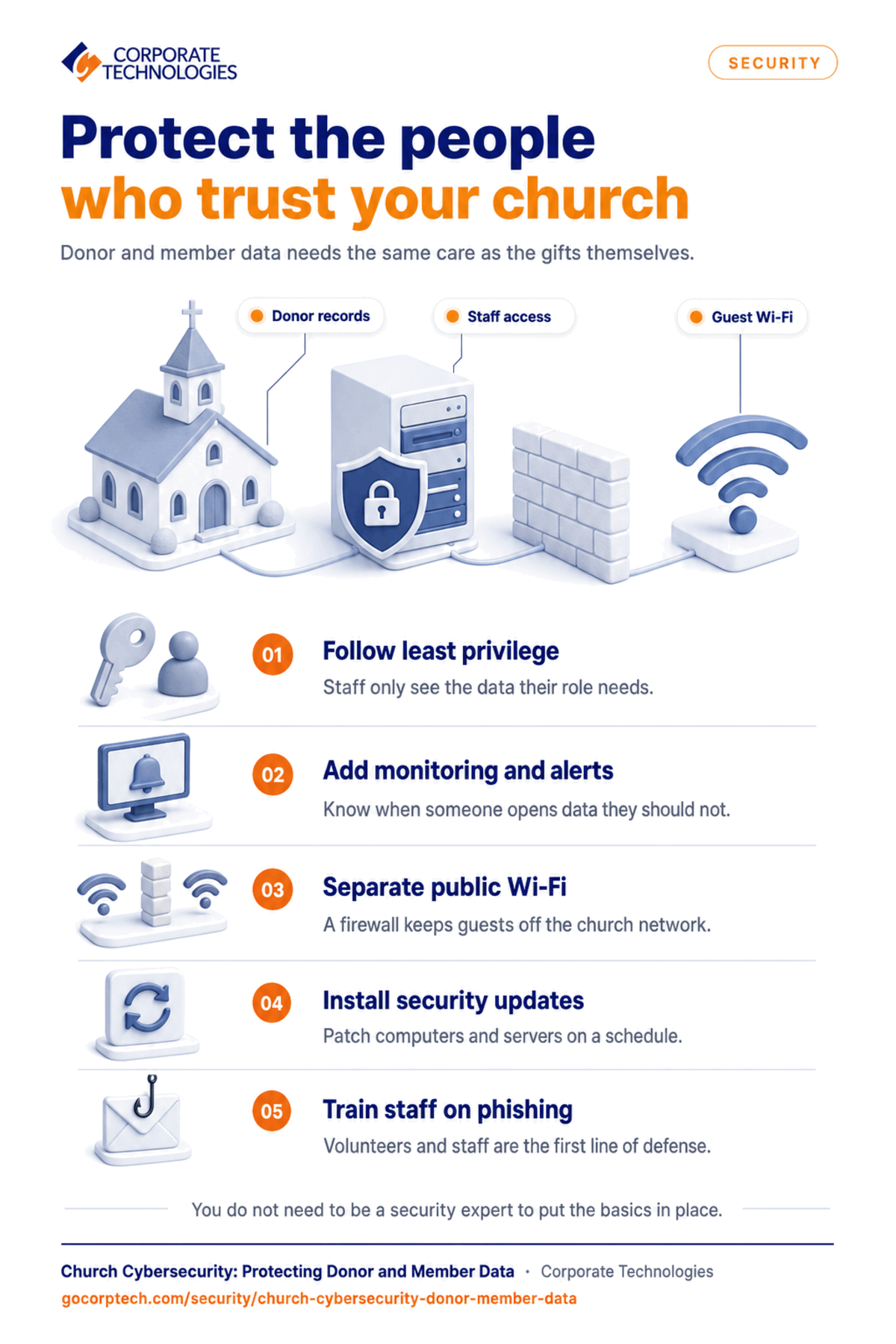
It can be tempting to give staff members unfettered access to all internal data and applications. Convenience often comes at the price of security. Your staff is the most vulnerable to phishing and cyber-threats. You can’t completely stop a cyber-attack using least privilege, but you can mitigate and limit cybersecurity risks.
The rule of “least privilege” says that users should be given access to only the data needed to perform their job functions. Should the user accidentally download malware, the malware would only have access to the same data as the user’s authorized access in most cases. Not only does following the rule of least privilege limit data theft, but it also limits loss from corruption or deletion.
Least privilege also helps with insider threats. Whether it’s intentional or unintentional, insiders can steal data, bring it home, or send it to a third party. Limiting what staff members can access removes the threat of entire databases and applications being compromised. Some of the biggest data threats start with compromising an unsuspecting user.
Add Monitoring Controls
You don’t know unauthorized access is granted unless you have monitoring tools and logging in place. If your data is stored in the cloud, cloud providers have their own monitoring tools. Cloud provider monitoring also includes logging any access requests, including access denied and granted actions. These activities can give you insight to any nefarious network activity.
Most operating systems will log activity on local servers. You need third-party applications to set up decent monitoring and alerts. Setting up logging and monitoring might be too technical for internal staff, so you can turn to a managed service provider (MSP) to help you with the setup.
Any good monitoring tool has an alerts and notification system. Notifications go out to a set individual when suspicious activity is detected. Configuring these tools can also require someone who understands how they work. A wrong configuration could leave you with a false sense of security. A managed service provider can help with monitoring setup too.
Set Up a Firewall for Public Wi-Fi
Churches aren’t subject to HIPAA, but HIPAA’s requirements for public Wi-Fi on a corporate healthcare network are beneficial for any business, including churches. It’s common for churches to have public Wi-Fi hotspots, but these public networks should be separated using a firewall. Staff should never use the public Wi-Fi with their workstations, so staff and public network data are always separated.
To separate the two networks, install a firewall. The firewall uses access control lists to determine if a public Wi-Fi user should have access to internal church data. Users on public Wi-Fi should never be allowed to traverse to internal network systems, so the Wi-Fi firewall should have simple rules to block all incoming traffic.
Understandably, configuring access control lists and installing a firewall might be beyond your staff’s technical expertise. Another option is using cloud providers to store public data, but you still need the infrastructure to protect data. Managed service providers can help you install and configure firewalls.
Install Security Updates
Unless you have a full-time staff member monitoring the latest threats and vulnerabilities, you won’t know when any of your applications need a security update. Firmware updates for routers and other hardware are also important. Some updates patch critical vulnerabilities that could give outsiders access to your private church data.
Patch management doesn’t need to be a full-time job, but it requires commitment to monitoring for updates and understanding the threat landscape. Instead of having a staff member manage updates, a managed service provider can push updates remotely or offer onsite support for IT. Not every service provider offers onsite support, so make sure you check your contract if you need a technical present at your office to manage network infrastructure.
Miscellaneous Cybersecurity Considerations
The above sections cover some critical components of a secure network, but here are a few more miscellaneous items that you should consider for cybersecurity:
- User security education: Help users identify phishing to avoid a data breach from email-based attacks.
- Antivirus: You should have antivirus installed on all workstations
- Password management: Require complex passwords, such as passwords of a certain length with a capital letter, number, and special characters.
- Compliance review: Make sure that all your systems are compliant with government requirements.
- Email filters: Block phishing, spam, and other email-based nuisances.
Get Help with Church Data Protection
If cybersecurity management is beyond your skill expertise, a managed service provider can help. MSPs like Corporate Technologies have full-time staff, onsite support, a 24/7 help desk for staff questions, and at a low-cost per-user flat rate.
Contact us today to see what Corporate Technologies can do to protect your data.
FAQs
Cybersecurity requires several layers, but generally you need antivirus software, monitoring and logging software, user access controls, email filters, and user education.
Attackers target small businesses including churches for their lack of cybersecurity controls, so yes it’s necessary even with a small church and a few staff members.
Some MSPs charge hourly, but Corporate Technologies charges a flat per-user monthly fee.
User education and email filters greatly limit risk from phishing emails.
Yes, cloud providers offer data security, including monitoring and alerts to detect suspicious activity.
Keep reading
More in Security →
Cybersecurity Insurance in Maryland: What Carriers Now Require from Your IT Infrastructure
Learn what cybersecurity insurance carriers require from Maryland businesses and how managed IT services help meet security controls, compliance, and audit expectations.
Cyber Insurance Requirements in Illinois: What Underwriters Ask For in 2026
What Illinois businesses need for cyber insurance: MFA, EDR, immutable backups, email security. Plus the Illinois laws behind the exposure and policy…
Dental Ransomware Incidents: What Actually Happens
Learn how ransomware attacks dental offices, what happens during an attack, and how backups and security can help you recover safely.
Free, same business day
What would managed IT cost for your team?
Tell us how many computers and users you have. An engineer sends a per-user range, usually the same business day. No credit card, no bot.
- Live service specialist in about a minute, 24/7
- 21 offices across 18 states
- 60-day money-back guarantee
Get your instant IT support estimate
Tell us how many computers and users you have and we send a per-user range, usually the same business day.

