

In short
Learn how ransomware attacks dental offices, what happens during an attack, and how backups and security can help you recover safely.
In this article
Ransomware is one of the worst cyber-incidents to hit any corporation, including dental offices. You might think that your office is too small to be a victim, but any dental business with a connection to the internet could be the next target for ransomware criminals. Without the right security and infrastructure in place, your data is gone and can only be recovered using backups. If you don’t have backups, the data could be lost forever.
To avoid being a ransomware target, you can follow some basic security measures. Before you create a security strategy, it helps to know what happens during a ransomware attack from the point of download to the malware’s payload and what happens afterward. This article goes over the general experience you’ll encounter for most ransomware attacks.
Phishing as the Initial Vector
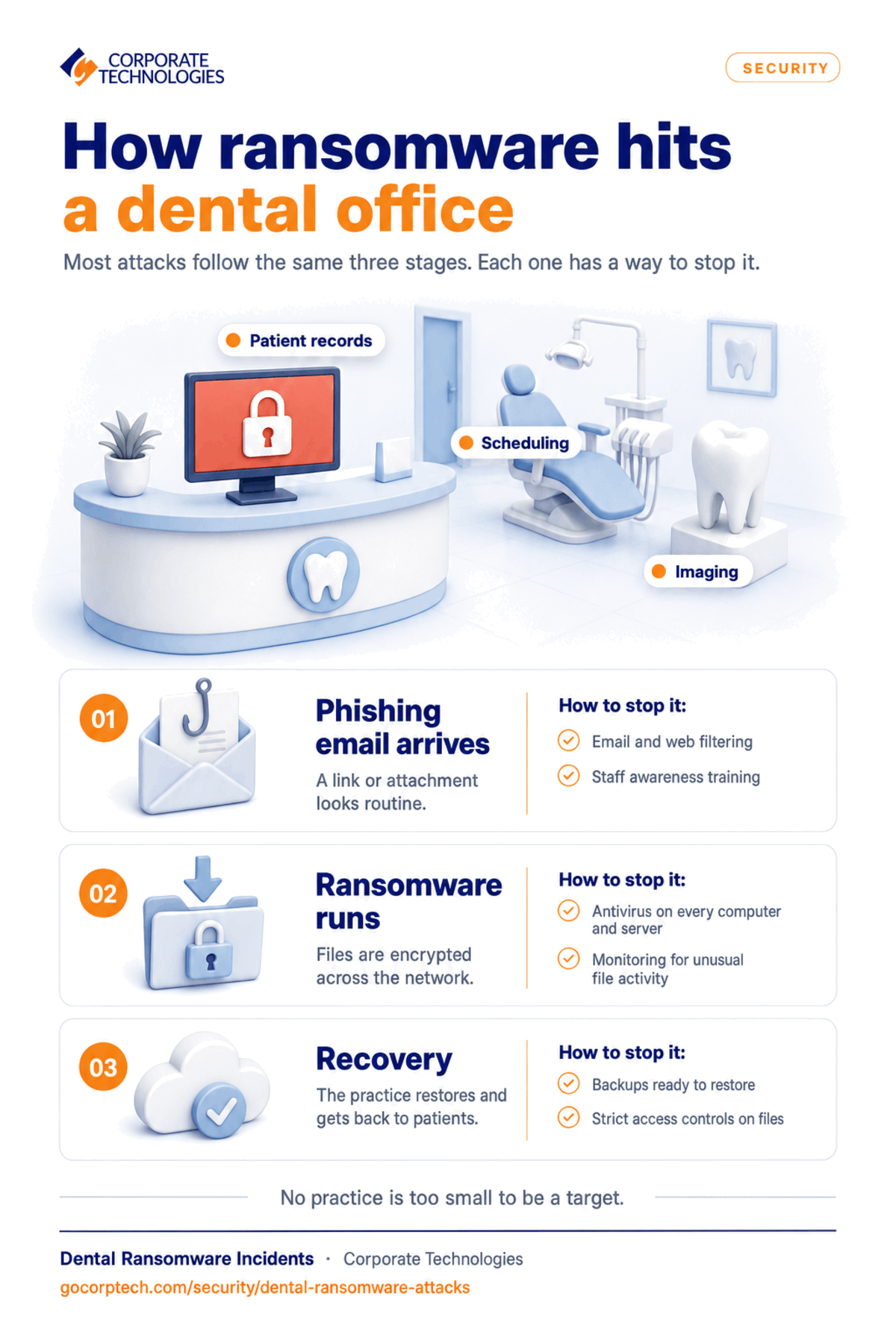
Most ransomware attacks start with a phishing email. Usually, these email messages don’t target dental offices only. They target small businesses in general. Cyber-criminals are aware that most small offices don’t have the resources to detect and block phishing emails. Small businesses rely on users detecting phishing emails, or they don’t even realize that they are a primary target.
Want to reduce downtime and make IT predictable?
Take Dental Office IT Readiness Assessment Test for Free Take Dental Office IT Readiness Assessment Test
Phishing emails usually contain a malicious attachment, or they might have a link to a site hosting malicious executable files. If it’s the former, the attachment might be a script used to download the malware executable. Malicious attachments can also be Microsoft Office documents with malicious macros. As an aside, Microsoft has a setting for Office to ask permission before executing macros instead of automatically running them. Asking permission to run macros reduces the risk of being a victim of ransomware.
Links point to an attacker-controlled server hosting ransomware executables. After the user clicks the link, the browser opens a page telling the user to download software. The method of convincing the user to download ransomware varies, but the message gives the user a sense of urgency to convince people to avoid the realization that it could be a scam.
Ways to avoid this step in a ransomware attack:
- Use email filters to block suspicious messages
- Install web filters to block known malicious domains
- Always have antivirus installed as a last layer of defense
- Offer security awareness training to office staff
Ransomware Download and Payload
With a successful phishing email out of the way, the attacker convinces the user to run a ransomware executable. If the email message had a malicious attachment, the script downloads and runs the ransomware executable. Zero-day ransomware won’t be detected by antivirus software, but you could be lucky enough to have the right antivirus in place to avoid being a victim.
Every ransomware author has their own strategy to bypass detection. The ransomware application might replicate itself across the network, but usually it immediately releases a payload. The payload for ransomware is encrypting all important files. Most ransomware targets the typical Office documents, database files, and images of dental clinics. Every version of ransomware has its own long list of file extensions to find and encrypt.
Encryption is irreversible unless you have the key. Older ransomware encrypted using a symmetric key, but it exposed the key when it stored the key in a local file. To hide the symmetric key, attackers now use asymmetric encryption to hide it. Symmetric encryption uses a single key to encrypt and decrypt files. The key is then encrypted using an asymmetric public key, which can then only be decrypted using the attacker’s private key held on the attacker’s server.
The process of symmetric and asymmetric encryption in ransomware is complicated. Just know that the hybrid encryption strategy stops cybersecurity professionals from reverse engineering ransomware procedures to stop it from holding files hostage. The two-way encryption strategy also hides the decryption key from researchers so that the ransomware cannot be neutralized after the initial payload.
At this point, all your files are unavailable. You might notice that software no longer works, and office staff can’t open files. A message displays telling users that they need to pay a ransom to access files. Most ransomware attacks make the amount affordable so that businesses can make the payment to get files back. Ransoms can range from a few hundred dollars to several million, but attackers determine the amount using business size and research into financials.
To avoid this step in a ransomware attack:
- Run antivirus on all computers including servers
- Install monitoring software to detect any file anomalies or unusual data access patterns
- Frequently back up files and store backups in a secure location, ideally in the cloud where ransomware cannot get to it.
Recovering from Ransomware
Even with backups, ransomware can interrupt normal productivity and has been known to force businesses offline until recovery can be done. You’ll notice that files across the network and on computing devices are encrypted. Server files are encrypted, so applications, email services, internal software, and databases might not work properly.
Law enforcement advises businesses to avoid paying attackers, because it encourages them to continue with their illegal activity. Unfortunately, most businesses feel like they have no choice but to pay the ransom. Most businesses pay the ransom to obtain their data, but it’s not guaranteed that you’ll get the key to decrypt files. Ransomware might have bugs affecting the decryption process, or businesses pay and the ransomware owner never sends the key. Businesses gamble when they pay the ransom, and some ransomware is coded to never decrypt files.
A more guaranteed way to recover without paying a ransom is to recover with backups. Backups are a part of disaster recovery, and they should be stored in a secure location where ransomware cannot encrypt these files too. Recovery still takes time, so the business will suffer from downtime while recovery is ongoing.
How to avoid this step in ransomware:
- Have backups available
- Monitor for suspicious network and file activity
- Keep strict access controls on users and block files they don’t need access to
Help with Ransomware
Configuring your network and installing monitoring software takes professional experience. If you don’t install and configure these applications properly, you can have a false sense of security. You also need someone to review disaster recovery and set up backup procedures.
Corporate Technologies can help you avoid being the next ransomware victim. Contact us today to see what we can do for you.
Check Out Our Whitepaper: HIPAA Compliance Checklist for Dental Offices: What You Must Know
FAQs
All important files are encrypted with an irreversible cipher and cannot be recovered without backups.
Backups recover data so that the dental office does not need to pay a ransom.
Antivirus stops some ransomware, but zero-day threats often bypass antivirus software.
Usually, ransomware starts with a phishing email containing a malicious link or file attachment.
Install antivirus on all computers, use monitoring software to detect and stop ransomware activity, and always have frequent backups for disaster recovery.
Keep reading
More in Security →
Cybersecurity Insurance in Maryland: What Carriers Now Require from Your IT Infrastructure
Learn what cybersecurity insurance carriers require from Maryland businesses and how managed IT services help meet security controls, compliance, and audit expectations.

Cyber Insurance Requirements in Illinois: What Underwriters Ask For in 2026
What Illinois businesses need for cyber insurance: MFA, EDR, immutable backups, email security. Plus the Illinois laws behind the exposure and policy…
Protecting Donor & Member Data (Church Cybersecurity Risks)
Learn how churches can protect donor and member data from cyber threats using access controls, monitoring, and simple cybersecurity best practices.
Free, same business day
What would managed IT cost for your team?
Tell us how many computers and users you have. An engineer sends a per-user range, usually the same business day. No credit card, no bot.
- Live service specialist in about a minute, 24/7
- 21 offices across 18 states
- 60-day money-back guarantee
Get your instant IT support estimate
Tell us how many computers and users you have and we send a per-user range, usually the same business day.

