


In short
Is break-fix IT slowing you down? Discover the signs your business has outgrown quick fixes and why managed IT services are the smarter choice.
In this article
Small businesses can usually get by with just a “fix it when it breaks” mentality, but scalable IT infrastructure requires a proactive approach. You need hardware capable of handling busy seasons, and you need software that allows for employee productivity without being a hindrance. If both these things are constantly breaking, it’s time to consider a professional approach to your IT. Professional buildouts might have a higher cost upfront, but the savings from productivity loss, angry customers, delays, and downtime are much bigger in the long run.
Here are some signs that it’s time to seek out a provider that can help manage, update, scale, and monitor your critical applications.
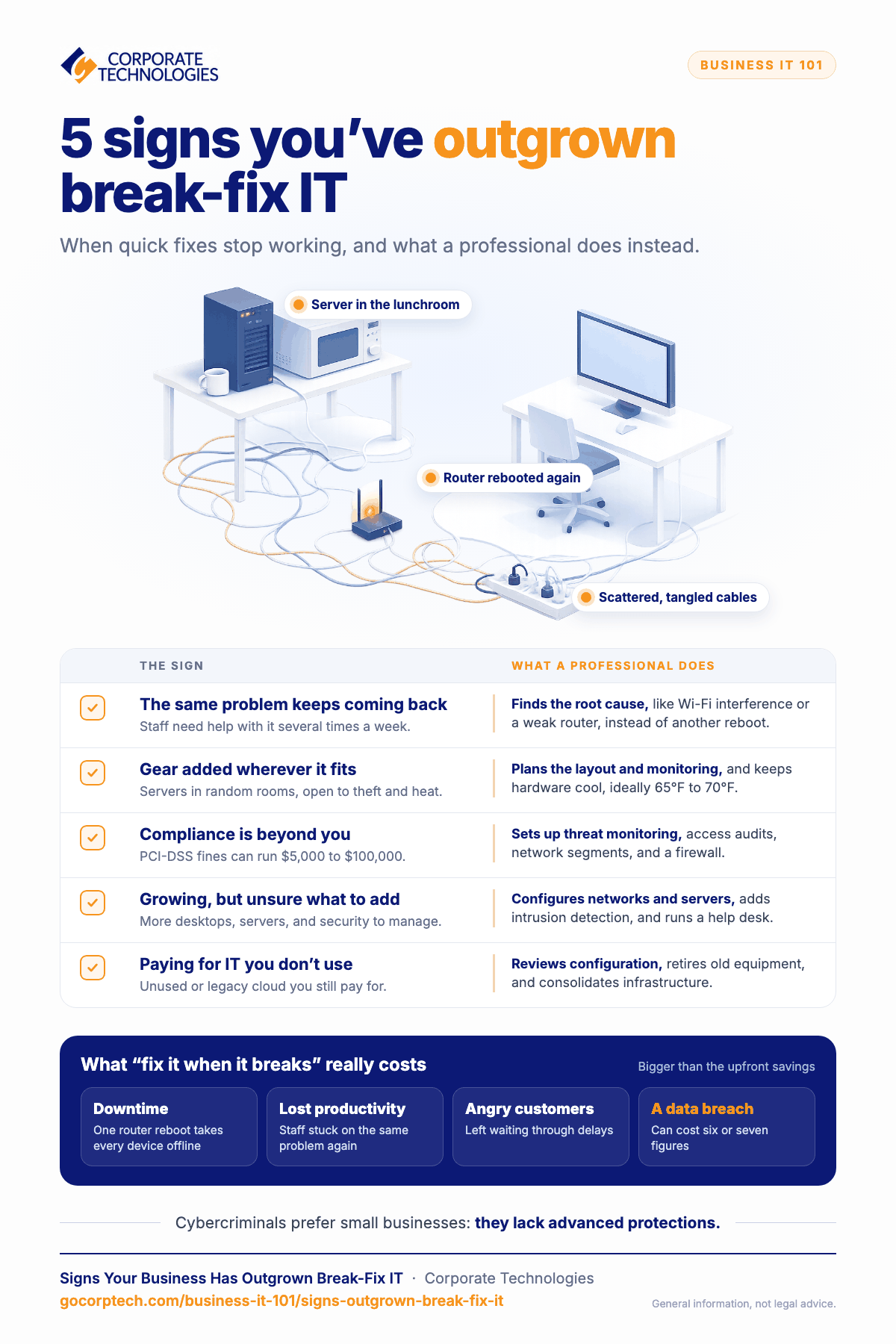
Excessive Downtime Impacts Productivity
“Excessive” is relative, but you know when your IT infrastructure fails too much. If your employees have to ask for help for the same issue several times a week, it likely impacts their productivity. Let’s say that Wi-Fi constantly goes down, and you reboot the router to fix the problem. It’s a simple fix, but rebooting a router brings all devices down, including any software or hardware that continually connects to the internet.
An IT issue that continually happens with a simple fix but one that interferes with productivity is never the answer. The answer is to figure out the root cause of the problem and have it professionally remediated. Remediation could be anything like:
- Identifying interference like signal degradation from walls. You would need a repeater or another Wi-Fi for remediation.
- Possible Wi-Fi card driver update.
- Network card replacement.
- Wi-Fi router replacement with one offering a stronger signal.
- Change in channel to bypass interference.
Added Infrastructure is Hacked Together Instead of Meticulously Designed
Let’s say you have a small business and host all your hardware on-premise. Do you add the server in a random room with wireless connectivity to a Wi-Fi router? Some businesses even put servers in the lunchroom! It’s a quick fix to solve a scalability problem, but as you can imagine, it’s not a permanent yet alone an optimized solution. A random room leaves hardware open to theft or accidental damage.
You might use cloud computing, but even cloud technology can be deployed in a way that doesn’t optimize resources or IT costs. Deploying any valuable resource requires planning, even if the planning is a simple layout to determine physical location of the server and how it will be monitored. In many of these scenarios, the server is improperly configured and isn’t monitored for threats. Computer hardware also requires optimal temperatures, ideally between 65F and 70F, so leaving equipment in a random room can reduce its life expectancy.
A few issues you might run into:
- Damaged hardware.
- Hazards from scattered wires or broken cables.
- Heat-related errors if a room isn’t cooled enough.
- Stolen data or equipment.
- Limitations on scalability.
Keeping IT Compliant is Beyond Your Skillset
Compliance should always be a consideration when building an IT environment, but it takes a professional to know how to do it. An inexperienced person could easily miss a configuration or miss important components in an IT design. Some compliance regulations require software setup, like monitoring of the environment or auditing records every time a user accesses them.
Regulations are especially strict around personally identifiable information (PII), financial data, and healthcare records. For example, a violation of PCI-DSS –regulations overseeing payment information– can cost $5000 to $100,000 in fines depending on your business and the severity of the violation. An SMB could be put out of business if they suffer from a data breach.
Compliance is a huge topic that often requires a professional, but here are a few common requirements you might need help with:
- Monitoring the environment for potential threats.
- Auditing records for any access requests, both failed and successful.
- Separating the network into logical segments
- Firewall installation
You Need Additional Infrastructure to Scale, But Don’t Know What to Deploy
When you only have a few people on desktop computers, you might be able to set up an environment yourself. When you get bigger and need more desktops, servers, software, and cybersecurity, it gets much more difficult to manage unless you have experience in IT. It can also limit your ability to scale your infrastructure as your business grows.
In IT the saying “you don’t know what you don’t know” is true. You might think you have everything configured with cybersecurity in place, but it’s common for businesses to overlook vulnerabilities. It only takes once for a data breach to cost six or seven figures in litigation, incident response, reputation loss, and compliance violations. A common thought is that an SMB isn’t big enough to be a target, and that’s not true. As a matter of fact, cyber-criminals prefer SMBs for the lack of advanced cybersecurity protections.
As you grow, you need software to make your business more productive. Professionals can steer you in the right direction. Here are a few reasons you might need a professional as your business grows:
- Set up of hardwired and Wi-Fi environments
- Server configuration, including any infrastructure in the cloud
- Monitoring and intrusion detection for cybersecurity
- Desktop configuration and support
- User help desk for various support issues
Unnecessary IT Spending
When you don’t have professionals deploying infrastructure, you might have unnecessary spending. Optimizing your costs is another area where IT professionals can save you money and frustrations. For example, you might have cloud infrastructure that costs more than you need to spend. It’s common for businesses to have unused IT in the cloud that can be retired. Legacy cloud infrastructure can also cost more than using newer technologies.
For SMBs, optimizing costs can be a huge benefit. It’s possible to save thousands in unnecessary spending, especially if you’re unfamiliar with cloud computing. Here are a few more ways professionals can help with IT costs:
- Configuration management and review
- Migration to cloud from on-premises to lower costs
- Retire older equipment
- Consolidate infrastructure
Where to Go From Here?
If you find yourself overwhelmed with IT support or continue to have problems with your infrastructure, it’s time to consider a professional managed IT service provider. A professional MSP like Corporate Technologies can create a secure, scalable IT environment that won’t inhibit your productivity.
To get started with your IT infrastructure, contact us today.
Keep reading
More in Business IT 101 →
Most SMB Security Stats Are Confident Claims. We Published the Operational Data Instead.
We published our real Q2 2026 operational data across ~1,700 SMBs, including a patch number that dropped 29 points the moment we…

Patch Management Explained: Why Unpatched Systems Get Breached
Learn why patch management is critical for business security. Discover how unpatched systems get breached, real-world examples like WannaCry, and how Corporate…

AI in Cybersecurity: What It Really Means for Small and Mid‑Sized Businesses
Explore AI in cybersecurity and discover its impact on small and mid-sized businesses in today's digital landscape.
Free, same business day
What would managed IT cost for your team?
Tell us how many computers and users you have. An engineer sends a per-user range, usually the same business day. No credit card, no bot.
- Live service specialist in about a minute, 24/7
- 21 offices across 18 states
- 60-day money-back guarantee
Get your instant IT support estimate
Tell us how many computers and users you have and we send a per-user range, usually the same business day.

