

In short
FERPA, CIPA, NJ privacy rules and the everyday failures that cost charter schools time. What a managed IT provider should cover, and how to budget for it.
In this article
A charter school runs on a budget that has to cover teaching first, and technology is usually handled by one person who also has another job. That person is responsible for a few hundred student devices, the Wi-Fi those devices depend on, the student information system, state reporting, and the data privacy obligations that come with all of it. This article is for charter school leaders and business administrators in New Jersey who are deciding whether to keep doing that in house, and what to look for if they bring in a managed IT provider.
The obligations a New Jersey charter school carries
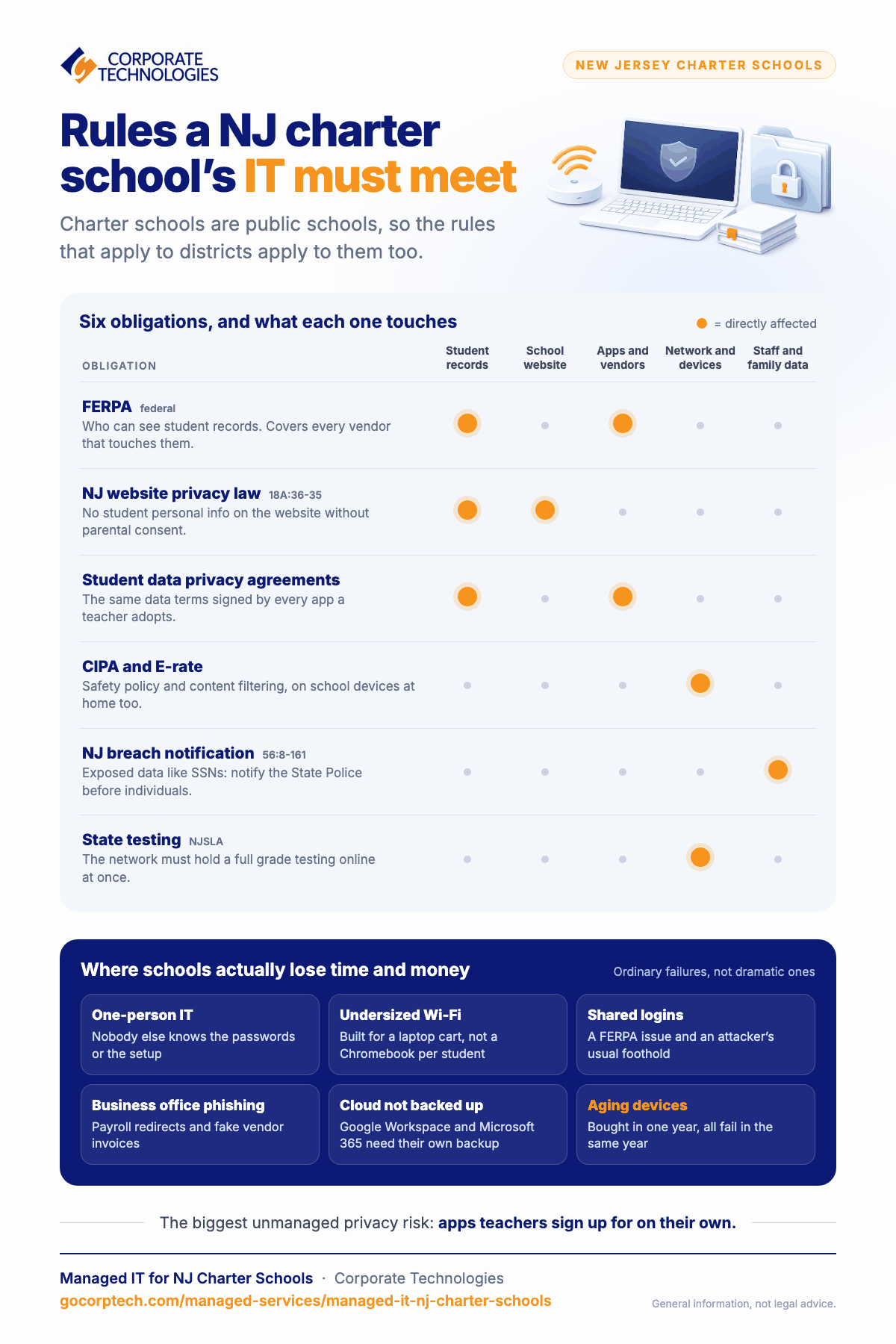
Charter schools are public schools, so the rules that apply to districts apply to them. The ones that touch technology most directly:
- FERPA. The federal Family Educational Rights and Privacy Act governs who can see student education records and under what conditions. It applies to every vendor that touches student data on the school’s behalf, which is why vendor agreements matter as much as the school’s own systems.
- New Jersey’s school website privacy law (N.J.S.A. 18A:36-35). A school may not post personally identifiable student information on its website without parental consent. Simple to comply with, easy to break with a well-meaning photo caption.
- Student data privacy agreements. Many New Jersey schools use the Student Data Privacy Consortium’s standard agreement with their software vendors, so that every app a teacher adopts has agreed to the same data handling terms. A school that has not done this usually has dozens of apps collecting student data under terms nobody has read.
- CIPA and E-rate. If the school receives E-rate discounts on internet access, it must have an internet safety policy and filter content on its network. Filtering has to work on school-issued devices at home as well, which is a technical problem, not a policy one.
- New Jersey breach notification (N.J.S.A. 56:8-161 and following). If personal information such as Social Security numbers is exposed, New Jersey requires notice to the State Police before affected individuals are notified. Schools hold this kind of data on staff and, in some cases, on students and families.
- State testing. NJSLA and other assessments are delivered online. A network that cannot sustain a full grade testing at once is a compliance problem on test day, not just an annoyance.
Where charter schools actually lose time and money
The incidents that cost a school the most are rarely dramatic. They are the ordinary failures that happen in a building where nobody is dedicated to preventing them.
- The one-person IT department. When the person who knows the passwords is out, or leaves, the school has a problem that has nothing to do with technology and everything to do with documentation. Every school needs a documented environment that a second person could pick up.
- Wi-Fi that was designed for fewer devices. A network installed when students shared a cart of laptops does not hold up when every student has a Chromebook. Dead zones and dropped connections during instruction are a capacity problem, and it is fixable.
- Shared logins. A single front-office account used by several people, or a teacher account that students know, is both a FERPA issue and the usual way an attacker gets a foothold.
- Phishing aimed at the business office. Payroll redirection and fake vendor invoices target schools because the business office is small and busy. A verification rule for any payment change, enforced every time, stops most of it.
- Backups that cover the server but not the cloud. Google Workspace and Microsoft 365 do not back up your data for you in the way most people assume. Deleted or ransomed files in the cloud need their own backup.
- Aging devices with no replacement plan. A fleet bought in one year all fails in the same year. Staggered replacement is a budget decision, and it needs an inventory to plan from.
What managed IT should look like for a school
Managed IT means a provider takes ongoing responsibility for the school’s technology for a flat monthly fee, rather than being called when something breaks. For a charter school, the arrangement should include the following. Treat it as a checklist when comparing proposals.
| Area | What to expect |
|---|---|
| Help desk | A number teachers can call during the school day and get a person, with device issues handled remotely where possible and a technician scheduled when not |
| Device management | Chromebooks, Windows and Apple devices enrolled in management so they can be configured, filtered, located, and wiped centrally |
| Identity | Multi-factor authentication for all staff, single sign-on where the applications support it, and an account process tied to hiring and departures |
| Network | Wi-Fi sized for one device per student plus staff, with a plan for test days; content filtering that meets CIPA on and off campus |
| Security | Endpoint detection and response on staff devices and servers, email filtering, security awareness training for staff, 24/7 monitoring |
| Backup | Backups of servers and of Google Workspace or Microsoft 365, tested restores, and a stated recovery time |
| Documentation and planning | An inventory, network diagrams, a device replacement schedule, and a technology plan the board can see |
| Vendor and privacy support | Help maintaining data privacy agreements and reviewing new apps before they are adopted |
Budgeting for it
Charter schools usually compare managed IT with the cost of one full-time technology coordinator. The honest comparison is not salary against fee. A single coordinator cannot provide 24/7 monitoring, cannot cover their own absences, and cannot be a specialist in networking, security, and devices at once. Many schools land on a hybrid: a provider handling monitoring, security, help desk, and projects, with a staff member who owns the relationship, classroom technology, and the day-to-day decisions. Our pricing is published per user per month on the managed IT packages page, so a school can model it before a conversation. E-rate does not fund managed services, but it does fund the network equipment and internet access those services depend on, and a provider should help you plan purchases around the funding cycle.
How Corporate Technologies works with New Jersey schools
We support schools and school networks from our New Jersey office in Fairfield, with a 24/7 help desk and security operations center shared across our 21 locations. The education work we do is described on managed IT services for education. If you want a quick read on where your school stands, the charter school IT readiness assessment covers student data, devices, filtering, and backups in a few minutes. For related reading, see 1:1 devices in charter schools and data privacy in charter schools.
Frequently asked questions
Do we lose control of our technology decisions?
No. The school decides what to buy and what to use. The provider is responsible for keeping it running, secure, and documented, and for giving you the information to make decisions. A good provider will tell you when a purchase is unnecessary.
Can a provider support Chromebooks and Google Workspace, or only Windows?
Any provider working with schools should support Google Workspace, Chromebook management, Windows, and Apple devices. Ask specifically; some business-focused providers have little school experience.
What about the apps teachers sign up for on their own?
This is the biggest unmanaged privacy risk in most schools. The fix is a simple approval process and a standard data privacy agreement, so that a new app can be adopted quickly but not silently. The provider can run the technical review; the school sets the policy.
How quickly can a school be onboarded?
Discovery and documentation of the existing environment usually comes first, then security basics such as MFA and endpoint protection, then network and device work scheduled around the school calendar. Summer is the easiest time for anything that touches the network or the device fleet.
Keep reading
More in Managed Services →
How We Measure Managed IT
Real operational metrics from Corporate Technologies' managed client base: about 2.6 hours of downtime a year, critical issues resolved in 8.5 hours,…
IT Solutions
FINRA and SEC IT Controls for Small Financial Firms in Maryland
Amended Regulation S-P (incident response, 72-hour vendor notice, 30-day customer notice), FINRA 4370, Reg S-ID, Maryland PIPA, and what examiners expect.
New Mexico Data Breach Law Explained for Small Businesses
The New Mexico Data Breach Notification Act: 45-day notice, the 1,000-resident AG threshold, the encryption exception, penalties, and the IT work behind…
Free, same business day
What would managed IT cost for your team?
Tell us how many computers and users you have. An engineer sends a per-user range, usually the same business day. No credit card, no bot.
- Live service specialist in about a minute, 24/7
- 21 offices across 18 states
- 60-day money-back guarantee
Get your instant IT support estimate
Tell us how many computers and users you have and we send a per-user range, usually the same business day.

