

In short
Compare managed IT services vs internal IT staff for small businesses. Learn costs, coverage, cybersecurity, and when co-managed IT makes sense.
In this article
When your current IT staff is overloaded with work, you can either hire additional internal staff or collaborate with a managed service provider (MSP). It’s a tough decision for small business owners, because leaning into external help often seems expensive. MSPs offer a wider range of services that internal staff can’t always manage alone. If your internal staff feels like they can no longer manage IT infrastructure, adding an external source often brings benefits to alleviate overhead without adding enormous costs.
What “Internal IT” Really Means in Small Businesses
Usually, a really small business starts off with one person supporting a few employees. This person isn’t dedicated to IT, but knows enough to support a couple of workstations. As the business grows, a dedicated IT staff member is added. This staff member often wears many hats, meaning the IT person deals with security, onboarding employees, managing updates and additional hardware, configuring cloud resources, offboarding employees, and numerous other responsibilities.
Internal IT understands your local environment much better than anyone. They also offer hands-on advice and know employee troubles from personal experience. In-house IT staff have a lot to offer around the office, but they don’t have unlimited time and experience. For example, what happens when you have a ransomware attack? You need someone with specialized knowledge to tackle this type of cybersecurity issue, or your office could suffer from a recurring incident when the threat is not eradicated from your network.
What Managed IT Actually Is (and Isn’t)
Think of managed IT as an extension of onsite IT staff. When IT staff go home for the day or it’s the middle of the night, your managed service provider has IT staff working 24/7 every day of the week. They have multiple staff members available to respond to any incident day or night. When your IT staff has other priorities, managed IT takes over for patches, updates, and compliance.
Small businesses might think of managed IT as a call center, but providers like Corporate Technologies offer onsite help with certain plans. Local IT offices provide professionals with varied experience. Each group of professionals has their own specialized experience, so your small business gets help that matches your specific IT issue. Managed IT is more than just a call center. They are full coverage for any IT issue and solution, so they enhance your current IT support.
Cost Comparison: Internal IT vs. Managed IT
Managed IT providers always market with cost-savings benefits. Not every MSP has a flat-rate cost with predictable pricing. Pricing plans range in cost depending on what you need. Corporate Technologies is one of the only local MSPs offering a 60-day moneyback guarantee so that you can try out managed IT before making a long-term commitment.
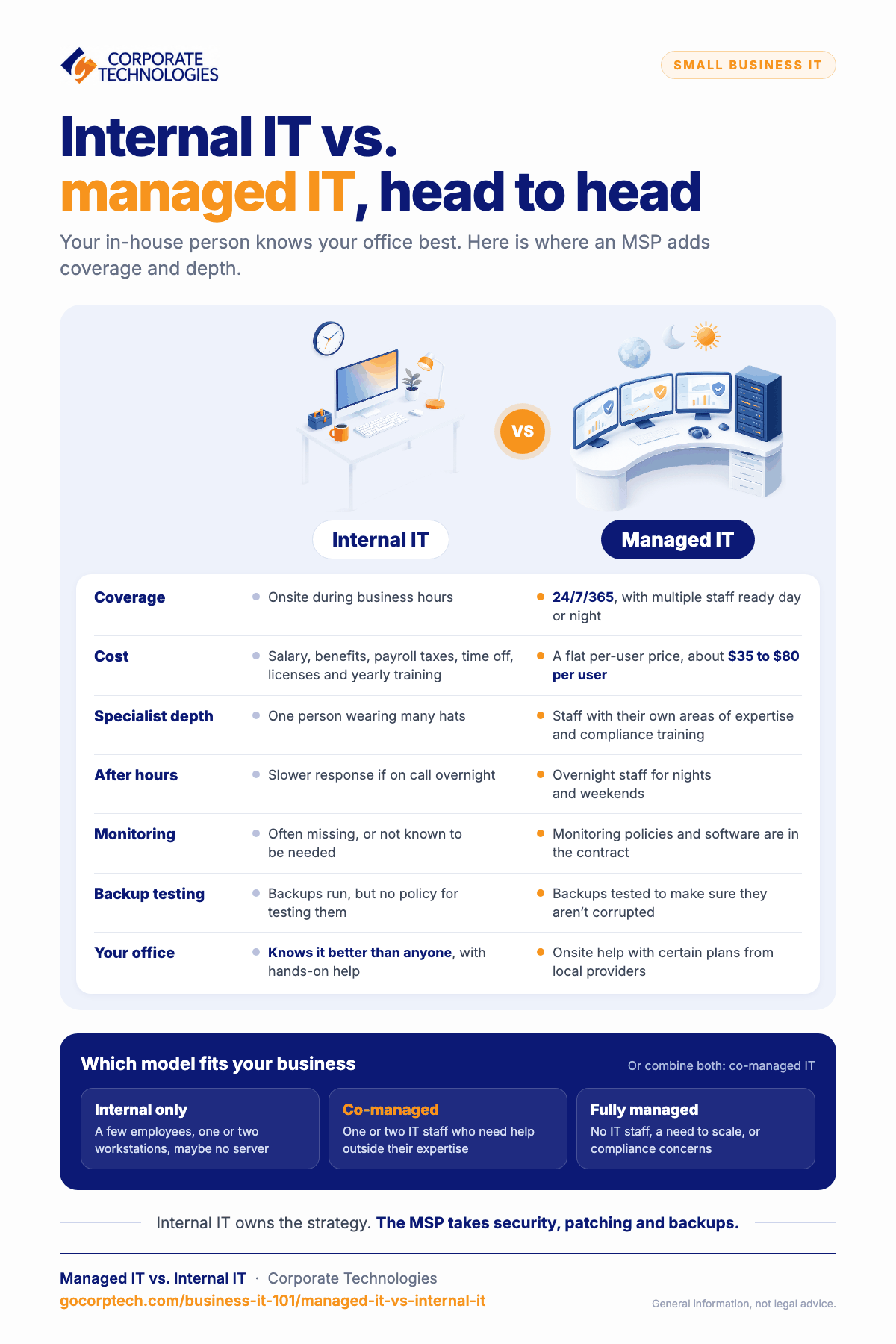
Costs for managed IT are usually per user. You pay a flat per-user price ranging from $35/user to $80/user. Compare this cost to an internal IT staff member. You need to pay a yearly salary based on your local market along with benefits, payroll taxes, time-off, and licenses. IT staff also need training year-to-year to keep up with the latest technology that affects your business.
Capability Comparison
Local IT staff know your environment well, but sooner or later they need help. Having a collaborative managed IT team gives internal staff help when it’s needed. Professionals for an MSP have their own personal experience and training, so they often have an area of expertise that your local internal IT staff can’t offer.
Here is a breakdown of where managed IT can be useful:
| Internal IT | Managed IT | |
| 24/7 Helpdesk | Onsite during business hours | Coverage 24/7/365 |
| Security monitoring | Often missing or unaware that it’s needed | Monitoring policies and software are part of the contract |
| Backup testing | Usually perform backups but don’t have a policy for testing | Testing of backups to ensure they aren’t corrupted |
| Compliance | Need training to know compliance requirements | Staff has specific training for various compliance regulations |
| After-hours incidents | Slower response if on-call overnight | Overnight staff available during nights and weekends |
| Project execution | Needs guidance for new infrastructure rollouts | Project managers and experienced staff offer deployments of new tech |
| Documentation andReporting | Varies depending on corporate requirements | Part of procedures after incident response and detection. Documents deployments and upgrades |
As you can see, managed IT has a broader depth of experience to offer. For example, most small business IT staff don’t have the experience and tools to work with sophisticated cybersecurity events. They also don’t have the training to deal with compliance-specific requirements. This isn’t to say they aren’t necessary in day-to-day operations, but they need help with issues outside of their expertise.
Co-Managed IT: When Internal IT and Managed IT Work Best
The best solution is to combine internal IT with a managed service provider. Internal IT takes ownership of strategies and what works best for your small business. They can direct MSPs and collaborate on ideas and what’s best for business productivity.
Managed IT will often take the lead on security, patch management, backup testing, and disaster recovery. When IT is in emergency mode, that’s when your business will see the best managed IT benefits. In addition to IT benefits, the business saves on headcount costs while still enabling business scalability and continuity.
For businesses under compliance regulations (and most have at least one regulation they must follow!), managed IT offers guidance on best practices. Monitoring tools eliminate alert fatigue often seen by internal IT overseeing a myriad of issues. Managed IT compliance documentation, policy guidance, and infrastructure deployments save on hefty fines for violations.
In some scenarios, fully managed IT makes more sense. If your small business has no current IT staff or someone who does IT on the side, it might be time to engage with a service provider. Your business gets the power of a full IT team without the costly salaries and real estate. No more turnover, office management of IT, or pressure to deal with IT issues.
Which Model Fits Your Business?
Small businesses need an IT person sooner or later. You can’t rely on a random employee to do it on the side and expect sufficient coverage. Here is a breakdown of which model you should go with:
Choose internal IT only if you have only a few employees and don’t need the complexities of advanced infrastructure. Maybe you have one or two workstations and don’t even need a server. Internal IT might be sufficient.
Choose co-managed IT if you have one or two staff members dealing with IT but need help with extra productivity that might be outside of your IT staff’s expertise. Adding an MSP is great for businesses trying to scale but infrastructure is holding them back. Read more about benefits of co-managed IT services here.
Choose fully managed IT if you need to scale, don’t have any IT support staff, but don’t know where to start with new infrastructure. Compliance concerns are also best handled by a provider with knowledgeable professionals.
See Also: How to Choose an MSP
You don’t need to choose between internal and external IT only. You can use a hybrid of both. If you want to test a managed service provider without the high-cost risks, Corporate Technologies has a 60-day moneyback guarantee.
Contact one of our professionals to see what we can do for your small business IT.
FAQs
Yes, some managed service providers offer local onsite support if they have offices in your city.
Internal IT staff are best for small businesses with only a few workstations, but managed IT offers a wider range of support than most small business IT.
Managed IT often has better monitoring tools and threat detection to better protect your small business from data breaches.
Collaborative contracts between onsite and offsite staff offer the best of both worlds where internal IT handles business-specific support and managed IT offers monitoring, upgrades, patch management, and 24/7 helpdesk support.
MSPs help businesses stay compliant with the latest regulations and support features required by government standards.
Keep reading
More in Business IT 101 →
Most SMB Security Stats Are Confident Claims. We Published the Operational Data Instead.
We published our real Q2 2026 operational data across ~1,700 SMBs, including a patch number that dropped 29 points the moment we…

Patch Management Explained: Why Unpatched Systems Get Breached
Learn why patch management is critical for business security. Discover how unpatched systems get breached, real-world examples like WannaCry, and how Corporate…

AI in Cybersecurity: What It Really Means for Small and Mid‑Sized Businesses
Explore AI in cybersecurity and discover its impact on small and mid-sized businesses in today's digital landscape.
Free, same business day
What would managed IT cost for your team?
Tell us how many computers and users you have. An engineer sends a per-user range, usually the same business day. No credit card, no bot.
- Live service specialist in about a minute, 24/7
- 21 offices across 18 states
- 60-day money-back guarantee
Get your instant IT support estimate
Tell us how many computers and users you have and we send a per-user range, usually the same business day.

