

In short
Discover the top 5 cybersecurity policies every small business needs to prevent data breaches, reduce risks, and protect sensitive information.
In this article
Even if you don’t consider yourself a target, small businesses should always have a cybersecurity policy in place. It’s common for small businesses to think that they’re too small to be targets, but they are actually primary targets for cyber-criminals. Many of today’s sophisticated attacks involve coordinated groups of hackers that know small businesses don’t have the staff or resources to stop them. Small businesses can fight back, though, with some basic cybersecurity policies to lower their risks of being the next data breach victim.
Authorized Access to Data Only If It’s Necessary
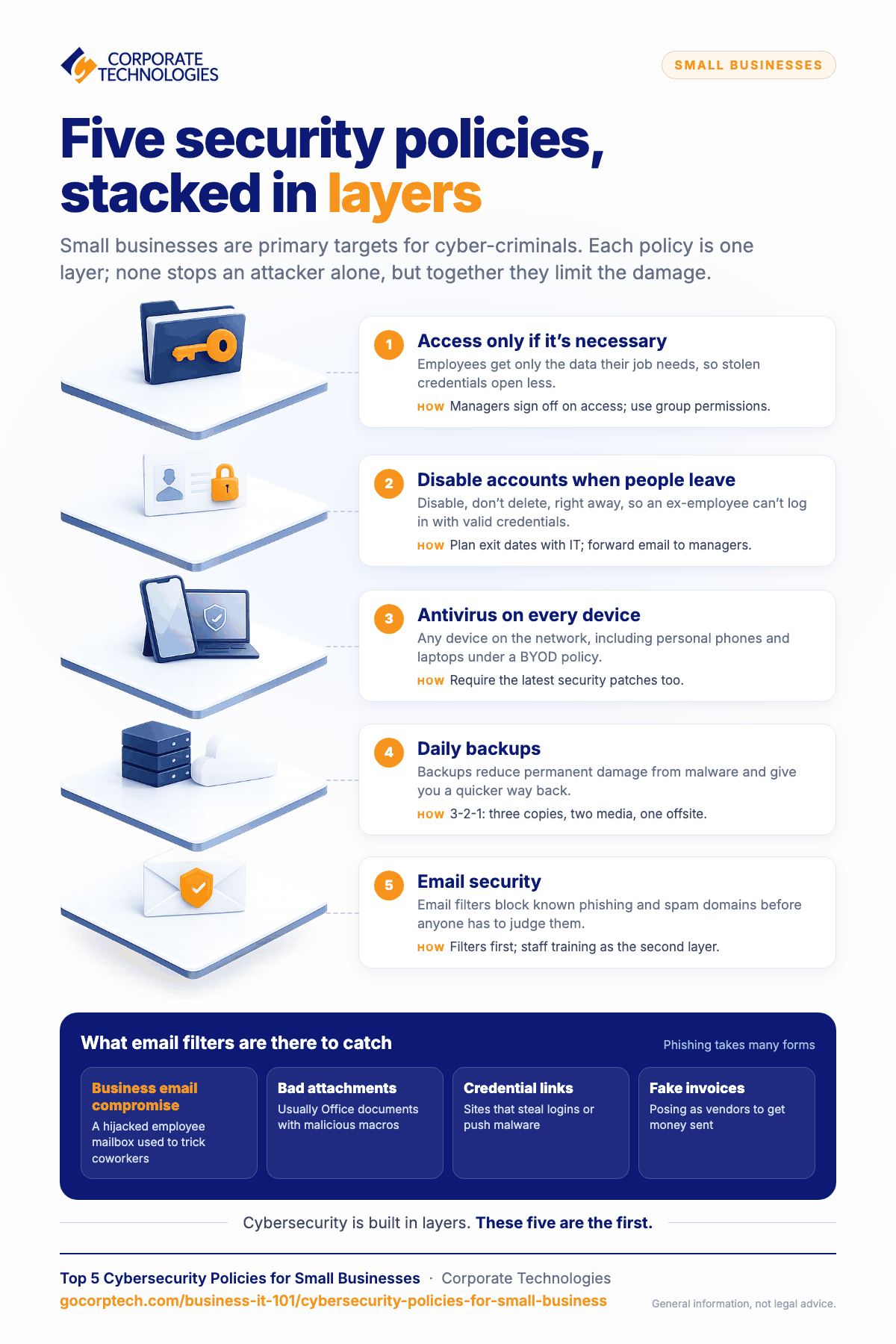
It’s easy to grant every employee access to everything to avoid hassles, but this gives an attacker with stolen credentials unfettered access to all your systems without any barriers. Once an attacker gains access to credentials or tricks an employee into installing malware on their local machine, the attacker can then laterally move throughout the network, stealing data without security obstacles. You can minimize a data breach by giving employees access to only the data necessary to perform their job functions. This approach is called the “principle of least privilege,” and it’s recommended by the National Institute of Standards and Technology (NIST).
Let’s say an attacker does steal credentials from an employee, but you’ve followed the privilege of least principle. An attacker would be limited to only the data authorized with the stolen credentials. This strategy does not stop an attacker entirely, but it limits damage. It’s important to note that attackers will likely try to elevate privileges using a variety of exploits and phishing via impersonation, but this creates a hurdle for them. Cybersecurity is built in layers, and limiting data access is one layer of many.
A few ways you can better manage user accounts:
- Document when an employee on boards and keep track of their data authorization, including application access.
- Have employee managers sign off on access requests.
- Group similar employees together and give access to user groups to better organize access requests. For example, if an employee is part of the accounting department, the accounting department has its own user group, and this group has access to all financial data.
Disable Unused Accounts After an Employee Leaves
Let’s say that you have a system available for employees over the internet. They must authenticate with their business credentials. You might already have two-factor authentication (2FA) installed. These security provisions are rendered useless if you don’t disable accounts when an employee is no longer employed. This lack of action leaves your organization vulnerable to insider threats, which are even more difficult to detect since the ex-employee is using valid credentials.
You probably need to retrieve email and data from the ex-employee’s account, so the proper way to manage this risk is to disable the account, not delete it. Disabling the account stops the ex-employee from authenticating in your systems, but it gives you time to collect data and retrieve old email messages to hand off to the next person in charge. You can disable the account yourself or have your IT staff disable it, but you’ll need to do it immediately to minimize risks.
A few ways you can ensure account closures:
- Coordinate dates of departures with IT to have them schedule account termination.
- Forward the employee’s email to their manager after the account is disabled.
- Ensure that managers have access to all subordinate data folders.
Require Antivirus on All Devices Connected to the Network
You might allow employees to connect to the network from their own devices. For example, they might connect to Wi-Fi from their smartphones to make calls or access the internet. Employee laptops might be used to connect to the network and take work home with them. While these are excellent ways to boost productivity, they also open up vulnerabilities and increase your attack surface. Should an attacker gain access to an employee’s personal device, the malware installed could then access your network data.
Part of your bring-your-own-device (BYOD) policy should be the requirement of antivirus. Antivirus policies should extend to local business devices, also, but small business owners often forget about the threats that might come with personal device connections. Ensure that users have antivirus on mobile devices, and take it a step further by ensuring that any software installed on their devices has the latest security patches.
Daily Backups of Data
The most secure environments still have their own incidents (Incident Response Plan), but backups reduce the permanent damage done from malware and give you quicker recovery routes. Backups also need to be in a secure environment, and you should follow the 3-2-1 rule to avoid failures. The 3-2-1 rule states:
- 3 backup copies
- 2 backup mediums, one copy on each medium
- 1 backup copy is offsite
To explain this better, suppose that you have a copy of all the files on drive E. Every night, you make a backup of drive E and store it to a NAS (Network Attached Storage). You should also store a copy on another disk, or if the backups are too large, use cloud storage. The cloud storage route would cover the last rule, which states that a copy should be off-site. The off-site copy is intended for catastrophes like fire or flooding at your office. Having multiple copies also avoids issues with corruption of one copy or should one of your backup disks fail. If one copy is corrupted, you can always restore data from one of the others.
Also read: Signs Your Business Has Outgrown Break-Fix IT
Email Security
Phishing has long been a primary attack vector. The types of phishing attacks are too many for this article, but they come in several forms:
- Business email compromise (BEC) is when an attacker gains access to an employee’s email account to then use it to trick other employees.
- Sending malicious attachments, usually Microsoft Office documents with malicious macros.
- Links to websites to steal employee credentials or convince them to install malware.
- Fake invoices from supposed vendors to trick employees into sending money
You can train employees to recognize the signs, but it still leaves you open to human error. Employee security training is beneficial, but it should be a secondary security layer to email filters. Email filters block suspicious emails that come from known phishing and spam domains. More advanced filters use a combination of artificial intelligence, machine learning, and threat intelligence. Your email provider should have security installed, or you can ask your managed service provider (MSP) to install it for you. Chances are that email security is included with your MSP offer.
Case Study: Cybersecurity & Managed IT Services for HVAC & Plumbing Co
Managed Service Providers Help with All These Policies and More
These top 5 cybersecurity policies are but a few of the layers of protection you should implement. The entire world of cybersecurity is a game of cat-and-mouse, so it can be difficult for a business owner to keep up with the changes. One day you’re protected, and the next day your business software has a known vulnerability, leaving you open to a data breach.
The best way to deal with cybersecurity is to have professionals dedicated to protecting your environment and keeping up with the latest threats. This leaves you available to do what’s most important – managing your customers and revenue.
To find out what Corporate Technologies can do for you, contact us now.
Keep reading
More in Business IT 101 →
Most SMB Security Stats Are Confident Claims. We Published the Operational Data Instead.
We published our real Q2 2026 operational data across ~1,700 SMBs, including a patch number that dropped 29 points the moment we…

Patch Management Explained: Why Unpatched Systems Get Breached
Learn why patch management is critical for business security. Discover how unpatched systems get breached, real-world examples like WannaCry, and how Corporate…

AI in Cybersecurity: What It Really Means for Small and Mid‑Sized Businesses
Explore AI in cybersecurity and discover its impact on small and mid-sized businesses in today's digital landscape.
Free, same business day
What would managed IT cost for your team?
Tell us how many computers and users you have. An engineer sends a per-user range, usually the same business day. No credit card, no bot.
- Live service specialist in about a minute, 24/7
- 21 offices across 18 states
- 60-day money-back guarantee
Get your instant IT support estimate
Tell us how many computers and users you have and we send a per-user range, usually the same business day.

